It’s a big world out there with plenty of amazing sights to see and more places to visit than anyone could ever go to - but what if I told you there's a map that lets you travel all over the world and see some of its most beautiful locations in a way you're likely to never experience for yourself?
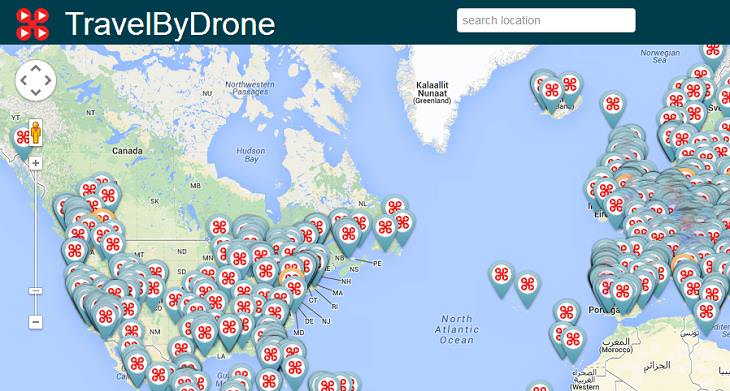
The site is called travelbydrone.com, and once you go there (either by clicking on the link or on the map below), you will see a map of the world much like any other map on the internet - with one crucial difference.
Instructions: Click on the image below and you'll be transferred to the map. Clicking on each of the markers on the map will open a video taken by a drone flying above that area. You can literally jump from anywhere to anywhere, and experience the locations from a bird's eye view. My personal recommendations? Rome, Jasper National Park and New York. Go on, explore the world and figure out which ones are yours!
If you want to get an idea of all the amazing videos that await you at travelbydrone, take a peek at this one:

8:24
15 Incredible Insects in Super Slow Motion
We could never imagine that insects could be so much fun to observe!
4:42
Arabian Nights: The Magic of Saudi Arabia
Come with us to fly above and within the magic of Saudi Arabia.
2:50
Adorable: Cats vs. Drones

Watch this video to see how these cats deal with their new friend the drone.
3:08
Watch the Monarch Butterfly Swarm in Gorgeous Detail!
This is something no human has ever been able to see from so close up, and it's one of the most incredible sights I've ever seen.
Explore 12 Beautiful Locations by Drone in Ultra HD!
Click and select one of our 12 different, ultra HD drone videos showcasing some of the most beautiful places in the world.
Get the Newest Coronavirus Updates With This Online Map
In this article, we’ll direct you to a convenient online map that records the most recent updates about the coronavirus.
We Found These Awesome Sites for Reading Short Stories!
These are the best places to read short stories online.
Learn How to Protect Yourself Using a Public Wi-Fi Network
Public Wi-Fi networks are incredibly convenient, but they're not always safe. Here are 10 ways of protecting yourself when using public Wi-Fi.
Who Traces Your Emails? Learn How to Detect Email-Tracking
40% of emails are being tracked by somebody without people's consent or notification, which means you'd better learn how to protect your privacy...
Laptop Won't Power Up? Try These 11 Effective Solutions
Laptop not starting? Try these essential steps to troubleshoot it.
Don't Charge Your Phone Over 80%, Here's Why
There is truth to the no-overnight-charging rule, and there is also some science to back it up.
Secure Your Data: 5 Must-Have Privacy Apps

A look at five apps that help you take back control of your digital footprint, including their strengths, trade-offs, and where to download them safely.
The Most Amazing Websites for Learning Languages for Free
Learn any language for free with these amazing websites!
14 Tips for Using the Computer More Easily
It’s very likely that in the following computer tips list you’ll find information that will surprise you!
9 Warning Signs You're Dealing with a Social Media Scam
Don’t fall for these common social media scam ads.
Is Your Browser Slowing Down? Fix It With These 10 Tips
Get Chrome running smoothly with these seven easy fixes.
Here’s Where You Can Watch Classic Movies for Free!
Want to watch free classic movies? Check out these sites and apps.
The Most Reliable Cloud Storage Services for 2025
Here’s a closer look at some of the best cloud storage services to consider in 2025.
Exploring the Web Beyond Google: 7 Handy Alternatives
Try some of these non-conventional search engines that you didn't know existed.
If You Aren’t Doing these Things, Your PC WILL Wear Out...
All the basics of computer maintenance.
0:48
WhatsApp Hack: Read Messages Without Showing Blue Ticks
Learn how to read WhatsApp messages without showing blue ticks in this video.
Guide: How to Unlock Your Phone Without a Passcode
Forgot your phone passcode? Don't panic.Just follow these steps.
Is DeepSeek Worth the Hype? A Closer Look at Its Features
DeepSeek is the new AI chatbot in town. But is worth the hype?
Computer Guide: How to Clear Space on Your Google Account
How to easily free up storage space on your Google Drive without paying for more storage.
Not Sure What to Watch Next? Try These 8 Helpful Sites
Not sure what to watch next? Try these helpful sites.
Skype Is Shutting Down – Try These Alternatives Now
With Skype officially retiring, here are some handy alternatives you should try.
Privacy Settings You Should Change in Chrome Right Now
These Chrome settings should always be disabled.
Firefox Just Got Better: 10 Handy Extensions You’ll Love
With the right add-ons, Firefox can become an indispensable browser that you'll rely on every day.
These 10 Keyboard Shortcuts Will Make Life Easy!
These keyboard shortcuts will help you learn the easiest ways to use your computer when your mouse is being less than cooperative!
Your Easy Guide to OpenAI's Amazing Video and Photo Tools
OpenAI has created tools that anyone can use to make videos and photos, even if you're not a computer expert. Let me walk you through them step by step.
If You Do This, Then You Could Be Damaging Your Phone...
Many people end up damaging their phones without even realizing that they are doing so, and here are 9 of the most common ways this happens.
7:31
How to Edit Your Photos Using 3 Different AI Services
If you shoot weddings, portraits, or anything high-volume, and you’ve wondered if AI can really speed things up without cutting corners, this is the no-nonsense breakdown you need.
17:41
TikTok: Tips and Tricks for Beginners
Whether you are a total beginner or just looking to streamline your process to get more views, this tutorial covers everything you need to know to go from recording to posting.
Do This to Your Router to Increase Internet Speed
Want a faster and safer internet connection? Then do this to your router...
Can’t Connect to the Internet? Here’s What To Do
Not being able to connect to the internet is one of the most pestering things. This is why it might be happening and easy solution to fix it.
3:32
The Easy Way to Clean Your Computer's Keyboard
Cleaning a dirty keyboard is quite a straightforward task, as you're about to find out.
10 Practical Smartphone Tips and Features Few People Know
These practical tips and clever uses of smartphones will help you start using your phone at its full potential!
3:28
Easy Tips for Connecting Your Laptop to an External Screen
Watch this helpful tutorial to learn how to connect your laptop to a monitor.
Computer Guide: Comparing Skype and Microsoft Teams
This article will explain why Skype is going away, how Teams fills its shoes, and guide you through using Teams for your personal video calls, screen shares, and chats.
7:38
Most People Don’t Know About These Google Maps Features
Google Maps has a ton of new features that most people don’t know about.
How to Tell If a Virus Warning Is Real or Fake - 12 Tips
If you see a barrage of security alerts popping up on your computer, then it might be sign of a virus attack.
1:55
Never Lose Your WhatsApp Chats Again with These Hacks!
Protect your WhatsApp chats with these tips.
You Should Bookmark These Incredibly Useful Sites
Make sure that you bookmark these handy websites!
9 Useful Blogs Created Specifically For Senior Citizens
Here’s a wonderful collection of blogs that seniors will find particularly helpful.
7 UNDISCOVERED Apps That are NOT on the Google Play Store!
I can’t believe I never knew about these handy Android apps.
Guide: How to Sign a PDF Without Printing it First
This guide will teach you how to sign PDF files digitally without having to print them.
Learn Any New Language with These Awesome Apps!
Learn new languages faster with these AI-powered apps.
To enable your Ad-Free Subscription, please fill the fields below
Your subscription was successful, now you can enjoy an ad-free experience!! Note: To make sure you get no ads, please make sure to log in to your account. If you are logged in already, then refresh the page. The subscription can be cancelled at any time.