Quick, what is the password to your email account?? Now your bank, your pharmacy, your favorite shopping site, your doctor's portal, and the dozen other places you log in to each month. If the honest answer is that you use the same one or two passwords nearly everywhere, or that you keep a list on a scrap of paper by the computer, you are far from alone. The typical person now juggles more than a hundred online accounts, and no human memory was built for that.
There is a simple tool designed to solve exactly this problem, and it is called a password manager. If the name sounds technical, do not worry. The idea behind it is wonderfully simple, and using one is easier than the patchwork of sticky notes and guesswork most of us rely on today. Here is a plain-language explanation of what they are, why they are worth having, and exactly how to get one on your phone or computer.
Think of a password manager as a secure, locked vault for all your logins. Instead of remembering a hundred different passwords, you only have to remember one: the master password that opens the vault. Inside, the manager safely stores every username and password you have, and fills them in for you automatically whenever you visit a website or open an app.
It does more than just remember, though. When you sign up for something new, or want to replace a weak old password, the manager will create a long, random, nearly uncrackable password for you, save it, and type it in for you next time. You never have to think it up, write it down, or memorize it. The vault remembers everything so you do not have to.
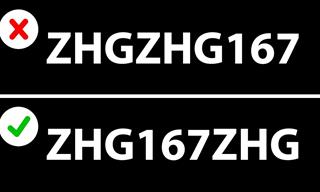
Here is the one small catch, and it is an easy one. You do need to choose a strong master password for the vault itself, and that is the single password you will commit to memory. A good trick is to use a passphrase: a short string of random words you can picture, something like "purple-anchor-garden-coffee." It is long enough to be very secure, yet easy to remember. Make it unique, never use it anywhere else, and you are set.
The good news is that the best options today are excellent and completely free. You do not need to pay a penny to be far safer than you are now. Here are three trustworthy choices, depending on the devices you use.
For most people, Bitwarden is the one to choose. It is free, it is trusted, and its code is open for security experts to inspect, which is a very good sign. Unlike some "free" tools, Bitwarden's free version is genuinely complete: unlimited passwords, unlimited devices, and syncing across all of them, at no cost. It works on every device you are likely to own. There is also an optional premium upgrade for about ten dollars a year if you ever want extra bells and whistles, but the free version is all most people will ever need.
Here is where to download it, depending on what you use:
If privacy is especially important to you, Proton Pass is another fine free choice. It is made by a respected company based in Switzerland, known for its strong privacy protections, and like Bitwarden it offers unlimited passwords and devices at no cost. It also includes a clever extra: the ability to create disguised email addresses, so you can sign up for websites without handing over your real email and inviting spam.
If every device you own is made by Apple, you already have a capable password manager built right in, at no cost and with nothing to download. It is called Passwords. On an iPhone or iPad, you will find it in your Settings, and on a Mac it lives in its own Passwords app. It quietly offers to save and fill your logins as you go, and it syncs across your Apple devices automatically. It does not work well outside the Apple world, so if you also use a Windows PC or an Android phone, one of the two free apps above will serve you better. But for a dedicated Apple household, the built-in option is a perfectly good place to start.
Whichever you choose, setting it up takes only a few minutes. The process looks much the same for all of them:
From then on, the manager does the heavy lifting. As you visit your usual websites, let it save each login. Within a week or two, your whole digital life will be tucked safely into one vault, and you will wonder how you ever managed without it.