|
You’re trying to get something done on your computer, maybe it’s some work, or chatting with your family, maybe you started writing that novel you’ve thought about for so long, but this damn piece of junk is so slow. If you don't want to spend money on a new computer, what can you do to solve this problem? I’ve been there, and thanks to my tech-savvy friends, I've compiled this guide to help you clean up your old computer and give it a new lease on life.

![]() First thing’s first: You need an antivirus installed on your computer! If you don’t have one, your computer might be infected with viruses, these nasty little pieces of software, used for a variety of things (gathering info, stealing passwords or just by people looking to be purposely malicious) – tend to hog the computing power of your Central Processing Unit (CPU) and slow down your computer’s response time.
According to tests performed in June 2014, the Antivirus software with the highest level of protection (99% success rate) were:
(credit: avira.com, 360safe.com, bitdefender.com, eset.com, kaspersky.com, cloudantivirus.com)
But before you install the Antivirus of your choice, make sure that you don’t have an old Antivirus installed – 2 antivirus programs don’t cooperate, they clash and slow down your computer. To check if you have an Antivirus installed, watch this video:
Pro-tip #1: Be sure to run a full scan on your computer once in a while, as there might be infected files lying dormant in your hard-drive.

![]() Now that we made sure you have an antivirus installed and that it’s up-to-date, it’s time to check for the other problems that might be slowing down your computer. These include “cookies” or even internet toolbars that can negatively effect your computer's speed because they might be doing “naughty” things in the background (like sending your browsing data to a company, or giving you search results that aren’t the best, but instead were paid for by advertisers).
Currently, the 2 best programs for clearing such offenders are BitDefender & Malwarebytes Antimalware Free (99% success rate or higher).
Pro-tip #2: Run a scan once or twice a week, you’ll be amazed at what you might find.

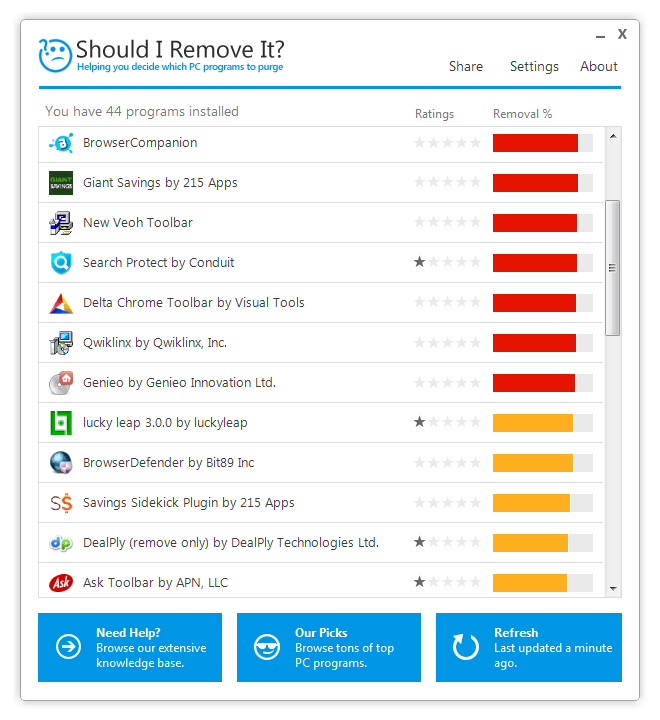
![]() Now that we've gotten the 2 biggest things out of the way, let’s clean up those nooks and crannies. You should download a program called “Should I Remove It” – it’ll scan your computer and let you know if you have useless programs installed, with an explanation on what each program does.
Some manufacturers install their own software on laptops and desktops and much of it is not really needed (called “bloatware”) and with ShouldIRemoveIt – you can easily get rid of all of these useless programs, clear space in your hard drive and speed up your computer.
Pro-tip #3: Most search-toolbars aren’t needed, and actually won’t display the best search results, consider uninstalling them.
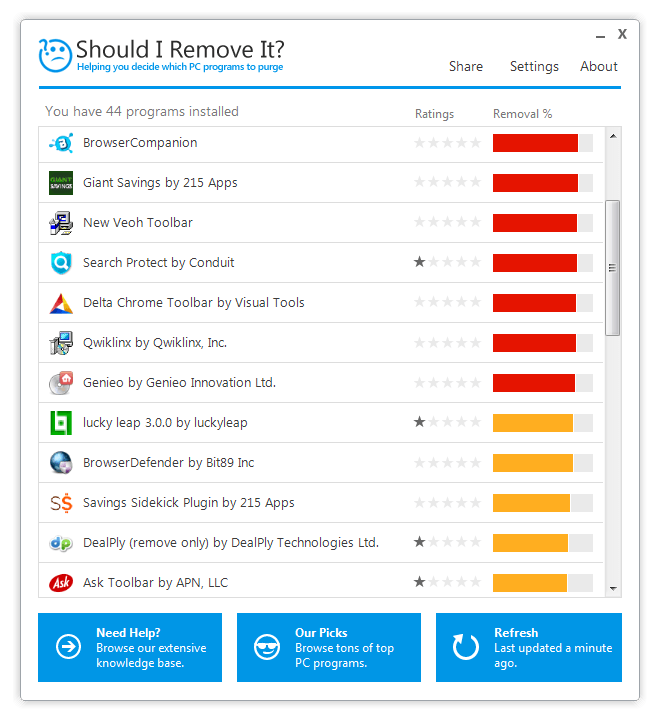
![]() (Credit: shouldiremoveit.com)
This process may take a while if your computer needs a serious clean-up, but if you follow these simple pieces of advice, you’ll enjoy a faster-working computer without the need to buy a new one or pay a technician to clean it for you!

![]() |

How to Easily Connect Your Laptop to Your TV!
Want to view your internet videos on your tv? No problem!
Windows Paint Can Do a Lot More Than You Think! Here's How
Although Windows Paint seems like it isn't capable of very much on first glance, there are actually many things that it's capable of. Take a look at this guide.
This Free Program Means You'll Never Lose a File Again
We all hate losing files and photos on our computers. Luckily, a free program called Recuva exists to help you get your deleted files back.
WI-FI GUIDE: Stop People Hacking Your Wi-Fi Password
This is how you set up a password for your wireless Wi-Fi account, to stop people using your connection for free.
Become a Windows Computer Wiz by Using These 11 Tricks
These simple tips and tricks for using a Windows PC will help you use your computer and turn you into a Windows PC master!
The 9 Free Programs Your New PC Computer Must Have
The essential list of software every new computer needs to run smoothly and safely.
9:54
Visit the Largest and Oldest Fortress City in Europe
The historic fortified city of Carcassonne is a World Heritage site in southwestern France, considered by many experts to be the largest and oldest fortress city in Europe.
How Long Does it Take to See Results From Exercises?
To help clarify what realistic progress actually looks like, we spoke with Micky Lal, a public health professional with a master's degree in kinesiology and more than a decade of experience as a clinical health educator. Here's what he wants you to k
I Bet You Didn't Know You Could Do THIS on Google Maps
Here are all of the things you can do on Google Maps that you never knew you could.
How to Solve Windows 11's Most Annoying Errors
In this article, we’ll explain the frequent problems people run into on Windows 11 and walk through easy, no-fuss fixes.
This Free Website Will Let You Play the Most Fun Mazes!
Do you love mazes and navigation challenges? Look no further than this fun site!
What Causes Laptop Batteries to Bulge Over Time?
These early warning signs can save your laptop's battery and prevent potentially dangerous situations.
2025's Online Threats Will Be More Sophisticated Than Ever
A look at the cyber scams that you need to be wary of this year.
10 Warning Signs You’re About to Fall for a Fake Ad
Thse are 10 red flags that should make you pause before clicking on a social media ad.
You Didn’t Realize it, But AI Is Making Your Life Better!
Here are thirteen unique ways AI can simplify daily life.
You Can Now Speak With ChatGPT on Your Whatsapp!
et’s explore what 1-800-ChatGPT offers, how to use it effectively, and why this innovation makes interacting with AI more seamless.
If Your Computer Is Not Working, Here's What to Do
This troubleshooting guide is all you need if you're computer isn't turning on.
Don't Charge Your Phone Over 80%, Here's Why
There is truth to the no-overnight-charging rule, and there is also some science to back it up.
12 Google Chrome Shortcuts Everyone Should Know
Keyboard shortcuts are immensely useful! If you’re using Google Chrome to browse the internet, we have a few neat shortcuts to share with you.
7 Handy Chrome Extensions That You Must Install Today
This article features some of the best and most useful Google Chrome extensions that will be handy to every user.
5:02
How to Transfer Data From Your Old iPhone to The New One
Got a new iPhone? Here's how you can move all your data from your old iPhone to the new one.
Your Computer Mouse Can Do Much More Than You Think...
Knowing how to use your mouse can make computing so much easier than you ever realized. Here are some great tips on how to maximize the use of your mouse, which will increase your overall productivity on the computer.
All You Need to Know About Your Computer
It's that age of computers, and we should all educate ourselves so we all save ourselves time and anxiety when using a computer, a tablet or a phone. This collection of posts will give you insight into many computer-related issues.
5 Best Antiviruses in 2025 for Both PC and Mac
Below, we highlight five popular antivirus solutions for Windows PCs and five for Macs, featuring a mix of free and paid options.
19:08
How to Solve the Top 30 Desktop Computer Issues
in this great and helpful video, we're touching on 30 common PC problems and how to prevent and fix them.
9 Useful Blogs Created Specifically For Senior Citizens
Here’s a wonderful collection of blogs that seniors will find particularly helpful.
3:35
Want to Increase Your iPad Keyboard Size? Watch This Guide
Want to increase the size of your iPad? Watch this tutorial now…
The Most Reliable Cloud Storage Services for 2025
Here’s a closer look at some of the best cloud storage services to consider in 2025.
10 Practical Smartphone Tips and Features Few People Know
These practical tips and clever uses of smartphones will help you start using your phone at its full potential!
Gemini 3: An AI Upgrade or a Warning of Things to Come?
A new AI version hitting the market is always the most successful, most surprising, and always overshadows its predecessors in every comparison metric - until the next version arrives and surpasses it.
17:20
Discover a Feature of Windows That's Super Helpful
Learn how to use some advanced new features of Windows 10 that you probably weren't aware of.
Turn Off These 9 Android Settings. They Pose a Risk
Here are some Android settings that you should consider turning off to enhance your device’s performance.
Get Closer to Nature with These Wonderful Free Apps
Install these free nature apps on your phone and understand nature a little better from the comfort of your home.
Surround Yourself With the Forest Sounds of the World
Ready to be surrounded by the music of the world’s forests and experience the restorative properties of being in nature?
3:32
The Easy Way to Clean Your Computer's Keyboard
Cleaning a dirty keyboard is quite a straightforward task, as you're about to find out.
Is Your Browser Slowing Down? Fix It With These 10 Tips
Get Chrome running smoothly with these seven easy fixes.
Gboard Secrets: 7 Handy Features You're Not Using Yet
Make the most out of Gboard with these awesome tips and tricls.
Secure Your Data: 5 Must-Have Privacy Apps
A look at five apps that help you take back control of your digital footprint, including their strengths, trade-offs, and where to download them safely.
Computer Guide: Comparing Skype and Microsoft Teams
This article will explain why Skype is going away, how Teams fills its shoes, and guide you through using Teams for your personal video calls, screen shares, and chats.
2:19
Google Presents Genie: A New Way to Create Interactions
This is Project Genie. Where imagination meets interaction, and every prompt opens a new frontier in AI research.
These Websites ONLY Share Positivity and Good Stories!
Say goodbye to negativity with these positive news platforms.
Is DeepSeek Worth the Hype? A Closer Look at Its Features
DeepSeek is the new AI chatbot in town. But is worth the hype?
12:38
Skype is Dead: 9 Features of Microsoft Teams
These nine lesser-known tools are a must for any Microsoft Teams user.
5 Best Online Platforms for Couples' Counselling
We've researched the options and returned with the 5 best platforms for online couples' therapy.
If You Aren’t Doing these Things, Your PC WILL Wear Out...
All the basics of computer maintenance.
5:28
WhatsApp Privacy Settings You Must Change for Safety
Want to take control of your WhatsApp privacy? In this tutorial, I'll walk you through the essential settings that protect your personal information and give you complete control over who sees what.
9 Lesser Known Free Websites for Learning in 2025
A list of 9 great free learning websites that cover a variety of subjects, from coding and science to business and language learning.
If You Do This, Then You Could Be Damaging Your Phone...
Many people end up damaging their phones without even realizing that they are doing so, and here are 9 of the most common ways this happens.
7 Reasons Why Your Computer is Running Abnormally Slow
There are many things that could be slowing your computer down and you'll find 7 of them in this article. Take a look!
To enable your Ad-Free Subscription, please fill the fields below
Your subscription was successful, now you can enjoy an ad-free experience!! Note: To make sure you get no ads, please make sure to log in to your account. If you are logged in already, then refresh the page. The subscription can be cancelled at any time.