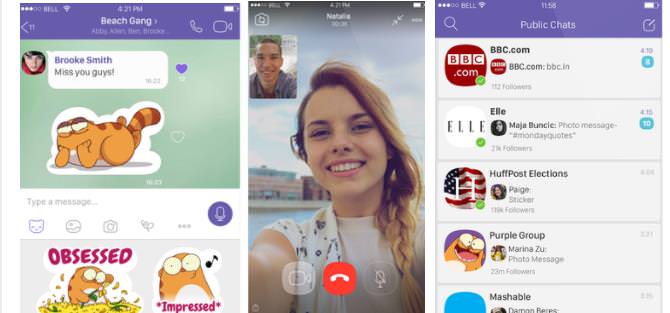
This is one of the best Skype alternatives since it offers many high-quality features free of charge. Viber launched in December 2012 for iPhone devices and, on the 19th July 2012, it was available for Android devices as well.
To use this application, the only thing you need is your cellphone number and internet connection. Viber offers its users free text messages, video calls, and audio calls. To add to this, it provides free distribution of multimedia content such as videos, audio messages, and photos.
It’s also possible to share stickers, which come in the shape of thematic bundles that can be downloaded from a vast library. The majority of the packages are free, while there are also some paid ones.
Unlike other apps, Viber doesn’t require you to add contacts to your contact list. After installing the app, you can automatically see which of your phone contacts are using the app.
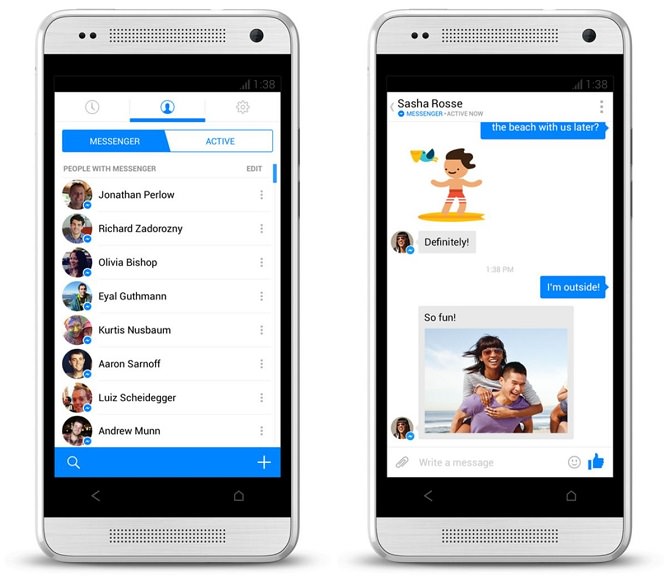
This is one of the best-known means of social networking. Since 2008, the ability to send messages via Facebook was passed down to Messenger. Apart from sending text messages, photos, emoticons, and other types of multimedia content, Messenger is also capable of video calls.
As a result, it’s considered one of the best Skype alternatives for those who only want to use basic features to communicate. Messenger is an all-in-one application, and its user-friendly interface offers calls of high quality. With just a few clicks on the screen, you can contact your Facebook friends by initiating voice or video calls.
Just over a year ago, the developers announced that users would be able to receive and send SMS through Messenger. However, this is only available on Android devices.
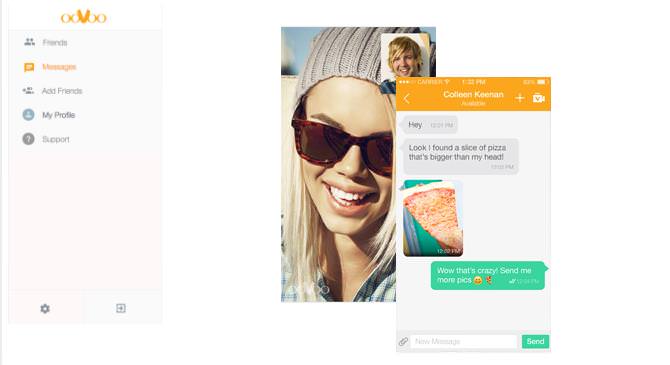
This program launched in 2007 for Windows and Mac computers started supporting it in 2008. OoVoo Is pretty straightforward since it offers its users a friendly interface. The user can use it to contact one or more friends with video or voice calls and the quality of the calls are excellent.
Your calls can be saved in video form, but if you want to do the same on Skype, you have to install additional software. Moreover, with OoVoo it’s possible to use it to call anyone that has Skype. This makes it one of the best Skype alternatives as we won’t have to pressure our Skype contacts into migrating to another program.

This is one of the most popular Skype alternatives available. In fact, it’s so popular that this application processes over 30 billion messages per day.
One of the main features of WhatsApp is its automatic contact registration. After your registration is complete, you’ll be able to see which of your contacts also use WhatsApp.
You can share information regarding a destination, as well as photos or ever your status. To add to this, WhatsApp allows users to send up to 100 messages to friends that don’t even use the application.
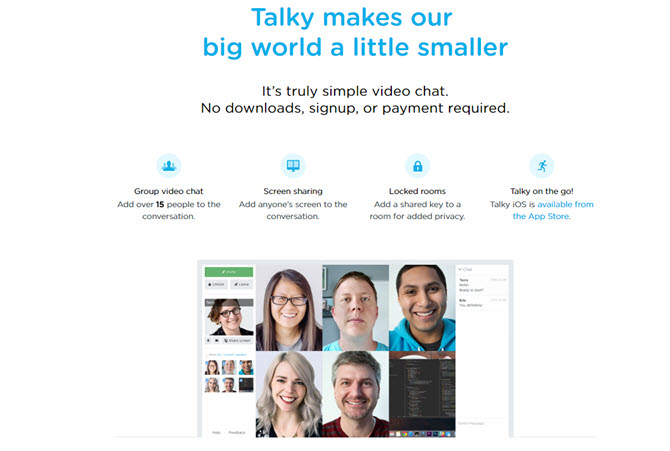
This app sells itself as “a truly simple video chat with screen sharing for groups.” All you need to do is pick a room name, get a unique URL, then share this URL with up to 15 people. The call will then be accessible to each person via their browser or iOS app.
Once a call is live, you can turn your webcam or microphone on and off, and chat via text. Once everyone is online, you can also lock the call for some extra privacy.
However, Talky cannot be used to make international or domestic calls.
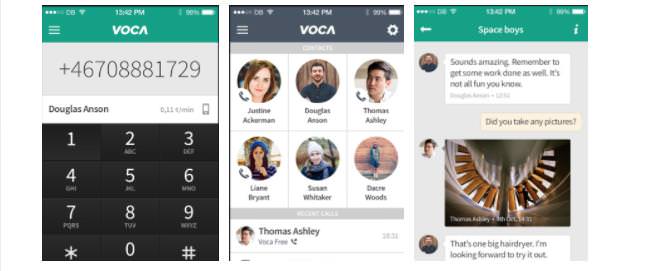
Using your Wi-Fi or data connection, Voca gives you extremely easy access to affordable international calls to over 230 countries. For example, U.S. to U.S. calls to landlines and phones cost $0.001.
If your friends and family are using this app, then texts, voice, and video calls are free of charge, but the app will use your data if you’re not connected to the Wi-Fi. For those who are security conscious, all messages and calls are encrypted.

A Few Hacks Any Zoom User Needs to Know
For better and for worse - Zoom is a part of our daily lives. Check out these 9 hacks that will make navigating the app easier.
10 Funny Comics Reveal the Annoying Side of Technology
With all the convenience computers brought into our lives, they also brought some universal moments of frustration. These funny comics capture them perfectly.
Have You Been Blocked on Facebook? Find Out Here...
If you're wondering whether or not someone has blocked you on Facebook, then read this article to find out if this is really the case.
I Never Knew Repairing a Smartphone Was So Simple!
Having phone trouble? Here are 6 of the most common smartphone issues and exactly how you can fix them.
15 Hilarious Computer Errors No One Expected
Sometimes, when technology malfunctions, it's too funny not to share it with others
Here Are the Most Googled Health Questions of 2018
We're always told not to Google questions about or health, but there are millions of people who do so. Here are the 10 most Googled health questions of 2018.
If You Aren’t Doing these Things, Your PC WILL Wear Out...
All the basics of computer maintenance.
The Most Amazing Websites for Learning Languages for Free
Learn any language for free with these amazing websites!
How to Set Up Your Phone to Call for Help If You Fall
This article teaches you to set up your iPhone or Android phone to be ready to summon help and speak for you when you need it most.
There's a keyboard Shortcut for Nearly Everything Here!
These shortcuts will cut down the time you waste fiddling about on the computer, and make you into something of an expert.
5 Most Common Mistakes People Make When Working With AIs
Here are the five biggest mistakes people make when working with AI, and exactly how to sidestep them.
7 Most Common Reasons the Phone Battery Deteriorates
The seven most common mistakes that quietly drain your battery and shorten its lifespan, along with simple ways to break each one.
5 DIY Solutions to Better Organize Your Cords and Cables
Computer cables have an annoying tendency to tangle and create an unseemly mess. Here are some easy ways to prevent that.
17:20
Discover a Feature of Windows That's Super Helpful
Learn how to use some advanced new features of Windows 10 that you probably weren't aware of.
Thirsty For Knowledge? Check Out These YouTube Channels
If you love to learn new things with each passing day, then get ready to discover a gold mine full of educational tools!
USB Drives Can Do More Than You Think – 10 Hacks You Need
Let’s explore some of the most practical yet overlooked ways to use USB drives.
Losing Important Emails? Here’s How to Tidy Up Your Gmail
A helpful guide to setting up Gmail filters to prevent emails from getting lost or spam overflowing your inbox.
5:02
How to Transfer Data From Your Old iPhone to The New One
Got a new iPhone? Here's how you can move all your data from your old iPhone to the new one.
Your Computer Mouse Can Do Much More Than You Think...
Knowing how to use your mouse can make computing so much easier than you ever realized. Here are some great tips on how to maximize the use of your mouse, which will increase your overall productivity on the computer.

9:17
The Best and Worst Apps for Learning Languages
Choosing the right language learning app can make the difference between steady progress and quick burnout
Replace Your Smartphone if It’s Showing Any of These Signs
Here are 7 major telltale signs that your smartphone is in need of an upgrade.
7:10
Computer Guide: How to Use Password Managers
Password managers help us by requiring us to remember just one password instead of many. Have a look at this video explaining all about it.
8:11
11 Do's and Don’ts for Using a Smartphone Better
Find out some useful do's and don'ts of smartphones that you might not have known earlier.
7:00
How to Remove Malware From Your Android Device
. For anyone looking to secure their phone and get it running smoothly again, this guide has it covered
2:38
How to Transfer Your Old VHS Tapes to a Computer
Do you have old family videos on VHS? It's time to make them digital so you can share them with all the family more easily! This video will show you how.
All You Need to Know About Your Computer
It's that age of computers, and we should all educate ourselves so we all save ourselves time and anxiety when using a computer, a tablet or a phone. This collection of posts will give you insight into many computer-related issues.
5 of the Best Apps for Anxiety in 2026
The Mind Ease App is our best overall because it's free and caters to anxiety in various ways for different people and symptoms.
How to Spot a Fake "Your Computer Is Infected" Pop-Up
This article helps people to identify malware or hacking pop ups that promise fake virus removal and what to do if you click or call them.
9:45
iPhone vs. Android: What's the Difference?
It’s one of the greatest rivalries in tech history: Android versus iPhone. But this battle is about much more than just smartphones...
3:32
The Easy Way to Clean Your Computer's Keyboard
Cleaning a dirty keyboard is quite a straightforward task, as you're about to find out.
1:56
No More Clutter! Free Up WhatsApp Storage in Minutes
Running out of storage on your phone because of WhatsApp? Try these hacks now.
This Free Website Will Let You Play the Most Fun Mazes!
Do you love mazes and navigation challenges? Look no further than this fun site!
How to Find Your Phone When You've Misplaced It
our phone is almost certainly close by, and there are some wonderfully simple ways to make it announce itself. Here is how, on both iPhone and Android.

9:55
Windows 11: Super Helpful Tips and Tricks
Windows 11 has come a long way since its rocky launch, and if you haven't explored it lately, you're in for a surprise. ..

Computer Guide: Comparing Skype and Microsoft Teams
This article will explain why Skype is going away, how Teams fills its shoes, and guide you through using Teams for your personal video calls, screen shares, and chats.
7 Handy Chrome Extensions That You Must Install Today
This article features some of the best and most useful Google Chrome extensions that will be handy to every user.
These Red Flags Indicate That a Shopping Website is Fake!
With online shopping being more prevalent than ever, scams are also on the rise. These are 8 warning signs that a shopping website is fake.
Take Your Computer Back to New with These Helpful Tips!
If your computer has become slow and is starting to lag, it’s probably about time you serviced it. Here's how to do it yourself, free of charge.
Secure Your Data: 5 Must-Have Privacy Apps
A look at five apps that help you take back control of your digital footprint, including their strengths, trade-offs, and where to download them safely.
How to Solve Windows 11's Most Annoying Errors
In this article, we’ll explain the frequent problems people run into on Windows 11 and walk through easy, no-fuss fixes.
9 Lesser Known Free Websites for Learning in 2025
A list of 9 great free learning websites that cover a variety of subjects, from coding and science to business and language learning.
What is "AI Psychosis", and Should You Be Worried?
A new informal term has been making the rounds - "AI psychosis" - and while it may sound alarming, understanding what it means can help you stay grounded and use these tools wisely.
12:38
Skype is Dead: 9 Features of Microsoft Teams
These nine lesser-known tools are a must for any Microsoft Teams user.
Handy Web Browser Shortcuts for Chrome, Edge, and Safari
Below are the most useful ones, written in plain language. They work in all the popular browsers, so whether you use Google Chrome, Microsoft Edge, or Apple's Safari, you are covered.
9 Useful Blogs Created Specifically For Senior Citizens
Here’s a wonderful collection of blogs that seniors will find particularly helpful.
10 Helpful Apps Every Senior Can Use
Ten of the best free apps out there for seniors, with easy links for both iPhone and Android phones.
5 Things to Never Store on Your Smartphone
Stop using your smartphone as a master repository for saving all kinds of information. It may be dangerous...
To enable your Ad-Free Subscription, please fill the fields below
Your subscription was successful, now you can enjoy an ad-free experience!! Note: To make sure you get no ads, please make sure to log in to your account. If you are logged in already, then refresh the page. The subscription can be cancelled at any time.