Suno AI is at the cutting edge of blending music creation with the power of artificial intelligence. Born from the minds of a dynamic group of musicians and AI wizards in Cambridge, MA, and bringing together talent from big names like Meta, TikTok, and Kensho, this platform is truly something special. What sets Suno AI apart is its remarkable ability to craft custom tunes just from your words.
Picture this: you type in what you're feeling, or the vibe you're after, and Suno AI brings it to life with not just melodies and rhythms but also with the nuanced sounds of life itself, from laughter to sighs to the patter of rain. And with their latest brainchild, model v3, we're talking about whipping up full-blown, radio-ready songs in mere moments. It's not just music; it's a platform that can make anyone a talented creator if they have the musical taste and love of all things musical.
How to use it
Accessing the Platform: First, you would need to visit the Suno AI website or access their platform through any app or interface they provide. Registration or sign-in might be required to use the platform's features. Don't worry, it's free unless you want to pay for a premium version. Each day you will get 50 free tokens to create up to 10 songs for free! So unless you really want to create dozens of songs every day, it'll probably be more than you need.
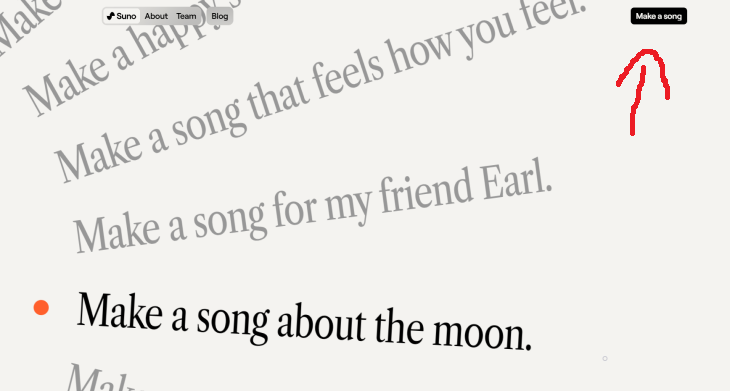
Entering a Prompt: You will see suggestions for songs. Click on Make a Song, located on the upper right corner.
Suno AI's core functionality revolves around creating music based on text prompts. You would enter a description of the type of song or sound you're interested in. This could include the mood, genre, specific instruments, and even lyrics if you have something specific in mind. The platform's AI then interprets this prompt to generate music that matches your description. For example, you could ask for a disco song about your favorite food, or a love ballad dedicated to your partner by name and personality.Customization Options: There are additional options to further customize your song. This includes adjusting the length of the track, tempo, or key. Most importantly, you can even give your OWN lyrics to the song. So you can create entirely original songs in any style or type of voice you want. In addition, you can create instrumental pieces that don't require lyrics at all.
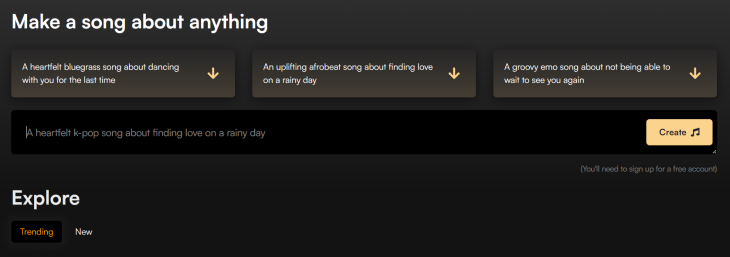
Generation Process: After submitting your prompt and any additional customizations, the AI begins the generation process. This is typically done in seconds or minutes, depending on the complexity of the request and how busy it is right now. Usually it will take around 30-60 seconds. The play button will appear but will not play the song until it is done forming it.
Download or Share: After finalizing the song, you can get a link to the audio or to a video (the song with a cover photo and the name of the song) or share it from the website itself if you want people to see it there and try it out for themselves!
Library: On the left hand side of the screen there is a column with "Explore", "Create" and "Library". In the library you'll be able to see all the musical pieces you've made, edit them or share them with friends and family.

Explore: There are incredibly talented people who have already made some amazing instrumental music pieces, operas and other amazing songs of any variety. The world is filled with people passionate about music, and so the explore option can be very rewarding if you're a music lover.
Now you can create your very own songs! Feeling like a musician yet? Share it with friends and family who also love music!

12 Things You May Not Have Realized AI Can Do For You
This article explores twelve delightful ways to harness the power of AI for entertainment, learning, and creativity.
12 Amazing Internet Radio Stations to Spice Up Your Day!

Check out these 12 fantastic internet radio stations.
MUSIC BOX: 10 Greatest Waltzes Ever Composed
Weโve gathered our top 10 picks and brought them to you, along with the stories behind them, so you can both enjoy and learn.
Is DeepSeek Worth the Hype? A Closer Look at Its Features
DeepSeek is the new AI chatbot in town. But is worth the hype?
Music Box: 20 Beautiful Covers of Beloved Rock Ballads
Presenting a collection of the best ballads, reimagined as unique piano covers that add a new level of emotion and originality.
How to Download Free Windows Software Securely โ 7 Tools
Hereโs how you can download free Windows software safely and securely.
The 11 Best Meal Planning Apps to Help You Lose Weight
Fortunately, numerous apps can make meal planningโand potentially weight lossโmuch more achievable.
Fed Up With Spotify? Try These Alternatives for Free Music
Here are eight of the best platforms where you can listen to music online without spending a dime.
Surround Yourself With the Forest Sounds of the World
Ready to be surrounded by the music of the worldโs forests and experience the restorative properties of being in nature?
5:02
How to Transfer Data From Your Old iPhone to The New One
Got a new iPhone? Here's how you can move all your data from your old iPhone to the new one.
Replace Your Smartphone if Itโs Showing Any of These Signs
Here are 7 major telltale signs that your smartphone is in need of an upgrade.
10 Popular Tech Myths You Need To Stop Believing Now
Here we bust some popular and common myths about everyday tech that people still believe in.
Making These Email Mistakes Comes Off As Rude or Annoying
When sending an email, the last thing you want is to come off as impolite or annoying. Here are 5 common email mistakes to avoid.
What Causes Laptop Batteries to Bulge Over Time?
These early warning signs can save your laptop's battery and prevent potentially dangerous situations.
25:19
S26 Ultra vs 17 Pro Max: A 2026 Flagship Phone Matchup!
In 2026, the smartphone crown is a toss-up between two absolute titans: the Samsung Galaxy S26 Ultra and the iPhone 17 Pro Max.
I Bet You Didn't Know You Could Do THIS on Google Maps
Here are all of the things you can do on Google Maps that you never knew you could.
7:40
ChatGPT vs. Google Gemini: Which One is Better in 2026?
Which AI truly owns your devices in 2026? Letโs find out.
This Free Website Will Let You Play the Most Fun Mazes!
Do you love mazes and navigation challenges? Look no further than this fun site!
Thirsty For Knowledge? Check Out These YouTube Channels
If you love to learn new things with each passing day, then get ready to discover a gold mine full of educational tools!
What To Do When Windows Will NOT Boot
There's nothing more frustrating than your computer refusing to boot. Here is what you can do to fix it when the system won't even initialize.
Losing Important Emails? Hereโs How to Tidy Up Your Gmail
A helpful guide to setting up Gmail filters to prevent emails from getting lost or spam overflowing your inbox.
5 DIY Solutions to Better Organize Your Cords and Cables
Computer cables have an annoying tendency to tangle and create an unseemly mess. Here are some easy ways to prevent that.
Your Computer Mouse Can Do Much More Than You Think...
Knowing how to use your mouse can make computing so much easier than you ever realized. Here are some great tips on how to maximize the use of your mouse, which will increase your overall productivity on the computer.
17:20
Discover a Feature of Windows That's Super Helpful
Learn how to use some advanced new features of Windows 10 that you probably weren't aware of.
What Do Those 12 'F' Keys on Your Keyboard Do?
Find out what those 12 curious F keys on your keyboard mean.
These Websites ONLY Share Positivity and Good Stories!
Say goodbye to negativity with these positive news platforms.
The Most Amazing Websites for Learning Languages for Free
Learn any language for free with these amazing websites!
Boost Your Brain With These 8 Brainy Mobile Games!
Weโve gathered 8 recommended games to keep your brain active, challenge your logical thinking, and help you pass the time enjoyably.
If You Do This, Then You Could Be Damaging Your Phone...
Many people end up damaging their phones without even realizing that they are doing so, and here are 9 of the most common ways this happens.
3:35
Want to Increase Your iPad Keyboard Size? Watch This Guide
Want to increase the size of your iPad? Watch this tutorial nowโฆ
20:27
Learn About Your Computer: Every Component Explained!
In just 3 minutes, you'll be much wiser about what your computer is made of.
What We Can Learn from ChatGPT About Being Human
What can we learn from ChatGPT about ourselves?
Your Easy Guide to OpenAI's Amazing Video and Photo Tools
OpenAI has created tools that anyone can use to make videos and photos, even if you're not a computer expert. Let me walk you through them step by step.
5:28
WhatsApp Privacy Settings You Must Change for Safety
Want to take control of your WhatsApp privacy? In this tutorial, I'll walk you through the essential settings that protect your personal information and give you complete control over who sees what.
These Shortcuts Make Using My PC SO Easy!
Shortcuts make life easier in many parts of life, and computing is no different. Here we'll show you how your keyboard can be used to speed things up.
You Can Now Speak With ChatGPT on Your Whatsapp!
etโs explore what 1-800-ChatGPT offers, how to use it effectively, and why this innovation makes interacting with AI more seamless.
12:38
Skype is Dead: 9 Features of Microsoft Teams
These nine lesser-known tools are a must for any Microsoft Teams user.
5 Hidden Google Chrome Games (And a Bonus)
Tired of Backgammon online? Try Google Chrome's online in-browser collection of games for an easy-to-reach entertainment break. Tic-tac-toe, snake, and more!
The 7 Backup Mistakes That Leave Your Files Vulnerable
Hereโs what most people get wrong about backups.
43:39
AI News: What's Going On With AI This Week?
This week's AI news covers major releases and impressive demos.
10 Practical Smartphone Tips and Features Few People Know
These practical tips and clever uses of smartphones will help you start using your phone at its full potential!
Customize Your Computer to Your Own Needs
Let the computer adjust itself to you! Here are 7 tricks that focus on ease of access and readability you can use to alter your computer experience for the better.
USB Drives Can Do More Than You Think โ 10 Hacks You Need
Letโs explore some of the most practical yet overlooked ways to use USB drives.
9:55
Windows 11: Super Helpful Tips and Tricks
Windows 11 has come a long way since its rocky launch, and if you haven't explored it lately, you're in for a surprise. ..
These 10 Keyboard Shortcuts Will Make Life Easy!
These keyboard shortcuts will help you learn the easiest ways to use your computer when your mouse is being less than cooperative!
You Didnโt Realize it, But AI Is Making Your Life Better!
Here are thirteen unique ways AI can simplify daily life.
3:32
The Easy Way to Clean Your Computer's Keyboard
Cleaning a dirty keyboard is quite a straightforward task, as you're about to find out.
To enable your Ad-Free Subscription, please fill the fields below
Your subscription was successful, now you can enjoy an ad-free experience!! Note: To make sure you get no ads, please make sure to log in to your account. If you are logged in already, then refresh the page. The subscription can be cancelled at any time.