|
Would you like to share videos you took, power point presentations or just a very big file? The quality of digital photos, videos and other files gets better all the time, but with improved quality comes an increase in file size. The majority of E-mail services limit the size of the files we can send to mere tens of megabytes (Gmail, for example, allows up to 20 megabites), which isn’t really an adequate amount when we want to share files with our friends. There are several services like Dropbox and Google Drive that allow you to save your files “in the cloud”, but once you run out of space, you cannot make changes or add more files until your friend downloads them. There is, however, a service that lets you send files with almost no limitation on size, called “We Transfer”. When you log in to the site, you will receive an offer to get the “plus” version, which allows you to send files larger than 2GB (GigaBytes). Click on “Skip” to continue to the free site. |
![]() |
|
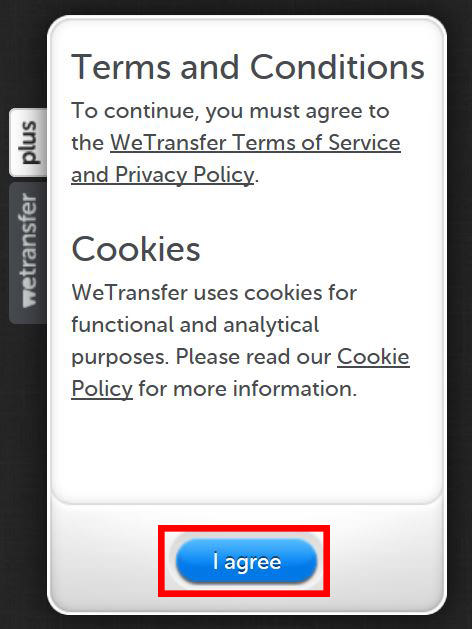
By using We Transfer, you can send large files directly to your friends’ email. Even though the size is limited to 2GB, you’re not limited to the number of transfers, so if your file is bigger than 2GB, you can simply split it into parts that are smaller than 2GB. You even get a notification when your friend receives the email, and another one when they download the file. To start transferring files, click on the “I agree” button. |
|
|
![]() |
|
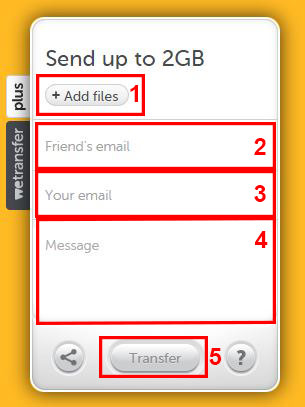
Using the service is simple, with 5 easy steps:
|
![]() |
|
Once your friend downloads the file, you’ll receive an email notification as well.
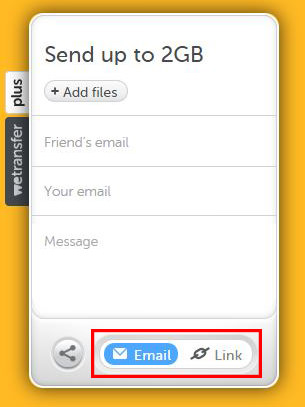
If you only wish to get a download link instead of emailing it, choose the share button |
![]() |
|
Once the upload is complete, you’ll get a link you can send to your friends via Facebook or any other messaging service. Please note that this is not a storage service, and files are only available for two weeks. The site also has a smartphone app: |

Your Computer Mouse Can Do Much More Than You Think...
Knowing how to use your mouse can make computing so much easier than you ever realized. Here are some great tips on how to maximize the use of your mouse, which will increase your overall productivity on the computer.
STOP! You're Damaging Your Computer...
Computers are practically indispensable to us these days. The thing is, you could be damaging yours without even knowing it. Looking out for these 16 things.
If Your Computer Is Not Working, Here's What to Do
This troubleshooting guide is all you need if you're computer isn't turning on.
These Apps Are All You Need on Your Next Vacation
Having these handy apps on your phone will see you taking your next trip abroad to the next level. Learn about these 6 essential travel apps.
Computer Guide: How to Backup and Restore Your Files!
If you're tired of copying your important computer files to a thumb drive, take a look at this guide to backing up and restoring Windows files ...
The 9 Free Programs Your New PC Computer Must Have
The essential list of software every new computer needs to run smoothly and safely.
17:20
Discover a Feature of Windows That's Super Helpful
Learn how to use some advanced new features of Windows 10 that you probably weren't aware of.
If You Aren’t Doing these Things, Your PC WILL Wear Out...
All the basics of computer maintenance.
11:12
The Windows Recycle Bin Isn’t Just for Trash—Here’s Why
Did you know about these cool features of the Windows Recycle Bin?
7 Websites With Free Useful Apps for Your Computer
we've gathered 7 recommended repositories where you can find almost any software you might need for Windows – and at no cost!
Your Easy Guide to OpenAI's Amazing Video and Photo Tools
OpenAI has created tools that anyone can use to make videos and photos, even if you're not a computer expert. Let me walk you through them step by step.
Your Computer Mouse Can Do Much More Than You Think...
Knowing how to use your mouse can make computing so much easier than you ever realized. Here are some great tips on how to maximize the use of your mouse, which will increase your overall productivity on the computer.
10 Popular Tech Myths You Need To Stop Believing Now
Here we bust some popular and common myths about everyday tech that people still believe in.
15:16
Get Smarter: How Do Hard Drives Work?
How do hard drives built and how do they work? All is explained in this video.
10 Practical Smartphone Tips and Features Few People Know
These practical tips and clever uses of smartphones will help you start using your phone at its full potential!
Overpaying for Streaming? Here’s How to Fix That!
Save big on your streaming bills with these simple tips.
Losing Important Emails? Here’s How to Tidy Up Your Gmail
A helpful guide to setting up Gmail filters to prevent emails from getting lost or spam overflowing your inbox.
Looking for an Instagram Alternative? Try These Platforms
If you’re ready to explore beyond Instagram, here are eight great alternatives.
Surround Yourself With the Forest Sounds of the World
Ready to be surrounded by the music of the world’s forests and experience the restorative properties of being in nature?
Here’s Where You Can Watch Classic Movies for Free!
Want to watch free classic movies? Check out these sites and apps.
PowerToys: The Best Free Microsoft App for Windows Users
In this article, we'll introduce you to this toolbox and show you which 23 useful tools are waiting for you there.
7 Tips to Follow When a Computer Hangs or Freezes
Take note of these steps that will help you unfreeze a computer that freezes or hangs regularly.
3:32
The Easy Way to Clean Your Computer's Keyboard
Cleaning a dirty keyboard is quite a straightforward task, as you're about to find out.
Learn Any New Language with These Awesome Apps!
Learn new languages faster with these AI-powered apps.
5:02
How to Transfer Data From Your Old iPhone to The New One
Got a new iPhone? Here's how you can move all your data from your old iPhone to the new one.
Gboard Secrets: 7 Handy Features You're Not Using Yet
Make the most out of Gboard with these awesome tips and tricls.
Why Fake Info is Best for These 6 Types of Sites
Always avoid giving your real information on these kinds of websites.
9:43
Tired of Google Photos Storage Limits? Try These Solutions
Get more space in your Google Photos account with these useful hacks.
2:35
6 Simple Tips for Taking Screenshots on Windows
Taking screenshots on Windows is now super easy. Just note these tips.
Can’t Connect to the Internet? Here’s What To Do
Not being able to connect to the internet is one of the most pestering things. This is why it might be happening and easy solution to fix it.
10 Warning Signs You’re About to Fall for a Fake Ad
Thse are 10 red flags that should make you pause before clicking on a social media ad.
Guide: How to Unlock Your Phone Without a Passcode
Forgot your phone passcode? Don't panic.Just follow these steps.
1:56
No More Clutter! Free Up WhatsApp Storage in Minutes
Running out of storage on your phone because of WhatsApp? Try these hacks now.
Don't Charge Your Phone Over 80%, Here's Why
There is truth to the no-overnight-charging rule, and there is also some science to back it up.
14 Tips for Using the Computer More Easily
It’s very likely that in the following computer tips list you’ll find information that will surprise you!
What Causes Laptop Batteries to Bulge Over Time?
These early warning signs can save your laptop's battery and prevent potentially dangerous situations.
2025's Online Threats Will Be More Sophisticated Than Ever
A look at the cyber scams that you need to be wary of this year.
It’s Almost a Crime Not to Use These Free Nifty Websites
Check out 15 really useful websites. They are completely free to use!
USB Drives Can Do More Than You Think – 10 Hacks You Need
Let’s explore some of the most practical yet overlooked ways to use USB drives.
2:27
Tutorial: How to Uninstall Apps on Your Windows 11 PC
How to uninstall apps on your windows PC.
Smishing 101: How to Recognize Scam Text Messages
This is how you recognize and handle fraudulent or scam text messages, also known as smashing.
5 Best Antiviruses in 2025 for Both PC and Mac
Below, we highlight five popular antivirus solutions for Windows PCs and five for Macs, featuring a mix of free and paid options.
Do You Eat Out Often? These 7 Apps Will Save You Money!
If you’re struggling to keep up with your monthly food budget, you’re not alone. Here are 7 dinning apps that will save you money every time you eat.
Computer Guide: Comparing Skype and Microsoft Teams
This article will explain why Skype is going away, how Teams fills its shoes, and guide you through using Teams for your personal video calls, screen shares, and chats.
Selling Used Stuff? Try These Amazing Apps
You can now sell your used household clothes and other items through some amazing apps.
What Do Those 12 'F' Keys on Your Keyboard Do?
Find out what those 12 curious F keys on your keyboard mean.
Stop Paying For Software: 8 Free Productivity Options
Here are eight free open-source alternatives that can take the place of paid productivity apps without sacrificing quality or functionality.
To enable your Ad-Free Subscription, please fill the fields below
Your subscription was successful, now you can enjoy an ad-free experience!! Note: To make sure you get no ads, please make sure to log in to your account. If you are logged in already, then refresh the page. The subscription can be cancelled at any time.