The coronavirus outbreak and the measures that we must take to fight it and stay safe have brought on a challenge that humans were not expecting - the impossibility of travel. The upside of this strange situation is that many people;ar destinations are now offering online tours and other alternative ways to enjoy the beauty of the world without moving from the couch or breaking quarantine. You can have a look at our previous articles listing the museums and national parks, which offer virtual tours.
One such initiative is the new interactive website where you can explore the Great Barrier Reef of Australia. This is one of the most impressive sights out there - the world’s largest coral reef system (2,300 kilometers, or just over 1,400 miles of Australia's coastline and twice the size of any other reef in the world), and home to dolphins, whales, sea turtles and over 1,500 species of fish.
The online tour of the reef, which is simply called Attenborough's Reef, is full of stunning underwater views of these wonders, and the best part is, it's narrated by David Attenborough.

For those of you who don’t know, David Attenborough is a British broadcaster and natural historian. He had written and narrated a succession of television programs on anthropology and natural history. The most notable would be the 9-part Life series. His more recent endeavors deal with issues of climate change, like his 2019 recent series Our Planet which can be streamed on Netflix. Attenborough had won an Emmy Award and several BAFTA awards for his work.
The naturalist was recently quoted saying in Big Issue magazine “In times of crisis, the natural world is a source of both joy and solace. The natural world produces the comfort that can come from nothing else.”
The narrated tour offers explanations on how corals grow, what the reef sounds like, and which species you can meet in each part.
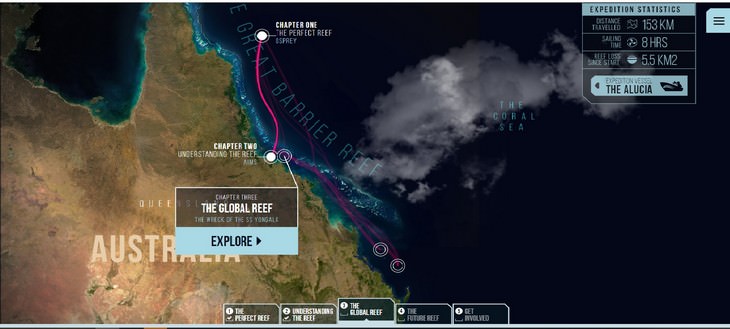
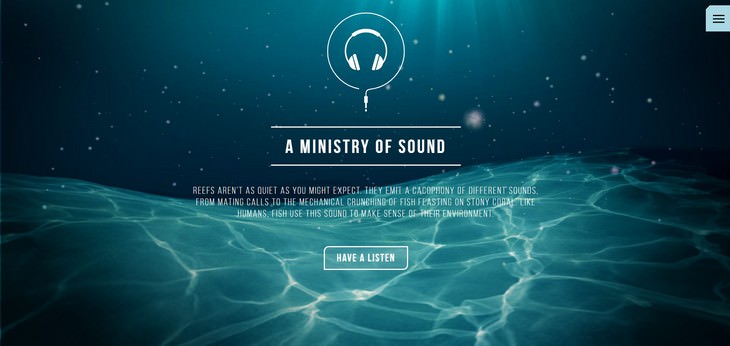
Some sections will have a button offering you to explore something extra, like sound or an interactive explanation on a certain animal. Here, for example, it's the 'Have a Listen' button.
Once you are finished, simply click the back button on the left upper corner of your screen.
This Rare Jellyfish Was Only Seen Twice
This rare jellyfish was only ever seen twice. Now we have it caught on video.
Explore 12 Beautiful Locations by Drone in Ultra HD!
Click and select one of our 12 different, ultra HD drone videos showcasing some of the most beautiful places in the world.
Video Collection: The Beauty That is the USA
We've taken the liberty of collecting informative beautiful videos about every one of America's gorgeous National Parks. Sit back and enjoy the tours!
INTERACTIVE MAP: 12 Beautiful New Zealand Sights
12 gorgeous sights you will see in New Zealand. Just click on any of the symbols to see a video of that place!
Australia is Just Full of Remarkable Places to See...
When visiting Australia, try to catch some of these terrific sights.
Take a Virtual Trip to Australia With An Interactive Guide
Australia is an amazing country that leaves many of us in complete awe for a whole variety of reasons. Take an interactive tour of the country.
The Viral Egg Poaching Hack That Actually Works
Poached eggs have a reputation for being tricky. The swirling water, the wispy whites floating everywhere, the timing - it's enough to put anyone off. But a simple trick that's been making the rounds online might just change all of that.
The Loneliness Crisis Among Men: What's Really Going On?
In recent years, you may have heard the phrase "male loneliness epidemic" popping up in conversations, podcasts, and news headlines. It's a topic that stirs strong feelings and sparks plenty of debate — but what does the research actually tell us? An
5 Best Antiviruses in 2025 for Both PC and Mac
Below, we highlight five popular antivirus solutions for Windows PCs and five for Macs, featuring a mix of free and paid options.
12:38
Skype is Dead: 9 Features of Microsoft Teams
These nine lesser-known tools are a must for any Microsoft Teams user.
Boost Your Brain With These 8 Brainy Mobile Games!
We’ve gathered 8 recommended games to keep your brain active, challenge your logical thinking, and help you pass the time enjoyably.
2:27
Tutorial: How to Uninstall Apps on Your Windows 11 PC
How to uninstall apps on your windows PC.
5:02
How to Transfer Data From Your Old iPhone to The New One
Got a new iPhone? Here's how you can move all your data from your old iPhone to the new one.
The Most Amazing Websites for Learning Languages for Free
Learn any language for free with these amazing websites!
11 Free AI Tools That Actually Help You Get Stuff Done
Have you tried any of these useful free AI apps?
Exploring the Web Beyond Google: 7 Handy Alternatives
Try some of these non-conventional search engines that you didn't know existed.
8 Mistakes That Shorten the Life of Your Electronics
Your gadgets and household electronics won’t last long if you keep repeating these common mistakes.
Simplify Finances With These Budget Apps for Families
Try these money mangement tools to simplify your finances in 2025
7:40
ChatGPT vs. Google Gemini: Which One is Better in 2026?
Which AI truly owns your devices in 2026? Let’s find out.
Your Computer Mouse Can Do Much More Than You Think...
Knowing how to use your mouse can make computing so much easier than you ever realized. Here are some great tips on how to maximize the use of your mouse, which will increase your overall productivity on the computer.
You Can Now Speak With ChatGPT on Your Whatsapp!
et’s explore what 1-800-ChatGPT offers, how to use it effectively, and why this innovation makes interacting with AI more seamless.
10 Free Ancestry Sites for Tracing Your Family History
Here are 10 of the best free ancestry sites that can help you uncover your family’s story.
Is DeepSeek Worth the Hype? A Closer Look at Its Features
DeepSeek is the new AI chatbot in town. But is worth the hype?

7 Tips to Follow When a Computer Hangs or Freezes
Take note of these steps that will help you unfreeze a computer that freezes or hangs regularly.

23:04
ChatGPT: 30 Tips to Using and Working with the AI
In this video, we’re breaking down 30 practical tips to help you use ChatGPT more effectively
Gboard Secrets: 7 Handy Features You're Not Using Yet
Make the most out of Gboard with these awesome tips and tricls.
20:27
Learn About Your Computer: Every Component Explained!
In just 3 minutes, you'll be much wiser about what your computer is made of.
Stop Paying For Software: 8 Free Productivity Options
Here are eight free open-source alternatives that can take the place of paid productivity apps without sacrificing quality or functionality.
1:56
No More Clutter! Free Up WhatsApp Storage in Minutes
Running out of storage on your phone because of WhatsApp? Try these hacks now.
Fed Up With Spotify? Try These Alternatives for Free Music
Here are eight of the best platforms where you can listen to music online without spending a dime.
Customize Your Computer to Your Own Needs
Let the computer adjust itself to you! Here are 7 tricks that focus on ease of access and readability you can use to alter your computer experience for the better.
9:17
The Best and Worst Apps for Learning Languages
Choosing the right language learning app can make the difference between steady progress and quick burnout
25:19
S26 Ultra vs 17 Pro Max: A 2026 Flagship Phone Matchup!
In 2026, the smartphone crown is a toss-up between two absolute titans: the Samsung Galaxy S26 Ultra and the iPhone 17 Pro Max.
If Your Computer Is Not Working, Here's What to Do
This troubleshooting guide is all you need if you're computer isn't turning on.
These Websites ONLY Share Positivity and Good Stories!
Say goodbye to negativity with these positive news platforms.
Take Your Computer Back to New with These Helpful Tips!
If your computer has become slow and is starting to lag, it’s probably about time you serviced it. Here's how to do it yourself, free of charge.
Busting 12 Password Myths to Safeguard Your Online Life
Don’t fall for these common password myths.
This Free Website Will Let You Play the Most Fun Mazes!
Do you love mazes and navigation challenges? Look no further than this fun site!
How to Tell If a Virus Warning Is Real or Fake - 12 Tips
If you see a barrage of security alerts popping up on your computer, then it might be sign of a virus attack.
Do You Eat Out Often? These 7 Apps Will Save You Money!
If you’re struggling to keep up with your monthly food budget, you’re not alone. Here are 7 dinning apps that will save you money every time you eat.
7 Handy Chrome Extensions That You Must Install Today
This article features some of the best and most useful Google Chrome extensions that will be handy to every user.
Surround Yourself With the Forest Sounds of the World
Ready to be surrounded by the music of the world’s forests and experience the restorative properties of being in nature?
Get Closer to Nature with These Wonderful Free Apps
Install these free nature apps on your phone and understand nature a little better from the comfort of your home.
5 DIY Solutions to Better Organize Your Cords and Cables
Computer cables have an annoying tendency to tangle and create an unseemly mess. Here are some easy ways to prevent that.
This One Computer Key Is Used for a Myriad of Shortcuts!
The 'Win' key is usally thought to only bring up the start menu. It actually does a whole lot more. Get a load of these dozens of shortcuts!
3:35
Want to Increase Your iPad Keyboard Size? Watch This Guide
Want to increase the size of your iPad? Watch this tutorial now…
Don't Charge Your Phone Over 80%, Here's Why
There is truth to the no-overnight-charging rule, and there is also some science to back it up.
Secure Your Data: 5 Must-Have Privacy Apps
A look at five apps that help you take back control of your digital footprint, including their strengths, trade-offs, and where to download them safely.
Do You Know How to Act in a Medical Emergency?
Don't feel powerless in a medical emergency, learn what actions to take in these 10 serious medical emergencies and how to save lives
To enable your Ad-Free Subscription, please fill the fields below
Your subscription was successful, now you can enjoy an ad-free experience!! Note: To make sure you get no ads, please make sure to log in to your account. If you are logged in already, then refresh the page. The subscription can be cancelled at any time.