10:55
30 Well Known Life Hacks Tested- Which is Real?
30 well-known life hacks tested in front of your eyes. Watch this video to save you the time of trial and error
15 Easy Ways to Repurpose Household Waste in the GARDEN
Learn how to reuse waste and old or broken items to give your garden a real upgrade!
These Nifty Visual Guides Can Come in Handy For All of Us
Here are some really useful guides with some great life hacks and tips and tricks that can come in handy to anyone.
7:40
Basic Culinary Skills Taught by the Master, Gordon Ramsay
It only takes 7 minutes for Gordon Ramsay to teach us the perfect way to carry out these 5 basic culinary skills that everyone should know
10 Neat Kitchen Tricks and Hacks Every Cook Must Know
Neat tricks to help around the kitchen
9:19
Incredible Hidden Features of Your iPhone You Must Use
Every iPhone user must take note of these hidden features that you probably didn't know before.
Smishing 101: How to Recognize Scam Text Messages
This is how you recognize and handle fraudulent or scam text messages, also known as smashing.
Your Computer Mouse Can Do Much More Than You Think...
Knowing how to use your mouse can make computing so much easier than you ever realized. Here are some great tips on how to maximize the use of your mouse, which will increase your overall productivity on the computer.
These Gmail Shortcuts Will Save You Time & Frustration
If you use Gmail, but you don't know how to use a single keyboard shortcut, then you well and truly are missing out. Here are the most useful ones...
There's a keyboard Shortcut for Nearly Everything Here!
These shortcuts will cut down the time you waste fiddling about on the computer, and make you into something of an expert.
If Your Computer Is Not Working, Here's What to Do
This troubleshooting guide is all you need if you're computer isn't turning on.

I Never Knew Repairing a Smartphone Was So Simple!
Having phone trouble? Here are 6 of the most common smartphone issues and exactly how you can fix them.

5 Things to Never Store on Your Smartphone
Stop using your smartphone as a master repository for saving all kinds of information. It may be dangerous...
Get Closer to Nature with These Wonderful Free Apps
Install these free nature apps on your phone and understand nature a little better from the comfort of your home.
2:38
How to Transfer Your Old VHS Tapes to a Computer
Do you have old family videos on VHS? It's time to make them digital so you can share them with all the family more easily! This video will show you how.
5 Most Common Mistakes People Make When Working With AIs
Here are the five biggest mistakes people make when working with AI, and exactly how to sidestep them.
Surround Yourself With the Forest Sounds of the World
Ready to be surrounded by the music of the world’s forests and experience the restorative properties of being in nature?
The 7 Most Common Online Scams in 2026
The seven most common online scams targeting people over 50 right now, and the simple habits that will keep your money and your peace of mind safe.
Is it a Fake AI Video or the Real Thing? 13 Telling Signs
Have you ever been scrolling through TikTok or Facebook and felt that something about the person on your screen just did not add up? 13 ways to identify a fake AI video.
2:35
6 Simple Tips for Taking Screenshots on Windows
Taking screenshots on Windows is now super easy. Just note these tips.
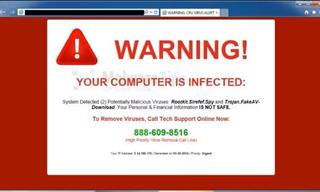
How to Spot a Fake "Your Computer Is Infected" Pop-Up
This article helps people to identify malware or hacking pop ups that promise fake virus removal and what to do if you click or call them.
12 Google Chrome Shortcuts Everyone Should Know
Keyboard shortcuts are immensely useful! If you’re using Google Chrome to browse the internet, we have a few neat shortcuts to share with you.
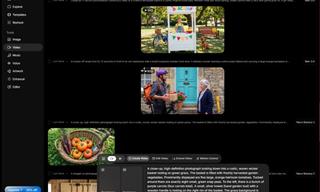
How to Make Easy Videos with AI (No Film School Required)
This guide explains how AI video creation works, what it costs, which tools are easiest to start with, and how to use a regular chatbot to write the instructions for you when you don't know the filmmaking vocabulary.
If You Do This, Then You Could Be Damaging Your Phone...
Many people end up damaging their phones without even realizing that they are doing so, and here are 9 of the most common ways this happens.
Do You Know How to Act in a Medical Emergency?
Don't feel powerless in a medical emergency, learn what actions to take in these 10 serious medical emergencies and how to save lives
5 of the Best Apps for Anxiety in 2026
The Mind Ease App is our best overall because it's free and caters to anxiety in various ways for different people and symptoms.
8 Benefits of Quitting Social Media (Even for a Week)
Learn about 8 benefits you can enjoy when quitting social media, even for a short period.
This One Computer Key Is Used for a Myriad of Shortcuts!
The 'Win' key is usally thought to only bring up the start menu. It actually does a whole lot more. Get a load of these dozens of shortcuts!
2026 Foldable Smartphones: The Complete Buyer's Guide
The foldable phone market in 2026 has reached unprecedented levels of sophistication and diversity. Here's a guide looking at the top foldable models.
Computer Guide: Comparing Skype and Microsoft Teams
This article will explain why Skype is going away, how Teams fills its shoes, and guide you through using Teams for your personal video calls, screen shares, and chats.
9:55
Windows 11: Super Helpful Tips and Tricks
Windows 11 has come a long way since its rocky launch, and if you haven't explored it lately, you're in for a surprise. ..
Computer Tips: All You Can Do With the CTRL/Control Key!
The control key has more uses than just copying and pasting. These are the 20 more useful keyboard shortcuts you can do with the control key.
4:50
Guide: How to Remove Malware from Android Phones
In this video, we’ll cut through the tech jargon to show you exactly how to spot the red flags of a compromised device.
17:41
TikTok: Tips and Tricks for Beginners
Whether you are a total beginner or just looking to streamline your process to get more views, this tutorial covers everything you need to know to go from recording to posting.
5:15
How to Find Out if Your Computer Has a Virus
In this video, I'll show you the most telling signs that your machine may be infected, walk you through how to remove threats effectively, and share the best antivirus solutions to keep you protected for good.
20:27
Learn About Your Computer: Every Component Explained!
In just 3 minutes, you'll be much wiser about what your computer is made of.
Guide: How to Protect Your Eyes When On the Computer
Eye strain can be a serious problem if you work at a computer for long hours each day. Luckily, there are various things you can do in order to prevent it.
Computer Guide: Windows 11 Shortcut Keys!
Learn the best shortcuts for Windows 11 using your keyboard. From taskbar to screenshots, learn it all.
9:45
iPhone vs. Android: What's the Difference?
It’s one of the greatest rivalries in tech history: Android versus iPhone. But this battle is about much more than just smartphones...
43:39
AI News: What's Going On With AI This Week?
This week's AI news covers major releases and impressive demos.
These Red Flags Indicate That a Shopping Website is Fake!
With online shopping being more prevalent than ever, scams are also on the rise. These are 8 warning signs that a shopping website is fake.
Want Your PC to Run Longer? Then Avoid These Mistakes
Avoiding these silly mistakes will help you prevent damage to your computer and also extend its life.
A Plain-Language Guide to Password Managers
Here is a plain-language explanation of what they are, why they are worth having, and exactly how to get one on your phone or computer.
4:44
What Is Net Neutrality and How Does It Affect You?
What on Earth is net neutrality, and how does it effect you? Watch this informative video and find out!
3:35
Want to Increase Your iPad Keyboard Size? Watch This Guide
Want to increase the size of your iPad? Watch this tutorial now…
This Incredible Map Will Let You to Fly Above Any Location
This amazing site allows you to watch drone videos by location - and boy are they beautiful.
7:10
Computer Guide: How to Use Password Managers
Password managers help us by requiring us to remember just one password instead of many. Have a look at this video explaining all about it.
To enable your Ad-Free Subscription, please fill the fields below
Your subscription was successful, now you can enjoy an ad-free experience!! Note: To make sure you get no ads, please make sure to log in to your account. If you are logged in already, then refresh the page. The subscription can be cancelled at any time.