|
You’re trying to get something done on your computer, maybe it’s some work, or chatting with your family, maybe you started writing that novel you’ve thought about for so long, but this damn piece of junk is so slow. If you don't want to spend money on a new computer, what can you do to solve this problem? I’ve been there, and thanks to my tech-savvy friends, I've compiled this guide to help you clean up your old computer and give it a new lease on life.

![]() First thing’s first: You need an antivirus installed on your computer! If you don’t have one, your computer might be infected with viruses, these nasty little pieces of software, used for a variety of things (gathering info, stealing passwords or just by people looking to be purposely malicious) – tend to hog the computing power of your Central Processing Unit (CPU) and slow down your computer’s response time.
According to tests performed in June 2014, the Antivirus software with the highest level of protection (99% success rate) were:
(credit: avira.com, 360safe.com, bitdefender.com, eset.com, kaspersky.com, cloudantivirus.com)
But before you install the Antivirus of your choice, make sure that you don’t have an old Antivirus installed – 2 antivirus programs don’t cooperate, they clash and slow down your computer. To check if you have an Antivirus installed, watch this video:
Pro-tip #1: Be sure to run a full scan on your computer once in a while, as there might be infected files lying dormant in your hard-drive.

![]() Now that we made sure you have an antivirus installed and that it’s up-to-date, it’s time to check for the other problems that might be slowing down your computer. These include “cookies” or even internet toolbars that can negatively effect your computer's speed because they might be doing “naughty” things in the background (like sending your browsing data to a company, or giving you search results that aren’t the best, but instead were paid for by advertisers).
Currently, the 2 best programs for clearing such offenders are BitDefender & Malwarebytes Antimalware Free (99% success rate or higher).
Pro-tip #2: Run a scan once or twice a week, you’ll be amazed at what you might find.

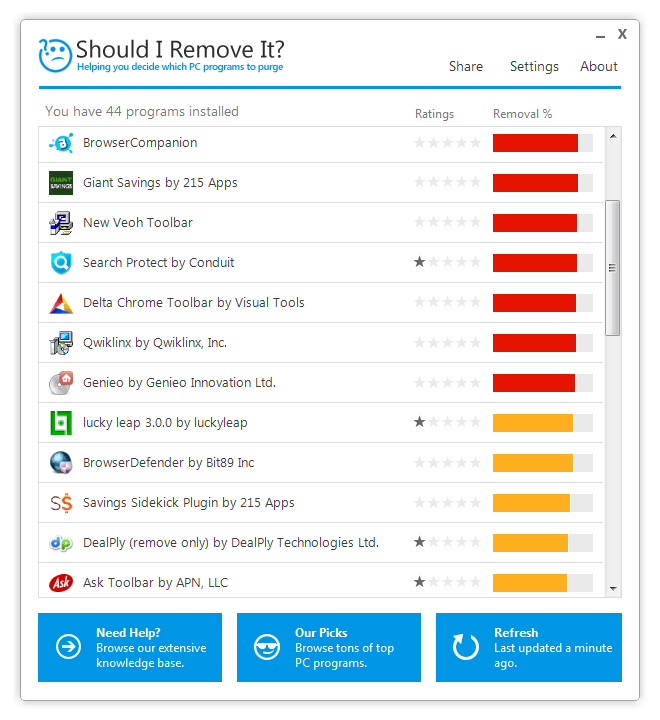
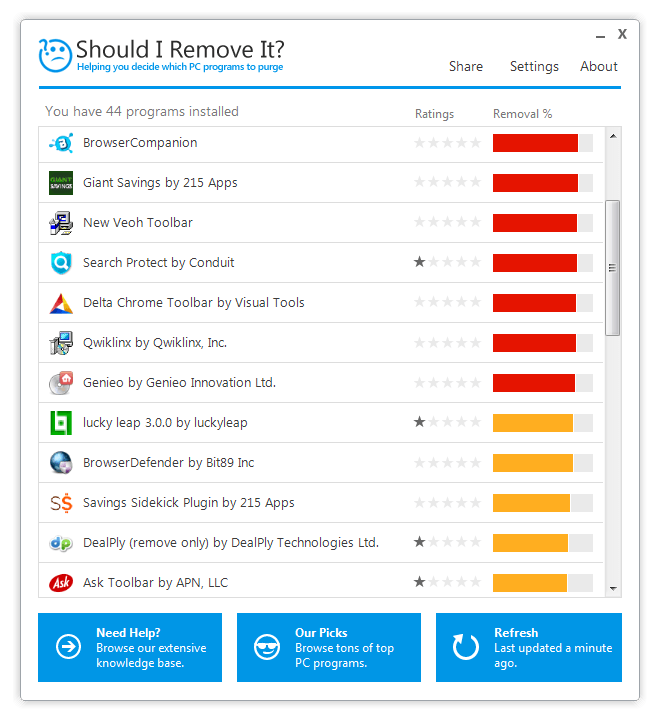
![]() Now that we've gotten the 2 biggest things out of the way, let’s clean up those nooks and crannies. You should download a program called “Should I Remove It” – it’ll scan your computer and let you know if you have useless programs installed, with an explanation on what each program does.
Some manufacturers install their own software on laptops and desktops and much of it is not really needed (called “bloatware”) and with ShouldIRemoveIt – you can easily get rid of all of these useless programs, clear space in your hard drive and speed up your computer.
Pro-tip #3: Most search-toolbars aren’t needed, and actually won’t display the best search results, consider uninstalling them.
![]() (Credit: shouldiremoveit.com)
This process may take a while if your computer needs a serious clean-up, but if you follow these simple pieces of advice, you’ll enjoy a faster-working computer without the need to buy a new one or pay a technician to clean it for you!

![]() |

Become a Windows Computer Wiz by Using These 11 Tricks
These simple tips and tricks for using a Windows PC will help you use your computer and turn you into a Windows PC master!
These Apps Are All You Need on Your Next Vacation
Having these handy apps on your phone will see you taking your next trip abroad to the next level. Learn about these 6 essential travel apps.
How to Easily Send Large Files to Your Friends and Family
Have videos, large images and music that you want to share with your loved ones? This is how you easily do so.
How to Choose the Perfect Laptop For Your Needs!
Are you thinking of getting a new laptop but can't wrap your head around all the terms and sizes? This guide will make things easier for you.
This Free Program Means You'll Never Lose a File Again
We all hate losing files and photos on our computers. Luckily, a free program called Recuva exists to help you get your deleted files back.
What's the Healthiest Way to Sit at Your Computer?
Learn how to minimise the health risks of using your computer with this positioning guide.
Smishing 101: How to Recognize Scam Text Messages
This is how you recognize and handle fraudulent or scam text messages, also known as smashing.
Thirsty For Knowledge? Check Out These YouTube Channels
If you love to learn new things with each passing day, then get ready to discover a gold mine full of educational tools!
5 Awesome Google Chrome Settings You Aren’t Using
Google Chrome’s advanced settings have many useful features that will make your browsing experience so much better.
11:12
The Windows Recycle Bin Isn’t Just for Trash—Here’s Why
Did you know about these cool features of the Windows Recycle Bin?
Best ChatGPT Prompts for 2024
Let's explore some great prompts you can start with on your AI adventure, either for fun or for productivity or knowledge.
7:31
How to Edit Your Photos Using 3 Different AI Services
If you shoot weddings, portraits, or anything high-volume, and you’ve wondered if AI can really speed things up without cutting corners, this is the no-nonsense breakdown you need.
5:23
Phone Security– The Fastest Way to Secure a Hacked Phone
This guide helps you in checking for hackers on your phone, removing them, and locking down your phone.
PowerToys: The Best Free Microsoft App for Windows Users
In this article, we'll introduce you to this toolbox and show you which 23 useful tools are waiting for you there.
The 7 Backup Mistakes That Leave Your Files Vulnerable
Here’s what most people get wrong about backups.
5:02
How to Transfer Data From Your Old iPhone to The New One
Got a new iPhone? Here's how you can move all your data from your old iPhone to the new one.
7:09
Struggling with Slow iPhone Internet? Try These Tips
iPhone running slow again? Here’s how you boost your speed…
12 Amazing Internet Radio Stations to Spice Up Your Day!
Check out these 12 fantastic internet radio stations.
The Most Reliable Cloud Storage Services for 2025
Here’s a closer look at some of the best cloud storage services to consider in 2025.
This One Computer Key Is Used for a Myriad of Shortcuts!
The 'Win' key is usally thought to only bring up the start menu. It actually does a whole lot more. Get a load of these dozens of shortcuts!
Firefox Just Got Better: 10 Handy Extensions You’ll Love
With the right add-ons, Firefox can become an indispensable browser that you'll rely on every day.
These Websites ONLY Share Positivity and Good Stories!
Say goodbye to negativity with these positive news platforms.
Did You Know These Cell Phone Facts Are All Totally False?
People just love to give you advice about smart phones, but it turns out that a lot of this information is false. Never believe these 9 smart phone myths.
7 Reasons Why Your Computer is Running Abnormally Slow
There are many things that could be slowing your computer down and you'll find 7 of them in this article. Take a look!
7:38
Most People Don’t Know About These Google Maps Features
Google Maps has a ton of new features that most people don’t know about.
ChatGPT's Got Competition: 7 Exciting AI Contenders
Looking for a ChatGPT alternative? Here are a few good ones.
7 UNDISCOVERED Apps That are NOT on the Google Play Store!
I can’t believe I never knew about these handy Android apps.
How to Tell If a Virus Warning Is Real or Fake - 12 Tips
If you see a barrage of security alerts popping up on your computer, then it might be sign of a virus attack.
7 Tips to Follow When a Computer Hangs or Freezes
Take note of these steps that will help you unfreeze a computer that freezes or hangs regularly.
3:28
Easy Tips for Connecting Your Laptop to an External Screen
Watch this helpful tutorial to learn how to connect your laptop to a monitor.
There's a keyboard Shortcut for Nearly Everything Here!
These shortcuts will cut down the time you waste fiddling about on the computer, and make you into something of an expert.
USB Drives Can Do More Than You Think – 10 Hacks You Need
Let’s explore some of the most practical yet overlooked ways to use USB drives.
These 10 Keyboard Shortcuts Will Make Life Easy!
These keyboard shortcuts will help you learn the easiest ways to use your computer when your mouse is being less than cooperative!
Why Fake Info is Best for These 6 Types of Sites
Always avoid giving your real information on these kinds of websites.
Make Google Maps Better with These Handy Tools
These add-ons make Google Maps so much better!
Can’t Connect to the Internet? Here’s What To Do
Not being able to connect to the internet is one of the most pestering things. This is why it might be happening and easy solution to fix it.
Guide: How to Sign a PDF Without Printing it First
This guide will teach you how to sign PDF files digitally without having to print them.
Exploring the Web Beyond Google: 7 Handy Alternatives
Try some of these non-conventional search engines that you didn't know existed.
Don't Charge Your Phone Over 80%, Here's Why
There is truth to the no-overnight-charging rule, and there is also some science to back it up.
1:55
Never Lose Your WhatsApp Chats Again with These Hacks!
Protect your WhatsApp chats with these tips.
14 Tips for Using the Computer More Easily
It’s very likely that in the following computer tips list you’ll find information that will surprise you!
Do You Know How to Act in a Medical Emergency?
Don't feel powerless in a medical emergency, learn what actions to take in these 10 serious medical emergencies and how to save lives
How to Identify an Online Scam Email
Phishing emails are a common way of stealing information, but you can avoid them if you follow these tips that'll help you identify them
5 Best Online Platforms for Couples' Counselling
We've researched the options and returned with the 5 best platforms for online couples' therapy.
8:31
20 Terrifically Helpful Chrome Keyboard Shortcuts
Welcome to the ultimate guide to mastering 20 essential keyboard shortcuts for the Google Chrome browser!
Your Easy Guide to OpenAI's Amazing Video and Photo Tools
OpenAI has created tools that anyone can use to make videos and photos, even if you're not a computer expert. Let me walk you through them step by step.
Forget Chrome—Zen Browser Is the Upgrade You Need
If you’re tired of slow load times, constant battery drain, or a cluttered interface, Zen might be the browser you’ve been waiting for.
To enable your Ad-Free Subscription, please fill the fields below
Your subscription was successful, now you can enjoy an ad-free experience!! Note: To make sure you get no ads, please make sure to log in to your account. If you are logged in already, then refresh the page. The subscription can be cancelled at any time.