The world’s largest search engine continues to expand in a whole multitude of areas, and flights are no exception. Google Flights is the quickest price comparison tool available right now, and works just as well on mobile.
How to use it:
All you need to do is head to the Google Flights website, enter your ideal travel dates and destination, and let Google do the rest. There are various filters for narrowing down your search, such as the number of stops you deem acceptable, what your budget is and even your preferred airline.
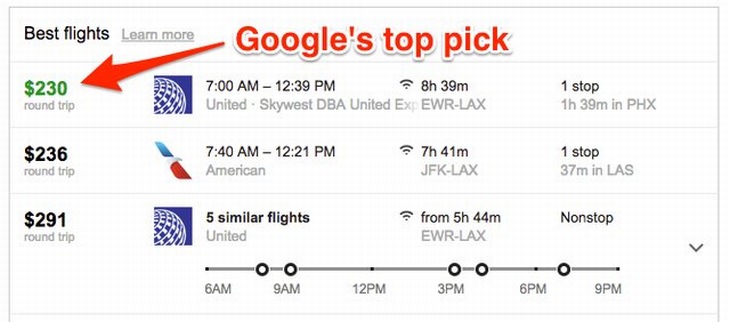
If you happen to be in a rush, take note of the price highlighted in green that will be visible under the “Best flights” heading. This is Google’s top pick for your desired route and dates.
Insider’s Tip:
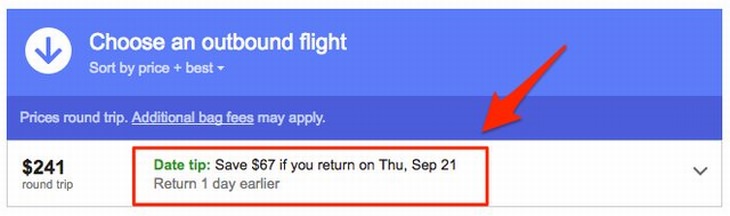
Should you not have fixed dates which you absolutely must travel on, you can save even more money by setting your destination and selecting the “Flexible dates” option. Google will give you a “Date tip”, which will show up in green at the top of your search results and suggest money-saving itinerary changes.
Kayak’s best feature is that it searches through a ton of travel sites at once, guaranteeing that you’ll find the best flight prices on the web for your route. Another highlight is its ability to find “hacker” fares, which are round-trip options consisting of one-way flights with two different airlines.
How to use it:
Simply enter your travel dates, destination and the class you wish to travel in. When compared to Google Flights, this search engine is a little slower, but it might just give you a couple of options that Google Flights didn’t display to you.
Insider’s Tip:
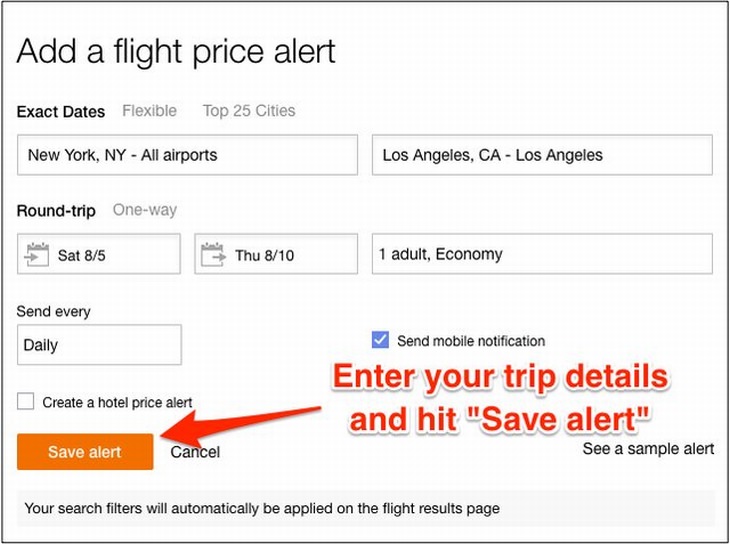
Setting up price alerts on Kayak is the best way to find the cheapest flights possible. It’s just a question of setting it up first. Enter your place of origin and destination, and the website will track flight prices for you. As soon as there’s a movement in prices, you’ll instantly be sent an email informing you of the change.
If you’re the type to book a trip somewhere spontaneously, then this is definitely the site for you. It’s free for the first month, and costs $9.99 per month thereafter, but this subscription fee might be worth paying in the long run.

How to use it:
Log on to DealRay and sign up via the Sign Up button at the top of the page, or else click the Start Your Free Month button. You’ll be prompted to enter various details, but it’s very easy to do. The website will send you SMS alerts about the hottest deals every day or two, but you have to be willing to travel anywhere in the world because it does not track destination-specific flights. DealRay members report saving a massive $428 per deal on average.
Insider’s Tip:
If you have an iPhone, be sure to download the DealRay app. That way you’ll get push notifications about the best deals straight to the home screen of your phone.

WARNING! Facebook Is Selling Your Privacy Away...
Facebook has been supplying your own private data to companies for many years, and here are 5 of its worst abuses to date.
These Hotel Rooms Are the OPPOSITE of Relaxing
Sometimes when we stay at a hotel or an Airbnb, our expectations aren't met. That would be an understatement for these hilariously bad hotels...
QUIZ: Where Should You Go for Inspiration?
If your hometown no longer seems to be supplying you with the inspiration you need, then it might be time to take a trip to somewhere completely different...
These Are the Major Online Scams You Should Be Aware Of
The online world can be a pretty dangerous place, which is why you really need to become familiar with some of the most common online scams going.
The 15 Most Cutting-Edge Websites Making Waves This Year
These websites are the most innovative, current, and quite simply the coolest online in 2017. Take a look at these 15 great websites and get bookmarking!
Who Knew the US Has So Many Hidden Romantic Spots
These 10 lesser known holiday destinations are both original and romantic. If you live in the US they may even be closer than you thought!
Privacy Settings You Should Change in Chrome Right Now
These Chrome settings should always be disabled.
1:55
Never Lose Your WhatsApp Chats Again with These Hacks!
Protect your WhatsApp chats with these tips.
Computer Guide: How to Keep Your Computer Up-to-Date!
Follow this simple guide to update drives and resolve common issues on your Windows computer.
7:38
Most People Don’t Know About These Google Maps Features
Google Maps has a ton of new features that most people don’t know about.
There's a keyboard Shortcut for Nearly Everything Here!
These shortcuts will cut down the time you waste fiddling about on the computer, and make you into something of an expert.
Secure Your Data: 5 Must-Have Privacy Apps
A look at five apps that help you take back control of your digital footprint, including their strengths, trade-offs, and where to download them safely.
Computer Guide: How to Clear Space on Your Google Account
How to easily free up storage space on your Google Drive without paying for more storage.
15:24
15 Tech Hacks That Will Make Your Life Way Easier
These practical tips are designed to improve your daily tech experience.
Learn Any New Language with These Awesome Apps!
Learn new languages faster with these AI-powered apps.
Guide: How to Sign a PDF Without Printing it First
This guide will teach you how to sign PDF files digitally without having to print them.
Forget Chrome—Zen Browser Is the Upgrade You Need
If you’re tired of slow load times, constant battery drain, or a cluttered interface, Zen might be the browser you’ve been waiting for.
7 Tips to Follow When a Computer Hangs or Freezes
Take note of these steps that will help you unfreeze a computer that freezes or hangs regularly.
2:35
6 Simple Tips for Taking Screenshots on Windows
Taking screenshots on Windows is now super easy. Just note these tips.
Did You Know These Cell Phone Facts Are All Totally False?
People just love to give you advice about smart phones, but it turns out that a lot of this information is false. Never believe these 9 smart phone myths.
Do This to Your Router to Increase Internet Speed
Want a faster and safer internet connection? Then do this to your router...
7:09
Struggling with Slow iPhone Internet? Try These Tips
iPhone running slow again? Here’s how you boost your speed…
14 Tips for Using the Computer More Easily
It’s very likely that in the following computer tips list you’ll find information that will surprise you!
Who Traces Your Emails? Learn How to Detect Email-Tracking
40% of emails are being tracked by somebody without people's consent or notification, which means you'd better learn how to protect your privacy...
8 Smart Safari Customizations Every Mac User Should Know
Here are some of the most effective ways to fine-tune Safari on your Mac.
Watch Classic Cinema for Free with These Sites!
Here's where you can watch hundreds of classic movies online for free.
USB Drives Can Do More Than You Think – 10 Hacks You Need
Let’s explore some of the most practical yet overlooked ways to use USB drives.
Boost Your Brain With These 8 Brainy Mobile Games!
We’ve gathered 8 recommended games to keep your brain active, challenge your logical thinking, and help you pass the time enjoyably.
7 UNDISCOVERED Apps That are NOT on the Google Play Store!
I can’t believe I never knew about these handy Android apps.
7 Reasons Why Your Computer is Running Abnormally Slow
There are many things that could be slowing your computer down and you'll find 7 of them in this article. Take a look!
Best ChatGPT Prompts for 2024
Let's explore some great prompts you can start with on your AI adventure, either for fun or for productivity or knowledge.
Computer Guide: Comparing Skype and Microsoft Teams
This article will explain why Skype is going away, how Teams fills its shoes, and guide you through using Teams for your personal video calls, screen shares, and chats.
15:16
Get Smarter: How Do Hard Drives Work?
How do hard drives built and how do they work? All is explained in this video.
You Can Now Speak With ChatGPT on Your Whatsapp!
et’s explore what 1-800-ChatGPT offers, how to use it effectively, and why this innovation makes interacting with AI more seamless.
5 DIY Solutions to Better Organize Your Cords and Cables
Computer cables have an annoying tendency to tangle and create an unseemly mess. Here are some easy ways to prevent that.
Fed Up With Spotify? Try These Alternatives for Free Music
Here are eight of the best platforms where you can listen to music online without spending a dime.
Skype Is Shutting Down – Try These Alternatives Now
With Skype officially retiring, here are some handy alternatives you should try.
Make Google Maps Better with These Handy Tools
These add-ons make Google Maps so much better!
Selling Used Stuff? Try These Amazing Apps
You can now sell your used household clothes and other items through some amazing apps.
These 5 Free Tools Can Help You Save Money Today!
These free apps and sites make saving money a breeze.
You Didn’t Realize it, But AI Is Making Your Life Better!
Here are thirteen unique ways AI can simplify daily life.
Do You Eat Out Often? These 7 Apps Will Save You Money!
If you’re struggling to keep up with your monthly food budget, you’re not alone. Here are 7 dinning apps that will save you money every time you eat.

Smishing 101: How to Recognize Scam Text Messages
This is how you recognize and handle fraudulent or scam text messages, also known as smashing.
If You Aren’t Doing these Things, Your PC WILL Wear Out...
All the basics of computer maintenance.

Don't Charge Your Phone Over 80%, Here's Why
There is truth to the no-overnight-charging rule, and there is also some science to back it up.

How to Spot Fake Online Reviews: A Shopper’s Guide
Here are practical tips to help you spot fake Amazon reviews.
Exploring the Web Beyond Google: 7 Handy Alternatives
Try some of these non-conventional search engines that you didn't know existed.
To enable your Ad-Free Subscription, please fill the fields below
Your subscription was successful, now you can enjoy an ad-free experience!! Note: To make sure you get no ads, please make sure to log in to your account. If you are logged in already, then refresh the page. The subscription can be cancelled at any time.