Had Enough of Housework? Get Some Help from These Apps
Want to lighten up your house chore load? These apps will make cleaning your home all the more easier.
I Bet You Didn't Know Your Android Phone Can Do These...
Did you know that there's a whole bunch of things your Android phone can do that you didn't even know about? Here are 8 hidden tricks on your Android phone.
Make Your Life So Much Easier with These Awesome Websites!
Discover 12 of the handiest websites around, that you'll find yourself coming back to again and again.
How to Turn Your Phone Into a Wifi Hotspot!
If you've ever dreamt of sharing your smartphone's cellular connection with other Wi-Fi-only devices, such as a tablet or a laptop, then you're in luck!
If Your Windows PC Is Slowing Down, You Should Read This
NO - a slowing Windows PC isn't a fact of life. You simply need to know a few tips and tricks that you can apply to yours in order to speed it up! Read on...
16 Things You Didn't Know Google Can Do For You
We bet you didn't know about this brilliant Google tricks which will make your searches quicker and more accurate!
8 Benefits of Quitting Social Media (Even for a Week)
Learn about 8 benefits you can enjoy when quitting social media, even for a short period.
20:27
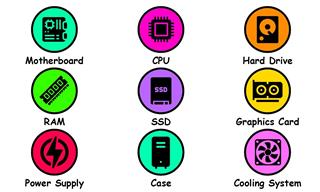
Learn About Your Computer: Every Component Explained!
In just 3 minutes, you'll be much wiser about what your computer is made of.
7:31
How to Edit Your Photos Using 3 Different AI Services
If you shoot weddings, portraits, or anything high-volume, and you’ve wondered if AI can really speed things up without cutting corners, this is the no-nonsense breakdown you need.

What is "AI Psychosis", and Should You Be Worried?
A new informal term has been making the rounds - "AI psychosis" - and while it may sound alarming, understanding what it means can help you stay grounded and use these tools wisely.
How to Find Your Phone When You've Misplaced It
our phone is almost certainly close by, and there are some wonderfully simple ways to make it announce itself. Here is how, on both iPhone and Android.
These 10 Keyboard Shortcuts Will Make Life Easy!
These keyboard shortcuts will help you learn the easiest ways to use your computer when your mouse is being less than cooperative!
7 Tips to Follow When a Computer Hangs or Freezes
Take note of these steps that will help you unfreeze a computer that freezes or hangs regularly.

Do You Eat Out Often? These 7 Apps Will Save You Money!
If you’re struggling to keep up with your monthly food budget, you’re not alone. Here are 7 dinning apps that will save you money every time you eat.
Gemini 3: An AI Upgrade or a Warning of Things to Come?
A new AI version hitting the market is always the most successful, most surprising, and always overshadows its predecessors in every comparison metric - until the next version arrives and surpasses it.
These Gmail Shortcuts Will Save You Time & Frustration
If you use Gmail, but you don't know how to use a single keyboard shortcut, then you well and truly are missing out. Here are the most useful ones...
If Your Computer Is Not Working, Here's What to Do
This troubleshooting guide is all you need if you're computer isn't turning on.
4:44
What Is Net Neutrality and How Does It Affect You?
What on Earth is net neutrality, and how does it effect you? Watch this informative video and find out!
A Plain-Language Guide to Password Managers
Here is a plain-language explanation of what they are, why they are worth having, and exactly how to get one on your phone or computer.
How to Set Up Your Phone to Call for Help If You Fall
This article teaches you to set up your iPhone or Android phone to be ready to summon help and speak for you when you need it most.
Your Easy Guide to OpenAI's Amazing Video and Photo Tools
OpenAI has created tools that anyone can use to make videos and photos, even if you're not a computer expert. Let me walk you through them step by step.
What We Can Learn from ChatGPT About Being Human
What can we learn from ChatGPT about ourselves?
5:28
WhatsApp Privacy Settings You Must Change for Safety
Want to take control of your WhatsApp privacy? In this tutorial, I'll walk you through the essential settings that protect your personal information and give you complete control over who sees what.
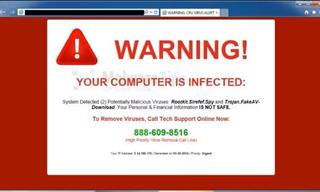
How to Spot a Fake "Your Computer Is Infected" Pop-Up
This article helps people to identify malware or hacking pop ups that promise fake virus removal and what to do if you click or call them.
This One Computer Key Is Used for a Myriad of Shortcuts!
The 'Win' key is usally thought to only bring up the start menu. It actually does a whole lot more. Get a load of these dozens of shortcuts!
9:55
Windows 11: Super Helpful Tips and Tricks
Windows 11 has come a long way since its rocky launch, and if you haven't explored it lately, you're in for a surprise. ..
The Keyboard Shortcuts You Never Know Existed
These aren't shortcuts to save five seconds here and there. They're tricks that change how you interact with your computer once you start using them.
7:00
How to Remove Malware From Your Android Device
. For anyone looking to secure their phone and get it running smoothly again, this guide has it covered
Want Your PC to Run Longer? Then Avoid These Mistakes
Avoiding these silly mistakes will help you prevent damage to your computer and also extend its life.
7 Handy Chrome Extensions That You Must Install Today
This article features some of the best and most useful Google Chrome extensions that will be handy to every user.
If You Do This, Then You Could Be Damaging Your Phone...
Many people end up damaging their phones without even realizing that they are doing so, and here are 9 of the most common ways this happens.
5 Best Online Platforms for Couples' Counselling
We've researched the options and returned with the 5 best platforms for online couples' therapy.
These Red Flags Indicate That a Shopping Website is Fake!
With online shopping being more prevalent than ever, scams are also on the rise. These are 8 warning signs that a shopping website is fake.
Computer Tips: All You Can Do With the CTRL/Control Key!
The control key has more uses than just copying and pasting. These are the 20 more useful keyboard shortcuts you can do with the control key.
Losing Important Emails? Here’s How to Tidy Up Your Gmail
A helpful guide to setting up Gmail filters to prevent emails from getting lost or spam overflowing your inbox.
4:50
Guide: How to Remove Malware from Android Phones
In this video, we’ll cut through the tech jargon to show you exactly how to spot the red flags of a compromised device.
5 Most Common Mistakes People Make When Working With AIs
Here are the five biggest mistakes people make when working with AI, and exactly how to sidestep them.
2026 Foldable Smartphones: The Complete Buyer's Guide
The foldable phone market in 2026 has reached unprecedented levels of sophistication and diversity. Here's a guide looking at the top foldable models.
7 Most Common Reasons the Phone Battery Deteriorates
The seven most common mistakes that quietly drain your battery and shorten its lifespan, along with simple ways to break each one.
The Truth Behind Misleading Phone Charging Myths
We're putting down these rumors once and for all! These cellphone battery charge myths are untrue.
The Only Guide You Need to Clean Your Computer
Computers collect dust and dirt, causing them to slow down and heat up. Here's how to clean them:
This Incredible Map Will Let You to Fly Above Any Location
This amazing site allows you to watch drone videos by location - and boy are they beautiful.
These Shortcuts Make Using My PC SO Easy!
Shortcuts make life easier in many parts of life, and computing is no different. Here we'll show you how your keyboard can be used to speed things up.
STOP! You're Damaging Your Computer...
Computers are practically indispensable to us these days. The thing is, you could be damaging yours without even knowing it. Looking out for these 16 things.
Customize Your Computer to Your Own Needs
Let the computer adjust itself to you! Here are 7 tricks that focus on ease of access and readability you can use to alter your computer experience for the better.
2:27
Tutorial: How to Uninstall Apps on Your Windows 11 PC
How to uninstall apps on your windows PC.
5 Useful Apps for Seniors You Probably Haven't Heard Of
We've selected five such apps for you. They are all completely free to download and allow you to enjoy their core features without paying a dime.
To enable your Ad-Free Subscription, please fill the fields below
Your subscription was successful, now you can enjoy an ad-free experience!! Note: To make sure you get no ads, please make sure to log in to your account. If you are logged in already, then refresh the page. The subscription can be cancelled at any time.