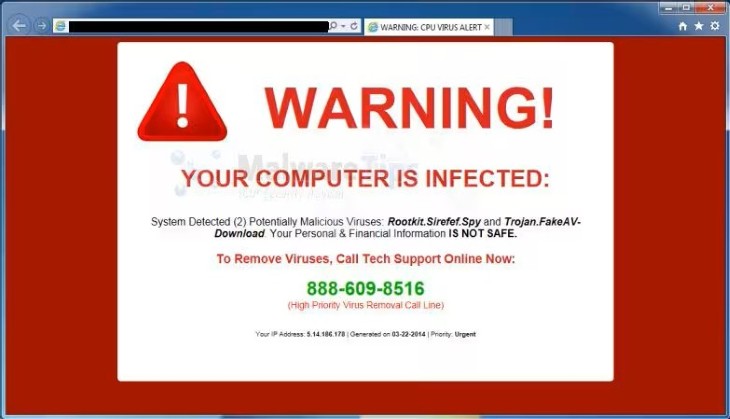
You are quietly reading the news or looking up a recipe when, all at once, your screen is taken over. A bright red warning fills the page. "YOUR COMPUTER IS INFECTED," it shouts. Maybe an alarm starts blaring, or a robotic voice warns that your passwords and bank details are being stolen this very second. There is a Microsoft or Apple logo, and a phone number in big letters telling you to call right now. Your heart skips a beat.
Take a breath, because here is the most important thing you will read today: that pop-up is a fake, and on its own it cannot harm your computer at all. It is a trick designed to frighten you into doing something you would never normally do. Once you understand how the trick works, it loses all its power.
What These Pop-Ups Really Are
Despite all the alarm bells, one of these scary warnings is nothing more than a web page, the same as any other page on the internet. It is not coming from your computer, and it is not coming from Microsoft, Apple, or your antivirus program. It cannot actually see your files, your passwords, or your bank account, no matter what it claims. It usually appears because of a bad advertisement on an otherwise ordinary website, which quietly redirects your browser to this frightening page.
So if the pop-up itself is harmless, where is the danger? The danger begins only if you do what it asks. This kind of trick is known as a tech support scam, and the pop-up is just the bait. The real trap is the phone number. If you call it, a polite and professional-sounding "technician" answers, confirms your computer is in terrible danger, and kindly offers to fix it. To do so, they ask you to install a small program that hands them remote control of your computer. From there they pretend to find viruses, demand payment to remove them, and may quietly help themselves to your accounts while keeping you talking. Sadly, these criminals target older adults most of all, and the losses can be severe.
The Telltale Signs of a Fake
The good news is that these scams almost always give themselves away. Once you know the signs, you will spot them in an instant:
- There is a phone number to call. This is the biggest giveaway of all, and the one rule worth memorizing. A genuine warning from your computer or security software will never give you a phone number to call. Microsoft, Apple, Google, and the real antivirus companies simply do not work that way.
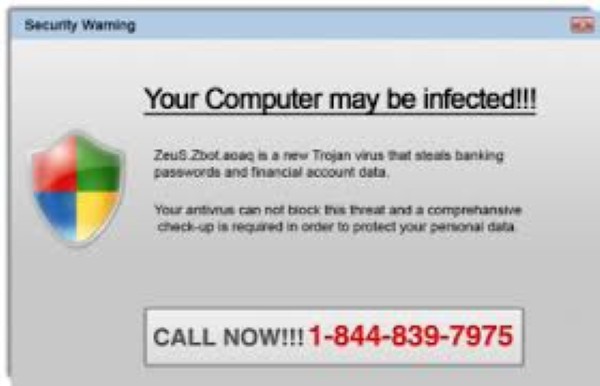
- It tries to frighten and rush you. The message uses alarming, urgent language, things like "Immediate action required," "Do not turn off your computer," or "Your information is being stolen now." Fear and hurry are the scammer's main tools, because a panicked person stops thinking clearly.
- It appears in your web browser. These warnings pop up while you are browsing the internet. A real alert from your computer's security would appear quietly from the system itself, not as a flashy page inside your web browser.
- There are alarm sounds or a talking voice. Blaring beeps or a robotic voice repeating warnings are a sure sign of a scam. Real security software does not shout at you.
- Your screen seems locked or stuck. The page may fill your whole screen and seem impossible to close. This is just a web trick to keep you trapped and panicking. Your computer is not actually locked.
- It does not quite look right. Many of these pages have clumsy spelling, odd grammar, or a design that does not match your computer. Sometimes you will even see a Windows-style warning on an Apple computer, or the other way around, which makes no sense at all.
- It demands payment, especially in unusual ways. If you are asked to pay to fix the problem, particularly with gift cards, a wire transfer, or a cash-reload card, it is absolutely a scam. No legitimate company asks to be paid that way.
The One Rule to Remember
If you forget everything else, hold onto this single sentence: a real security warning will never ask you to call a phone number. That one rule cuts through all the noise. The moment you see a scary computer message with a number to call, you can relax, because you already know exactly what it is. It is a scam, every single time.
What to Do the Moment One Appears

If one of these pop-ups ambushes you, here is exactly how to handle it calmly and safely.
- Do not panic, and do not call the number. Nothing bad is happening to your computer. You have all the time in the world. Simply do not call, and do not give anyone your information.
- Do not click anything inside the pop-up. Avoid clicking buttons, links, or even the little "X" within the warning itself, since the whole image can be one big trap. Instead, close the browser the safe way described below.
- Close your web browser. First, simply try clicking the X in the very top corner of the browser window to close it normally. If the page is stuck or fills the whole screen and will not close, do not worry. Use one of these built-in tools to shut the browser down completely:
- On a Windows computer, hold down the Ctrl, Shift, and Esc keys together to open the Task Manager. Click your browser's name in the list, then click "End task." You can also try pressing the Esc key or the F11 key to escape a full-screen page.
- On an Apple Mac, hold down the Command, Option, and Esc keys together to open the "Force Quit" window. Click your browser's name, then click "Force Quit."
- Reopen your browser carefully. When you open your browser again, if it offers to "restore" or reopen your previous pages, say no. Otherwise it may load the nasty pop-up all over again.
- Run a scan, for peace of mind. Once things are calm, you can run a scan with your computer's own security software, such as Windows Security, just to reassure yourself that all is well.
If You Already Called or Paid
If you have already called the number, let someone take control of your computer, or handed over any money, please do not feel embarrassed. These scammers are convincing professionals, and they fool plenty of intelligent, careful people every day. The important thing now is to act promptly:
- Disconnect from the internet right away, by unplugging the network cable or turning off your Wi-Fi. This instantly cuts off the scammer's access to your computer and gives you time to perform the following steps.
- Remove the program they had you install. If they walked you through downloading something with a name like AnyDesk, TeamViewer, or any other unfamiliar program, uninstall it. When in doubt, this is a good moment to call a trusted family member or a reputable local computer technician for help.
- Change your important passwords from a different device, such as your phone or a tablet. Start with your email and your bank, and turn on two-step verification wherever you can for an extra layer of protection.
- Contact your bank or card company immediately if you shared any card or banking details, or paid anything, so they can watch for and stop fraudulent charges. If you paid with gift cards, contact the company that issued the cards right away.
- Run a full security scan, and if anything still seems wrong, have a professional check the computer over to be certain it is clean.
Keeping Them Away in the First Place
A few simple habits make these pop-ups far less likely to trouble you:
- Keep your web browser, your computer, and your security software up to date, so they can block known scam pages automatically.
- Turn on your browser's pop-up blocker, a free setting that stops many of these in their tracks.
- Be cautious about which websites you visit and what you download, since these traps often hide in advertisements on less reputable sites.
- Never give control of your computer to anyone who contacts you out of the blue, whether by pop-up, phone call, or email.
A Word for Helping Family
The best protection is to talk about these scams before they happen. If you have a parent, spouse, or friend who is less comfortable with computers, share this simple rule with them: if a scary warning ever appears with a phone number to call, do not call it. Instead, call a trusted family member first. That one short conversation, had ahead of time, has saved countless people a great deal of money and heartache.
The Bottom Line
For all their flashing colors and blaring alarms, these fake virus pop-ups are bullies, and like all bullies, they crumble the moment you stand up to them. They cannot touch your computer or your money unless you let them in by calling that number. So the next time your screen lights up with a frightening warning, you can smile, recognize the trick for what it is, calmly close your browser, and carry on with your day. Your calm is the one thing these scammers cannot get past.