Unlike the youth of today, we seniors were not born with a smartphone in one hand and a mouse in the other. In fact, many of us remember a time when people had rotary phones, and a web was something spiders made. In this modern era, computers are everywhere and knowing how to position the different components can make a difference between a stiff and sore neck and shoulders, and an enjoyable experience. |
| Source |
|
First, let’s start with the lighting in the room – To minimize strain to your eyes, make sure you put the computer in a dimly-lit room to avoid glare from the screen. If you are going to work with papers and documents, make sure that you have a table lamp. Don’t be afraid to experiment with different light levels to find what is most comfortable for you. |

![]() |
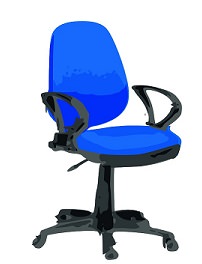
Second, your computer chair – Since you are going to be spending quite some time on that chair, you should invest in one that is both comfortable and offers good back support. The chair needs to leave you with enough room to fit your legs under the desk. If the chair has arm supports, make sure that they don't interrupt your usage by preventing you from sitting close enough to the keyboard. Invest in an adjustable chair with a curved back that offers lower-back support. Try a few chairs at the store, choose the one that feels the most comfortable. |
|
Third, foot support – Now that you’ve taken care of your eyes and back, let’s tend to your feet. When you’re at the computer, your feet must be comfortably placed on the ground. If they are not, you may need a small stool for your feet. |
|
|
|
Fourth, positioning the monitor – To check if your screen is properly positioned, sit by your desk and lean back, then hold your arms out in front of you. If you can touch the middle of the screen then your screen is positioned correctly for both your eyes and height. If you need to tilt your head to view the screen, then it is not properly placed. If you still haven’t gotten an LCD screen, you may want to consider it since they’re easier on the eyes than the old CRT screens. |

![]() |
|
Fifth, Keyboard positioning – The most important advice I can give a senior computer user is to make sure that their keyboard is positioned correctly. A properly positioned keyboard allows for natural posture while typing. Make sure that the keyboard is at elbow-height when you sit. If your wrists are angled when you type, you’re bound to suffer from forearm fatigue and it may even lead to carpal tunnel syndrome. Consider purchasing an ergonomic keyboard. |

Sixth, positioning your mouse – One of the most common work-related injuries in the last 20 years has been carpal tunnel syndrome. The rise in numbers of this infliction is due to incorrectly placed mice and lack of wrist support. You need to make sure that the mouse is placed on a stable surface at the same height as your keyboard, and that your hand feels like it’s in a neutral position. Consider purchasing a mouse pad with a silicone-gel pad for your wrist, or buying a “trackball” mouse, which requires less hand movement than a regular mouse. |
| Source |
|
Seventh, positioning documents – If you work with papers and other documents, you will want them to be as close to the screen as possible. Use a document holder to keep them at screen height, this will minimize the strain on your neck when you need to look at the papers. |
|
|
| Source |
| Title image source |

3 Juices to Get Rid of Pesky Migraines
These three juices will provide you with all the magnesium, calcium, and potassium that you need to keep migraines at bay.
5:03
This Video Saved Me From Wrist Pain. Let it Help You Too
Stretching your tendons can relieve pain better than stretching muscles. Here are 3 stretched for your hands.
Guide: How to Protect Your Eyes When On the Computer
Eye strain can be a serious problem if you work at a computer for long hours each day. Luckily, there are various things you can do in order to prevent it.
Tennis Balls Are Effective at Relieving Body Pain
You can use Tennis Balls to ease your aches and pains. Here's how!
This Guide Is All You Need to Relieve Your Joint Pain
If you're one of those unlucky individuals who suffers regularly from joint pain, make sure you refer to this guide to find out how to relieve it.
Make Sure You Know These Things Before Taking Pain Meds
Prescription pain meds are no laughing matter, and that's why it's crucial for you to know this information before taking them. Learn about them in this guide.
12 Amazing Internet Radio Stations to Spice Up Your Day!
Check out these 12 fantastic internet radio stations.
The 7 Backup Mistakes That Leave Your Files Vulnerable
Hereโs what most people get wrong about backups.
7:09
Struggling with Slow iPhone Internet? Try These Tips
iPhone running slow again? Hereโs how you boost your speedโฆ
Who Traces Your Emails? Learn How to Detect Email-Tracking
40% of emails are being tracked by somebody without people's consent or notification, which means you'd better learn how to protect your privacy...
Guide: How to Sign a PDF Without Printing it First
This guide will teach you how to sign PDF files digitally without having to print them.
Making These Email Mistakes Comes Off As Rude or Annoying
When sending an email, the last thing you want is to come off as impolite or annoying. Here are 5 common email mistakes to avoid.
3:28
Easy Tips for Connecting Your Laptop to an External Screen
Watch this helpful tutorial to learn how to connect your laptop to a monitor.
Turn Off These 9 Android Settings. They Pose a Risk
Here are some Android settings that you should consider turning off to enhance your deviceโs performance.
Thirsty For Knowledge? Check Out These YouTube Channels
If you love to learn new things with each passing day, then get ready to discover a gold mine full of educational tools!
7 Clear Indicators Your Home Router Needs to Be Changed
Is your router in need of an upgrade? Watch out for these signs.
1:56
No More Clutter! Free Up WhatsApp Storage in Minutes
Running out of storage on your phone because of WhatsApp? Try these hacks now.
How to Solve Windows 11's Most Annoying Errors
In this article, weโll explain the frequent problems people run into on Windows 11 and walk through easy, no-fuss fixes.
15:24
15 Tech Hacks That Will Make Your Life Way Easier
These practical tips are designed to improve your daily tech experience.
3:32
The Easy Way to Clean Your Computer's Keyboard
Cleaning a dirty keyboard is quite a straightforward task, as you're about to find out.
12 USEFUL Chrome Extensions That Save Time
Improve your browsing experience with these free Google Chrome extensions.
How to Identify an Online Scam Email
Phishing emails are a common way of stealing information, but you can avoid them if you follow these tips that'll help you identify them
7:31
How to Edit Your Photos Using 3 Different AI Services
If you shoot weddings, portraits, or anything high-volume, and youโve wondered if AI can really speed things up without cutting corners, this is the no-nonsense breakdown you need.
Best ChatGPT Prompts for 2024
Let's explore some great prompts you can start with on your AI adventure, either for fun or for productivity or knowledge.
Guide: How to Unlock Your Phone Without a Passcode
Forgot your phone passcode? Don't panic.Just follow these steps.
5 Best Online Platforms for Couples' Counselling
We've researched the options and returned with the 5 best platforms for online couples' therapy.
7 Websites With Free Useful Apps for Your Computer
we've gathered 7 recommended repositories where you can find almost any software you might need for Windows โ and at no cost!
Is Your Browser Slowing Down? Fix It With These 10 Tips
Get Chrome running smoothly with these seven easy fixes.
Secure Your Data: 5 Must-Have Privacy Apps
A look at five apps that help you take back control of your digital footprint, including their strengths, trade-offs, and where to download them safely.
You Didnโt Realize it, But AI Is Making Your Life Better!
Here are thirteen unique ways AI can simplify daily life.
Don't Charge Your Phone Over 80%, Here's Why
There is truth to the no-overnight-charging rule, and there is also some science to back it up.
Replace Your Smartphone if Itโs Showing Any of These Signs
Here are 7 major telltale signs that your smartphone is in need of an upgrade.
Canโt Connect to the Internet? Hereโs What To Do
Not being able to connect to the internet is one of the most pestering things. This is why it might be happening and easy solution to fix it.
Make Google Maps Better with These Handy Tools
These add-ons make Google Maps so much better!
10 Free Ancestry Sites for Tracing Your Family History
Here are 10 of the best free ancestry sites that can help you uncover your familyโs story.
9:16
Unlock iOS 18 Early: Your Installation Guide
Follow this guide to install iOS 18 Beta on your device easily.
9 Useful Blogs Created Specifically For Senior Citizens
Hereโs a wonderful collection of blogs that seniors will find particularly helpful.
9 Lesser Known Free Websites for Learning in 2025
A list of 9 great free learning websites that cover a variety of subjects, from coding and science to business and language learning.
43:39
AI News: What's Going On With AI This Week?
This week's AI news covers major releases and impressive demos.
PowerToys: The Best Free Microsoft App for Windows Users
In this article, we'll introduce you to this toolbox and show you which 23 useful tools are waiting for you there.
Laptop Won't Power Up? Try These 11 Effective Solutions
Laptop not starting? Try these essential steps to troubleshoot it.
2025's Online Threats Will Be More Sophisticated Than Ever
A look at the cyber scams that you need to be wary of this year.
7 Safe Ways to Watch Movies & TV Shows Online Free in 2024
Free movie and TV show sites you need to know about in 2024.
11 Free AI Tools That Actually Help You Get Stuff Done
Have you tried any of these useful free AI apps?
Computer Guide: How to Keep Your Computer Up-to-Date!
Follow this simple guide to update drives and resolve common issues on your Windows computer.
9 Warning Signs You're Dealing with a Social Media Scam
Donโt fall for these common social media scam ads.
5 Best Antiviruses in 2025 for Both PC and Mac
Below, we highlight five popular antivirus solutions for Windows PCs and five for Macs, featuring a mix of free and paid options.
To enable your Ad-Free Subscription, please fill the fields below
Your subscription was successful, now you can enjoy an ad-free experience!! Note: To make sure you get no ads, please make sure to log in to your account. If you are logged in already, then refresh the page. The subscription can be cancelled at any time.