|
If you've got an iPhone, here's a handy app you'll most definitely want to install, one that could potentially save your life. This health app, contains an important feature called Medical ID. You're probably already familiar with the 'In Case of Emergency' (ICE) practice, which collects important contact information on your phone so that it may be used to contact family in the event of an emergency - well, Apple's Medical ID is basically an enhanced version of ICE. This feature provides both emergency contact information, and also informs first responders and medical personnel of important health information, such as your medications, medical conditions, blood type and allergies. |
|
|
|
Setting Up |
|
Here's how to set up Medical ID on your iPhone: Note: To take advantage of this nifty feature, your phone needs to run on iOS 8. |
|
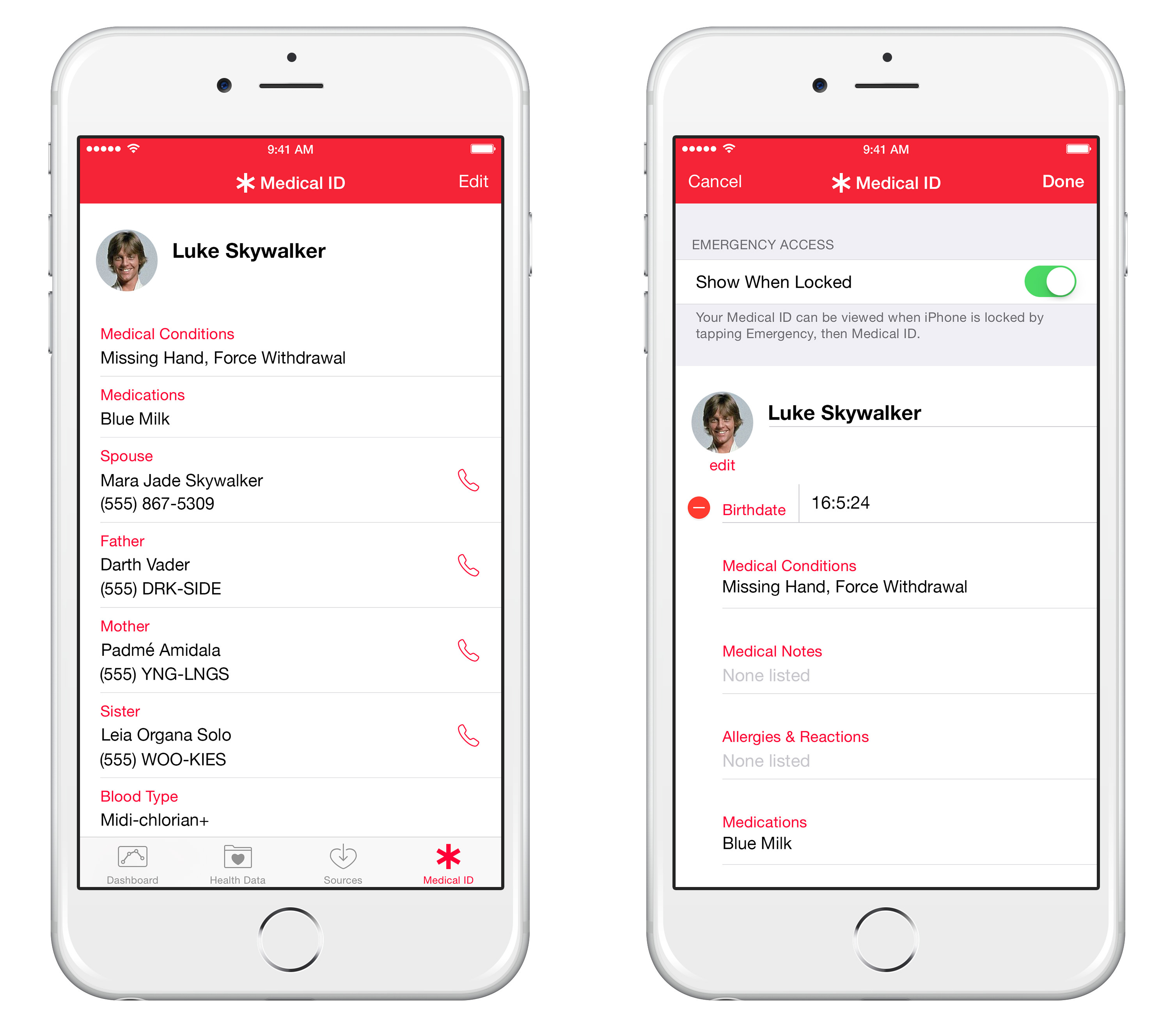
1. To get started, launch the Health app. 2. Tap the Medical ID icon, located at the bottom-right of your screen. 3. Tap Edit on the top-right corner of your screen |
![]() |
|
4. Change or update your name, photo, birth date and input any important medical information. 5. The fields available will allow you to list any medical conditions, allergies, and current medications. You also have a blank field for general medical notes - such as your preferred hospital or doctor, or any religious requests. 6. Further down, you can add multiple emergency contacts, which must be included in your already existing iPhone contacts. If your ICE contact is not in your phone book, they must be added prior to proceeding. 7. In the process of selecting your contacts, the Medical ID app, will ask you to identify your relationship with the person. With this in mind, should you rather not mention how this contact person is connected to you, you may simply put 'other' or 'emergency'. 8. Below the contacts section is another field, whereby you can add your blood type, height, weight and your organ donor preference. 9. Once you have completed the information, just tap Done at the top of the screen to save your changes. |
|
|
|
Accessing Medical ID |
|
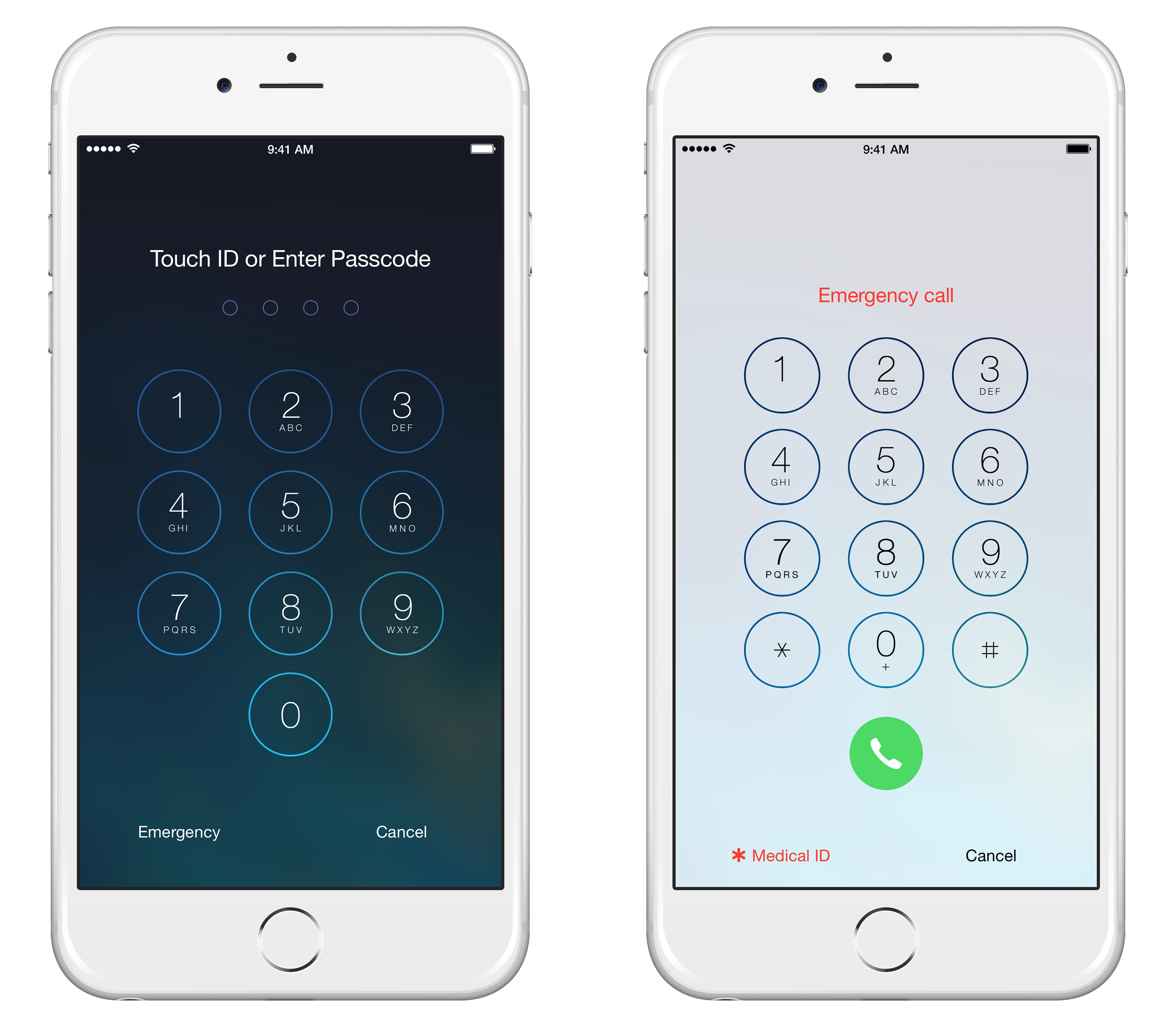
Once all your important medical information and emergency contacts have been stored in your iPhone's Medical ID, here's how someone can access this information in the event of an emergency. For safety reasons, your iPhone should be secure, meaning that it should have a passcode or Touch ID, prohibiting others from entering your phone. Despite this, the Medical ID can still be accessed from a locked screen. |
![]() |
|
Just tap Emergency on the bottom-left of the iPhone lock screen, allowing anyone without a passcode to make an emergency phone call. Then tap Medical ID, which will bring up a screen showing the information you entered previously. Anyone accessing your Medical ID can tap on any of your emergency contacts and call them directly. |
|
What if you don't have an iPhone? |
|
This app has yet to be introduced to android users, in which case, it is wise to mark or create a separate folder for your ICE contacts. |

4 Super Useful Cleaner Tools You MUST Have on Your Phone
Install these free cleaner apps on your smartphone and save some precious space on your device.
2:35
iPhone Tips: Reach The Top Of The Screen With One Hand
Has your iPhone's screen ever dropped down to the bottom half of the display area? It's not a bug but an important feature.
5:02
How to Transfer Data From Your Old iPhone to The New One
Got a new iPhone? Here's how you can move all your data from your old iPhone to the new one.
7 UNDISCOVERED Apps That are NOT on the Google Play Store!
I can’t believe I never knew about these handy Android apps.
Newest and Best Features in Apple's iOS 15
All the newest and most relevant updates on Apple's iOS operating system.
Guide: How to Take a Screenshot on ANY Device
This quick guide will help you take a screenshot on your on your Windows PC, Android device, Mac, iPhone, Chromebook, and more.
7 Safe Ways to Watch Movies & TV Shows Online Free in 2024
Free movie and TV show sites you need to know about in 2024.
If You Aren’t Doing these Things, Your PC WILL Wear Out...
All the basics of computer maintenance.
10 Warning Signs You’re About to Fall for a Fake Ad
Thse are 10 red flags that should make you pause before clicking on a social media ad.
Master AliExpress Shopping with These Expert Tips
Here’s how to shop smart and save on AliExpress.
ChatGPT's Got Competition: 7 Exciting AI Contenders
Looking for a ChatGPT alternative? Here are a few good ones.
6 Reliable Ways to Save YouTube Videos in 2024
Want to download your favorite YouTube videos for offline viewing? Read this now!
Did You Know These Cell Phone Facts Are All Totally False?
People just love to give you advice about smart phones, but it turns out that a lot of this information is false. Never believe these 9 smart phone myths.
10 Free Ancestry Sites for Tracing Your Family History
Here are 10 of the best free ancestry sites that can help you uncover your family’s story.
5:23
Phone Security– The Fastest Way to Secure a Hacked Phone
This guide helps you in checking for hackers on your phone, removing them, and locking down your phone.
15:16
Get Smarter: How Do Hard Drives Work?
How do hard drives built and how do they work? All is explained in this video.
I Bet You Didn't Know You Could Do THIS on Google Maps
Here are all of the things you can do on Google Maps that you never knew you could.
Privacy Settings You Should Change in Chrome Right Now
These Chrome settings should always be disabled.
3:28
Easy Tips for Connecting Your Laptop to an External Screen
Watch this helpful tutorial to learn how to connect your laptop to a monitor.
How to Download Free Windows Software Securely – 7 Tools
Here’s how you can download free Windows software safely and securely.
Losing Important Emails? Here’s How to Tidy Up Your Gmail
A helpful guide to setting up Gmail filters to prevent emails from getting lost or spam overflowing your inbox.
You Can Now Speak With ChatGPT on Your Whatsapp!
et’s explore what 1-800-ChatGPT offers, how to use it effectively, and why this innovation makes interacting with AI more seamless.
23:04
ChatGPT: 30 Tips to Using and Working with the AI
In this video, we’re breaking down 30 practical tips to help you use ChatGPT more effectively
Make Google Maps Better with These Handy Tools
These add-ons make Google Maps so much better!
The Most Reliable Cloud Storage Services for 2025
Here’s a closer look at some of the best cloud storage services to consider in 2025.
The Most Amazing Websites for Learning Languages for Free
Learn any language for free with these amazing websites!
How to Solve Windows 11's Most Annoying Errors
In this article, we’ll explain the frequent problems people run into on Windows 11 and walk through easy, no-fuss fixes.
You Didn’t Realize it, But AI Is Making Your Life Better!
Here are thirteen unique ways AI can simplify daily life.
8 Smart Safari Customizations Every Mac User Should Know
Here are some of the most effective ways to fine-tune Safari on your Mac.
8:31
20 Terrifically Helpful Chrome Keyboard Shortcuts
Welcome to the ultimate guide to mastering 20 essential keyboard shortcuts for the Google Chrome browser!
It’s Almost a Crime Not to Use These Free Nifty Websites
Check out 15 really useful websites. They are completely free to use!
The 7 Backup Mistakes That Leave Your Files Vulnerable
Here’s what most people get wrong about backups.
What Do Those 12 'F' Keys on Your Keyboard Do?
Find out what those 12 curious F keys on your keyboard mean.
Top 5 Apps for Checking on Your Pet’s Health
These apps were selected based on their functionality, user reviews, and relevance to health monitoring, as highlighted by pet care and technology sources.
Laptop Won't Power Up? Try These 11 Effective Solutions
Laptop not starting? Try these essential steps to troubleshoot it.
How to Spot Fake Online Reviews: A Shopper’s Guide
Here are practical tips to help you spot fake Amazon reviews.
7 Reasons Why Your Computer is Running Abnormally Slow
There are many things that could be slowing your computer down and you'll find 7 of them in this article. Take a look!
9 Lesser Known Free Websites for Learning in 2025
A list of 9 great free learning websites that cover a variety of subjects, from coding and science to business and language learning.
0:48
WhatsApp Hack: Read Messages Without Showing Blue Ticks
Learn how to read WhatsApp messages without showing blue ticks in this video.
These Websites ONLY Share Positivity and Good Stories!
Say goodbye to negativity with these positive news platforms.
Why Fake Info is Best for These 6 Types of Sites
Always avoid giving your real information on these kinds of websites.
Forget Chrome—Zen Browser Is the Upgrade You Need
If you’re tired of slow load times, constant battery drain, or a cluttered interface, Zen might be the browser you’ve been waiting for.
14 Tips for Using the Computer More Easily
It’s very likely that in the following computer tips list you’ll find information that will surprise you!
Who Traces Your Emails? Learn How to Detect Email-Tracking
40% of emails are being tracked by somebody without people's consent or notification, which means you'd better learn how to protect your privacy...
Best ChatGPT Prompts for 2024
Let's explore some great prompts you can start with on your AI adventure, either for fun or for productivity or knowledge.
9 Useful Blogs Created Specifically For Senior Citizens
Here’s a wonderful collection of blogs that seniors will find particularly helpful.
5 Things to Never Store on Your Smartphone
Stop using your smartphone as a master repository for saving all kinds of information. It may be dangerous...
To enable your Ad-Free Subscription, please fill the fields below
Your subscription was successful, now you can enjoy an ad-free experience!! Note: To make sure you get no ads, please make sure to log in to your account. If you are logged in already, then refresh the page. The subscription can be cancelled at any time.