|
I see that many people sign up for Facebook, but miss out on all the useful things you can do with it, as well as how to stay safe from identity theft, etc. This is why I have created this simple and useful guide for users who might not be too computer savvy. |
|

![]() |
|
|
The first thing you must do is make sure that your information is private and not freely shared with the whole world. Some bad people might use it to steal your identity, or try to scam you in some way or the other. Facebook makes it easy to make sure your private information remains private, and that what you share can be public, or only shared with your friends. |
|
|
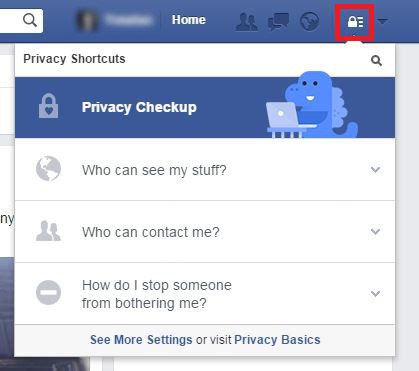
1. Click the privacy icon on the top-right corner. (highlighted in red) |
![]() |
|
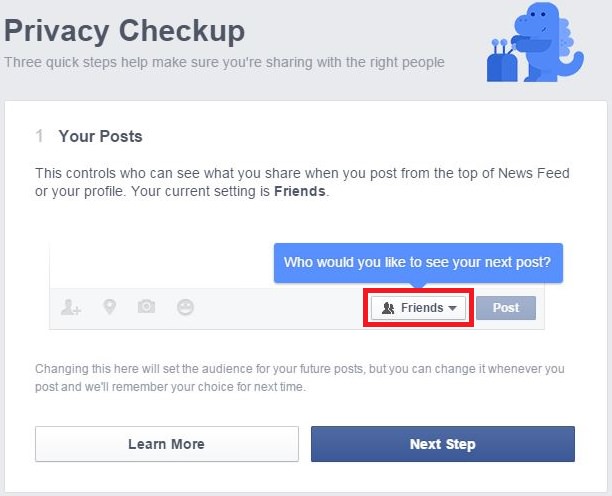
2. Use the privacy checkup option to quickly set-up your privacy settings: |
![]() |
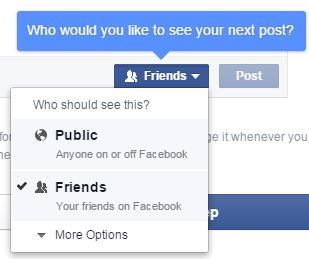
| 3. Clicking on the highlighted box will open this window, allowing you to decide who can see your posts. |
![]() |
| 4. Choose who gets to see posts from applications you connected with Facebook: |
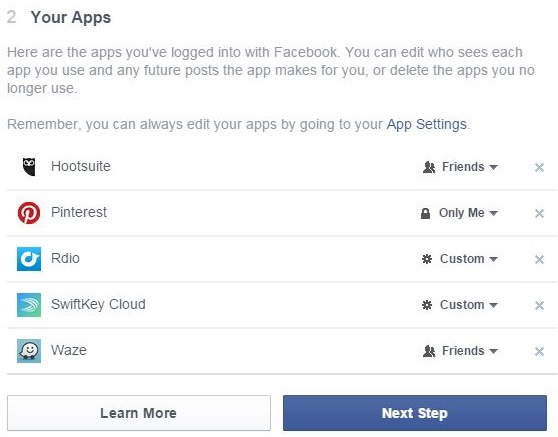
![]() |
| 5. Choose what information is visible, and to whom: |
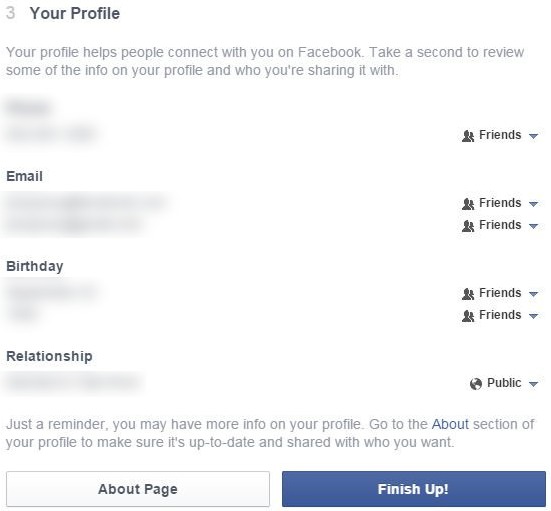
![]() |
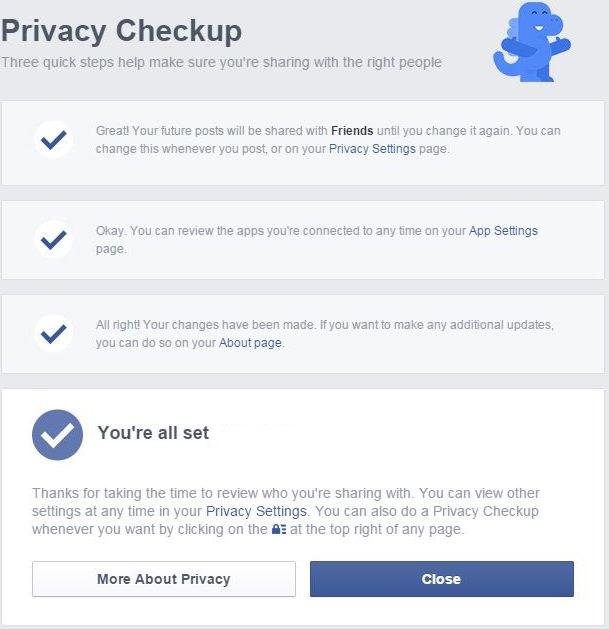
| 6. You’re all set! |
![]() |
|
You can edit extra privacy features like: |
|
|
You can choose who's allowed to send you messages and friend requests. |
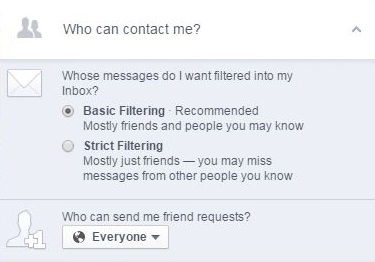
![]() |
|
If you're being harassed online, you can block the person by putting their name in the field, then selecting their profile from the drop-down list. |
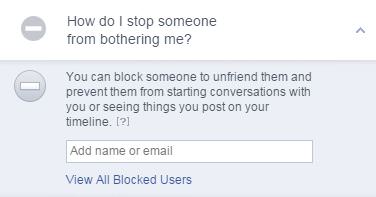
![]() |
|
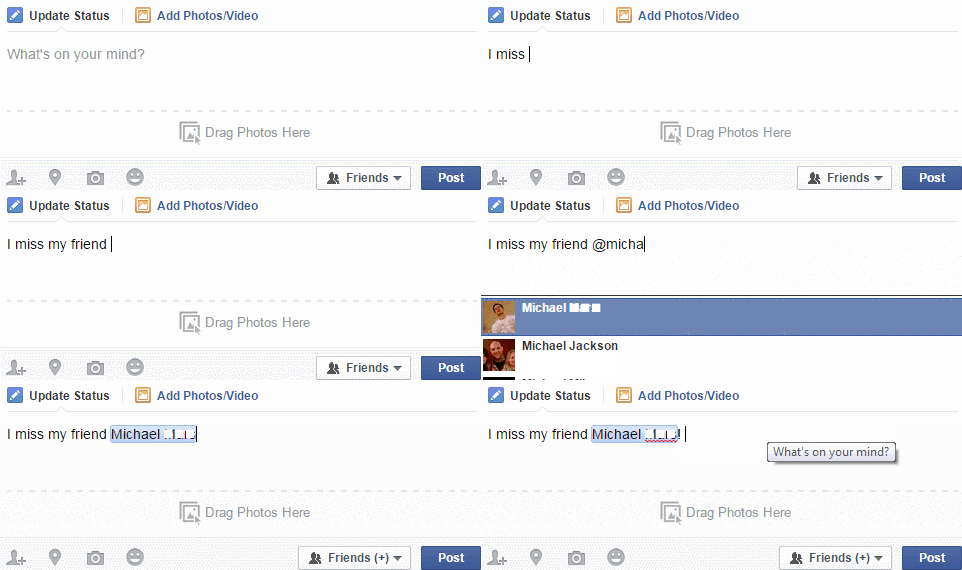
If you want to write a post and make sure a particular friend sees it, add the ‘@’ sign and write their name, and then select the friend from the drop-down list. (You can do this several times and add several friends to one post) |
|
![]() |
|
|
If you found a great site you want your friends to see, it’s simple to share it with your friends: |
|
|
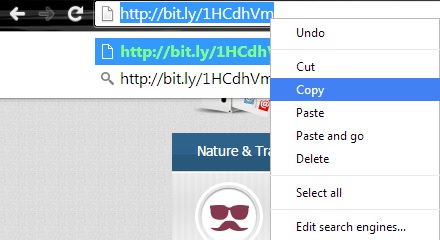
1. Copy the link you want to share |
![]() |
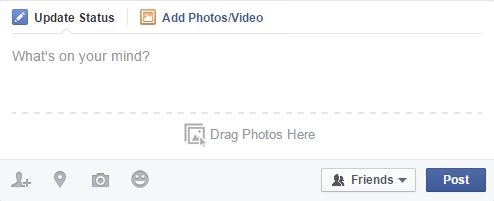
| 2. Begin as you would writing a regular post |
![]() |
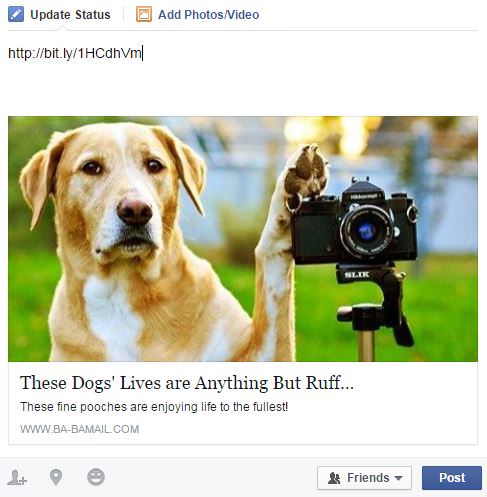
| 3. Paste the link in the text line of the post |
![]() |
|
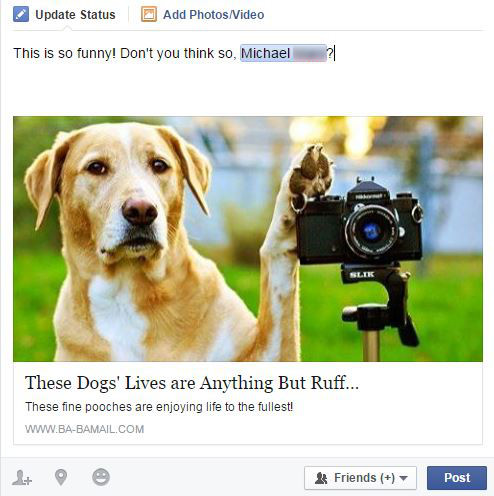
5. Once a preview of the site appears, you can delete the link from the text box and write your own text instead *Try tagging a friend if you want to make sure they see this link |
![]() |
|
If someone you don’t recognize is trying to become your “friend” on Facebook, don’t add them automatically. Engage them in a conversation to see if you know them, and if you don’t – that you would like them to see your information and posts. If a friend starts posting odd content, don’t click on it. Try sending them a message to see if they really did post it, or if their account was hacked. Don’t post private information like numbers or photos of your credit card, social security, ID, passport, etc. Those can be found and used by identity thieves. |
|
|
Be safe and enjoy your social media experience with peace of mind |
|

These Apps Are All You Need on Your Next Vacation
Having these handy apps on your phone will see you taking your next trip abroad to the next level. Learn about these 6 essential travel apps.
This Free Program Means You'll Never Lose a File Again
We all hate losing files and photos on our computers. Luckily, a free program called Recuva exists to help you get your deleted files back.
Become a Windows Computer Wiz by Using These 11 Tricks
These simple tips and tricks for using a Windows PC will help you use your computer and turn you into a Windows PC master!
Super Easy Tips to Maintain a Nutritious Diet in Lockdown
We have collected a few tips from nutritionists and experts on how to survive quarantine preparing easy, healthy and satisfying meals at home.
6 Simple and Practical Tips To Organize Your Kitchen
A well organized kitchen is the first step to a gratifying cooking experience
WARNING! Facebook Is Selling Your Privacy Away...
Facebook has been supplying your own private data to companies for many years, and here are 5 of its worst abuses to date.
A Simple Blood Test Could Detect Alzheimer Years Earlier
A few years ago, researchers have discovered a gene that could revolutionize how we diagnose Alzheimer's disease - and they found it by asking a simple question: Why do some people's brains succumb to the disease while others don't?
Ever Hear of the 54321 Shopping Method to Buying Groceries?
Grocery shopping has become increasingly stressful as prices continue to climb. Many shoppers find themselves struggling to balance their budgets while still putting nutritious food on the table. But a straightforward shopping strategy is helping peo
These 5 Free Tools Can Help You Save Money Today!
These free apps and sites make saving money a breeze.
Your Easy Guide to OpenAI's Amazing Video and Photo Tools
OpenAI has created tools that anyone can use to make videos and photos, even if you're not a computer expert. Let me walk you through them step by step.
Computer Guide: How to Keep Your Computer Up-to-Date!
Follow this simple guide to update drives and resolve common issues on your Windows computer.
Simplify Finances With These Budget Apps for Families
Try these money mangement tools to simplify your finances in 2025
You Can Now Speak With ChatGPT on Your Whatsapp!
etโs explore what 1-800-ChatGPT offers, how to use it effectively, and why this innovation makes interacting with AI more seamless.
What To Do When Windows Will NOT Boot
There's nothing more frustrating than your computer refusing to boot. Here is what you can do to fix it when the system won't even initialize.
Boost Your Brain With These 8 Brainy Mobile Games!
Weโve gathered 8 recommended games to keep your brain active, challenge your logical thinking, and help you pass the time enjoyably.
8:31
20 Terrifically Helpful Chrome Keyboard Shortcuts
Welcome to the ultimate guide to mastering 20 essential keyboard shortcuts for the Google Chrome browser!
1:55
Never Lose Your WhatsApp Chats Again with These Hacks!
Protect your WhatsApp chats with these tips.
Not Sure What to Watch Next? Try These 8 Helpful Sites
Not sure what to watch next? Try these helpful sites.
The Most Amazing Websites for Learning Languages for Free
Learn any language for free with these amazing websites!
How to Spot Fake Online Reviews: A Shopperโs Guide
Here are practical tips to help you spot fake Amazon reviews.
12:38
Skype is Dead: 9 Features of Microsoft Teams
These nine lesser-known tools are a must for any Microsoft Teams user.
8 Mistakes That Shorten the Life of Your Electronics
Your gadgets and household electronics wonโt last long if you keep repeating these common mistakes.
Secure Your Data: 5 Must-Have Privacy Apps
A look at five apps that help you take back control of your digital footprint, including their strengths, trade-offs, and where to download them safely.
We Found These Awesome Sites for Reading Short Stories!
These are the best places to read short stories online.
You Didnโt Realize it, But AI Is Making Your Life Better!
Here are thirteen unique ways AI can simplify daily life.
6 Reliable Ways to Save YouTube Videos in 2024
Want to download your favorite YouTube videos for offline viewing? Read this now!
9 Useful Blogs Created Specifically For Senior Citizens
Hereโs a wonderful collection of blogs that seniors will find particularly helpful.
Learn Any New Language with These Awesome Apps!
Learn new languages faster with these AI-powered apps.
10 Practical Smartphone Tips and Features Few People Know
These practical tips and clever uses of smartphones will help you start using your phone at its full potential!
Exploring the Web Beyond Google: 7 Handy Alternatives
Try some of these non-conventional search engines that you didn't know existed.
7 Websites With Free Useful Apps for Your Computer
we've gathered 7 recommended repositories where you can find almost any software you might need for Windows โ and at no cost!
12 Amazing Internet Radio Stations to Spice Up Your Day!
Check out these 12 fantastic internet radio stations.
7 UNDISCOVERED Apps That are NOT on the Google Play Store!
I canโt believe I never knew about these handy Android apps.
This One Computer Key Is Used for a Myriad of Shortcuts!
The 'Win' key is usally thought to only bring up the start menu. It actually does a whole lot more. Get a load of these dozens of shortcuts!
Thirsty For Knowledge? Check Out These YouTube Channels
If you love to learn new things with each passing day, then get ready to discover a gold mine full of educational tools!
Do You Know How to Act in a Medical Emergency?
Don't feel powerless in a medical emergency, learn what actions to take in these 10 serious medical emergencies and how to save lives
Overpaying for Streaming? Hereโs How to Fix That!
Save big on your streaming bills with these simple tips.
Canโt Connect to the Internet? Hereโs What To Do
Not being able to connect to the internet is one of the most pestering things. This is why it might be happening and easy solution to fix it.
Is DeepSeek Worth the Hype? A Closer Look at Its Features
DeepSeek is the new AI chatbot in town. But is worth the hype?
If You Arenโt Doing these Things, Your PC WILL Wear Out...
All the basics of computer maintenance.
3:32
The Easy Way to Clean Your Computer's Keyboard
Cleaning a dirty keyboard is quite a straightforward task, as you're about to find out.
Gboard Secrets: 7 Handy Features You're Not Using Yet
Make the most out of Gboard with these awesome tips and tricls.
There's a keyboard Shortcut for Nearly Everything Here!
These shortcuts will cut down the time you waste fiddling about on the computer, and make you into something of an expert.
3:35
Want to Increase Your iPad Keyboard Size? Watch This Guide
Want to increase the size of your iPad? Watch this tutorial nowโฆ
The Most Reliable Cloud Storage Services for 2025
Hereโs a closer look at some of the best cloud storage services to consider in 2025.
2:09
Guide: Download Netflix Videos on Any Laptop & PC
Want to watch your favorite Netflix content offline? This easy guide has you covered.
Laptop Won't Power Up? Try These 11 Effective Solutions
Laptop not starting? Try these essential steps to troubleshoot it.
I Bet You Didn't Know You Could Do THIS on Google Maps
Here are all of the things you can do on Google Maps that you never knew you could.
Make Google Maps Better with These Handy Tools
These add-ons make Google Maps so much better!
To enable your Ad-Free Subscription, please fill the fields below
Your subscription was successful, now you can enjoy an ad-free experience!! Note: To make sure you get no ads, please make sure to log in to your account. If you are logged in already, then refresh the page. The subscription can be cancelled at any time.