We all hear unnerving stories about how internet giants keep masses of data on all of us, but they aren’t as far removed from the reality of the situation as you might think. Google, for instance, knows quite a lot more about you than you realize.
With that being said, it does offer a number of ways to limit how much you are tracked, as well as control over the ads you see. These can be accessed via the search engine’s “My Activity” page, which is a digital dashboard that gives you a snapshot of all the data that it has gathered on you.
Click here to get started:
When You First Log In
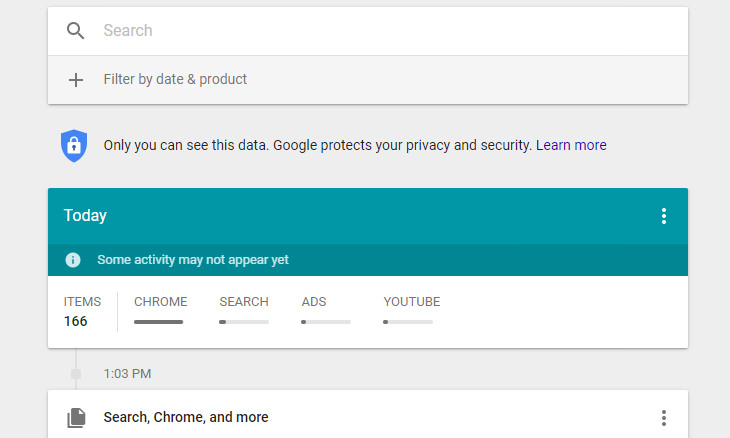
The first thing you’ll be presented with when you log in is a timeline of your activity using Google’s various products such as the search engine itself, your Google Chrome web browsing history or Google Maps. The privacy settings that you currently have enabled on Google determine what is displayed on the timeline.
How to See the Full Picture
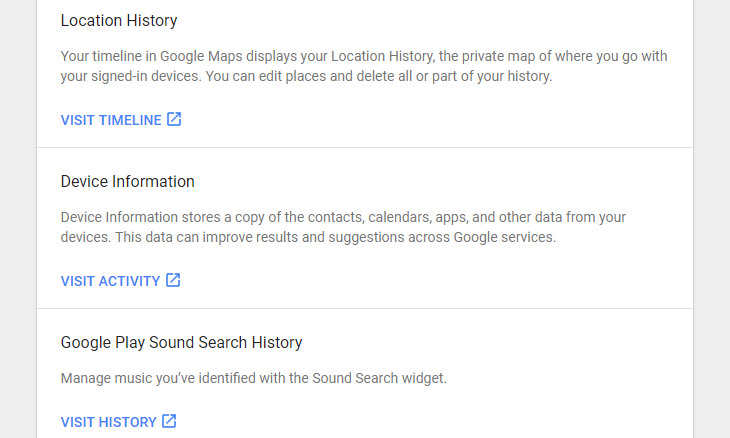
Seeing as the full picture of what Google knows about you might be obscured due to your privacy settings, you’ll need to point to the Menu icon in the upper left-hand corner of your screen and select Other Google Activity to find any additional data that Google has been gathering.
An example of this is your location history. All of the places that you’ve visited while being signed in to Google Maps (this will most likely happen when you’ve been using your smartphone to find your way around somewhere) will appear here.
Deleting Your Activity
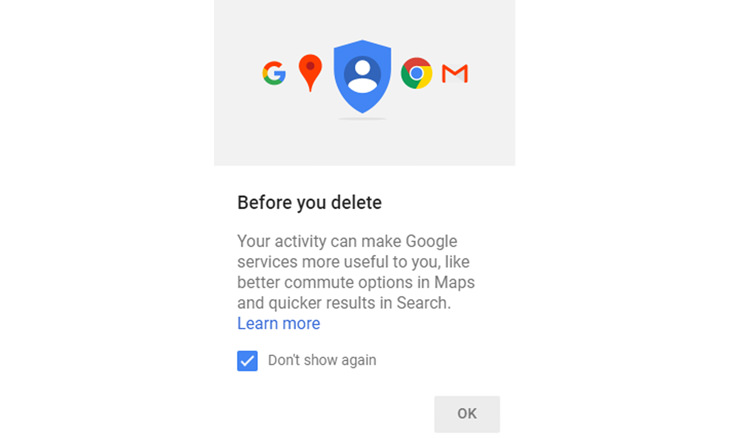
There are several methods that you can employ to delete your data from your My Activity page. You’ll find three vertical dots next to each individual item in the Other Google Activity page. All you need to do to begin deleting your data is to click on them. A menu will appear giving you the option to delete an individual item from your Google history permanently.
You can also search by product or topic using the search bar, and delete it via the three dots once you’ve found it.
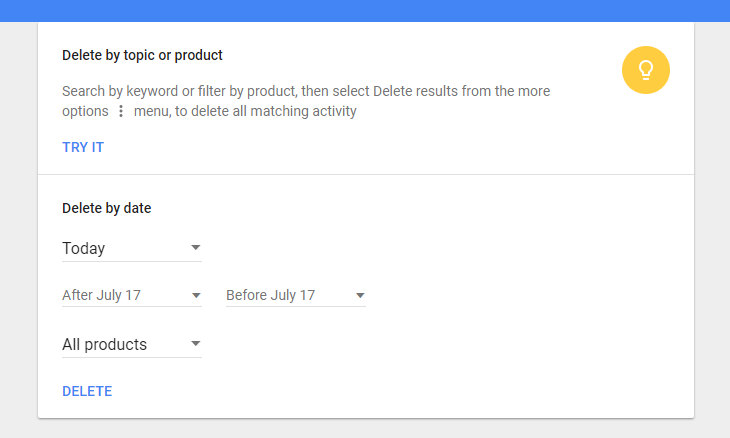
Last but not least, you can also delete by date. Simply click the three vertical dots at the top of your screen and selected Delete Activity By. This option also allows you to delete data from “all time”.
Limit Your Data from Being Saved
So you’ve deleted the activity you wished to, and now you’re probably wondering how to stop Google from collecting your data in the future.
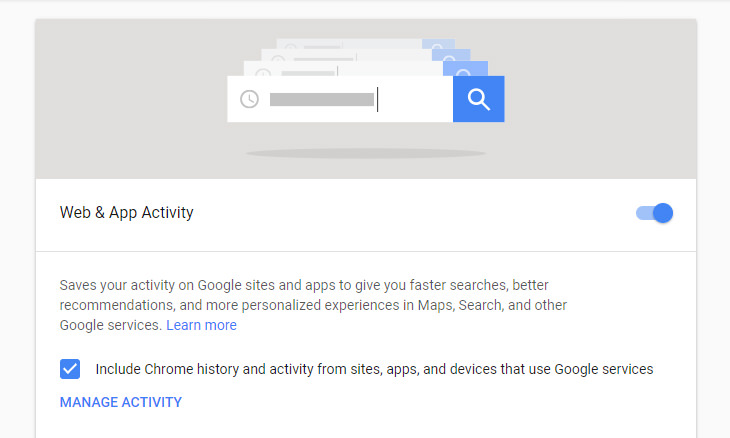
All you need to do is click on the menu icon in the upper left-hand corner and select Activity Controls to edit your preferences for the following:
• Web & app activity
• Location history
• Device information
• Voice & audio activity
• YouTube search history
• YouTube watch history
At this point, it’s also a good idea to run Google’s Privacy Checkup tool to review your privacy settings and just them to how you want them. And there you have it!

16 Things You Didn't Know Google Can Do For You
We bet you didn't know about this brilliant Google tricks which will make your searches quicker and more accurate!

5 Programs You Should Remove from Your Computer
This article specifies 5 programs that most people don't need on their computers and how to get rid of them.
A Few Hacks Any Zoom User Needs to Know
For better and for worse - Zoom is a part of our daily lives. Check out these 9 hacks that will make navigating the app easier.
Guide to Chat GPT: What It Is and How to Use It
This beginner's guide to Chat GPT will help you take your first steps in using this helpful chatbot.
Learn the Basics of Using a Computer With These Guides!
Windows computers are the most commonly used throughout the world. Fear is the primary obstacle in seniors towards using them. Here are 7 basic video tutorials.
5 Turmeric-Based Facial Masks For Removing Hair
Turmeric is a wonderful spice from India that has a whole myriad of different applications. Here's how to make 5 turmeric-based masks for unwanted hair removal.
These 10 Keyboard Shortcuts Will Make Life Easy!
These keyboard shortcuts will help you learn the easiest ways to use your computer when your mouse is being less than cooperative!
5 Hidden Google Chrome Games (And a Bonus)
Tired of Backgammon online? Try Google Chrome's online in-browser collection of games for an easy-to-reach entertainment break. Tic-tac-toe, snake, and more!
10 Warning Signs You’re About to Fall for a Fake Ad
Thse are 10 red flags that should make you pause before clicking on a social media ad.
Best ChatGPT Prompts for 2024
Let's explore some great prompts you can start with on your AI adventure, either for fun or for productivity or knowledge.
I Bet You Didn't Know You Could Do THIS on Google Maps
Here are all of the things you can do on Google Maps that you never knew you could.
Do You Know How to Act in a Medical Emergency?
Don't feel powerless in a medical emergency, learn what actions to take in these 10 serious medical emergencies and how to save lives
5 Best Online Platforms for Couples' Counselling
We've researched the options and returned with the 5 best platforms for online couples' therapy.
8 Smart Safari Customizations Every Mac User Should Know
Here are some of the most effective ways to fine-tune Safari on your Mac.
All You Need to Know About Your Computer
It's that age of computers, and we should all educate ourselves so we all save ourselves time and anxiety when using a computer, a tablet or a phone. This collection of posts will give you insight into many computer-related issues.
2025's Online Threats Will Be More Sophisticated Than Ever
A look at the cyber scams that you need to be wary of this year.
Your Easy Guide to OpenAI's Amazing Video and Photo Tools
OpenAI has created tools that anyone can use to make videos and photos, even if you're not a computer expert. Let me walk you through them step by step.
Can’t Connect to the Internet? Here’s What To Do
Not being able to connect to the internet is one of the most pestering things. This is why it might be happening and easy solution to fix it.
5 DIY Solutions to Better Organize Your Cords and Cables
Computer cables have an annoying tendency to tangle and create an unseemly mess. Here are some easy ways to prevent that.
It’s Almost a Crime Not to Use These Free Nifty Websites
Check out 15 really useful websites. They are completely free to use!
Computer Guide: How to Keep Your Computer Up-to-Date!
Follow this simple guide to update drives and resolve common issues on your Windows computer.
Your Computer Mouse Can Do Much More Than You Think...
Knowing how to use your mouse can make computing so much easier than you ever realized. Here are some great tips on how to maximize the use of your mouse, which will increase your overall productivity on the computer.
9 Warning Signs You're Dealing with a Social Media Scam
Don’t fall for these common social media scam ads.
Top 5 Apps for Checking on Your Pet’s Health
These apps were selected based on their functionality, user reviews, and relevance to health monitoring, as highlighted by pet care and technology sources.
5 Awesome Google Chrome Settings You Aren’t Using
Google Chrome’s advanced settings have many useful features that will make your browsing experience so much better.
USB Drives Can Do More Than You Think – 10 Hacks You Need
Let’s explore some of the most practical yet overlooked ways to use USB drives.
Why Fake Info is Best for These 6 Types of Sites
Always avoid giving your real information on these kinds of websites.
What Causes Laptop Batteries to Bulge Over Time?
These early warning signs can save your laptop's battery and prevent potentially dangerous situations.
7:38
Most People Don’t Know About These Google Maps Features
Google Maps has a ton of new features that most people don’t know about.
These 5 Free Tools Can Help You Save Money Today!
These free apps and sites make saving money a breeze.
Firefox Just Got Better: 10 Handy Extensions You’ll Love
With the right add-ons, Firefox can become an indispensable browser that you'll rely on every day.
10 Popular Tech Myths You Need To Stop Believing Now
Here we bust some popular and common myths about everyday tech that people still believe in.
3:28
Easy Tips for Connecting Your Laptop to an External Screen
Watch this helpful tutorial to learn how to connect your laptop to a monitor.
4:08
Guide: Download All Google Photos in a Few Clicks!
Want to download all your Google your photos and videos in a few clicks? Watch this…
Skype Is Shutting Down – Try These Alternatives Now
With Skype officially retiring, here are some handy alternatives you should try.
0:48
WhatsApp Hack: Read Messages Without Showing Blue Ticks
Learn how to read WhatsApp messages without showing blue ticks in this video.
Simplify Finances With These Budget Apps for Families
Try these money mangement tools to simplify your finances in 2025
8:31
20 Terrifically Helpful Chrome Keyboard Shortcuts
Welcome to the ultimate guide to mastering 20 essential keyboard shortcuts for the Google Chrome browser!
How to Download Free Windows Software Securely – 7 Tools
Here’s how you can download free Windows software safely and securely.
17:20
Discover a Feature of Windows That's Super Helpful
Learn how to use some advanced new features of Windows 10 that you probably weren't aware of.
1:55
Never Lose Your WhatsApp Chats Again with These Hacks!
Protect your WhatsApp chats with these tips.
8 Mistakes That Shorten the Life of Your Electronics
Your gadgets and household electronics won’t last long if you keep repeating these common mistakes.
5:23
Phone Security– The Fastest Way to Secure a Hacked Phone
This guide helps you in checking for hackers on your phone, removing them, and locking down your phone.
23:04
ChatGPT: 30 Tips to Using and Working with the AI
In this video, we’re breaking down 30 practical tips to help you use ChatGPT more effectively
10 Free Ancestry Sites for Tracing Your Family History
Here are 10 of the best free ancestry sites that can help you uncover your family’s story.
7 Safe Ways to Watch Movies & TV Shows Online Free in 2024
Free movie and TV show sites you need to know about in 2024.
The 7 Backup Mistakes That Leave Your Files Vulnerable
Here’s what most people get wrong about backups.
To enable your Ad-Free Subscription, please fill the fields below
Your subscription was successful, now you can enjoy an ad-free experience!! Note: To make sure you get no ads, please make sure to log in to your account. If you are logged in already, then refresh the page. The subscription can be cancelled at any time.