|
In this day and age, almost all of our information is saved either in our computer or on an external drive, allowing us to access and transfer many photos instantly. However, despite the improved availability and speed of access to our files, deleting them by mistake can also be easy.

Imagine sending your computer to get repaired, and when you get it back, it’s without your precious photos from your kid’s wedding. All of those precious memories gone in an instant. Luckily for you, not all is lost – you can restore most (if not all) of your lost data by using a simple, free program called Recuva. |

![]() |
| Source |
|
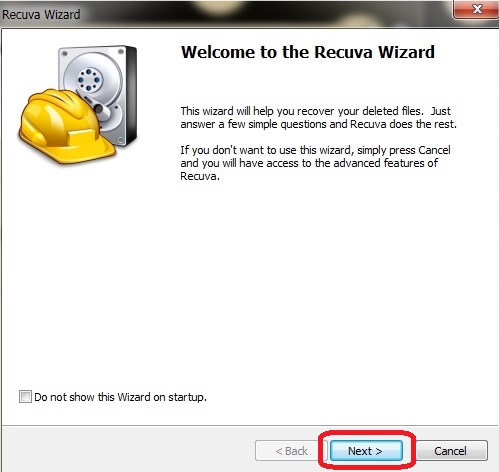
How does this work? When a file on your computer is deleted, only the link to it has been removed, making the file invisible. What that means is that the data is still on your hard drive or external drive, and programs like Recuva can search and recover the data (unless it has been overwritten – then you need to take it to a lab). If you recently deleted a file by accident, Recuva will be able to find it and restore it. How do I use it? First, download the program HERE and install it. After the installation, the Recuva window will open, displaying the “Recuva Wizard”, meant to simplify your use of the program. Click on “Next” when you’re ready. |
![]() |
|
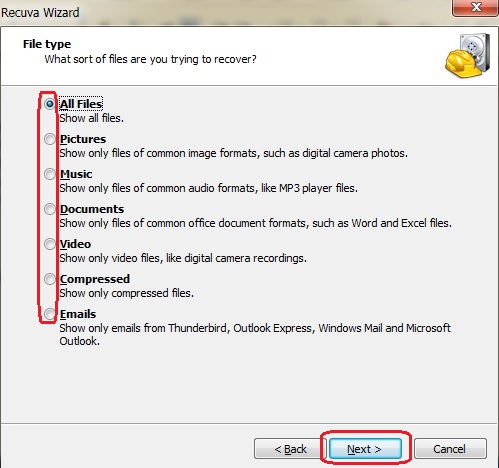
The next window will ask you what type of file(s) you’re looking for, so select the appropriate kind. If you’re unsure, select “All Files” instead and hit “Next”. |
![]() |
|
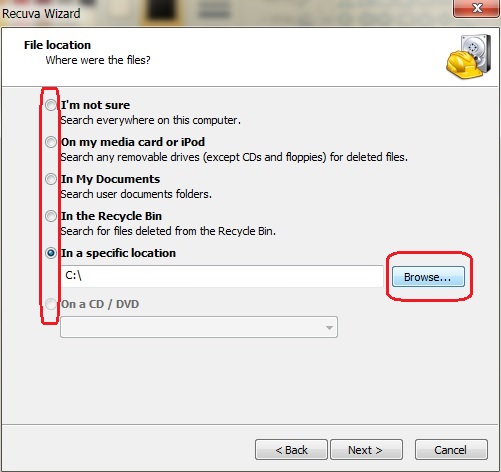
In the next window, you’ll be asked where the missing file was. If you don’t know, select “I’m not sure”, prompting the program to search the entire computer. If you know exactly where it is, click on “Browse” to find the directory it is in and then on “Next” to proceed. |
![]() |
|
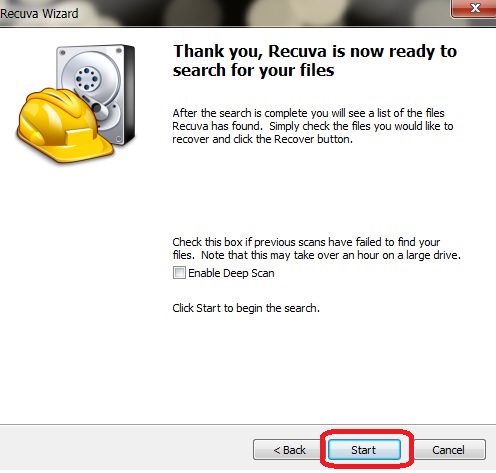
In the next window, click on “Start” – this will begin a scan of your computer for any recoverable files. |
![]() |
![]() |
| Scan window |
|
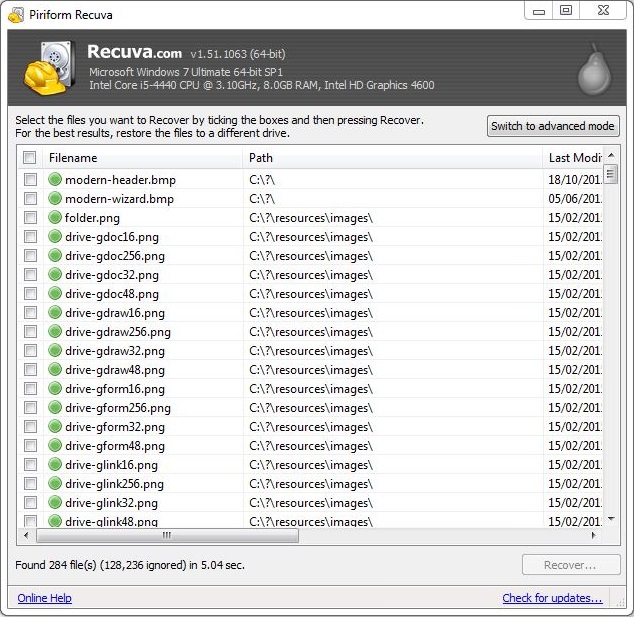
At the end of the scan, a new window will open up with a list of all the recoverable files that the program found. The files will have a circle on the left-hand side in either green, yellow or red. Green indicates that the file can be recovered, yellow indicates that the file may or may not be recoverable, and red indicates unrecoverable files. |
![]() |
|
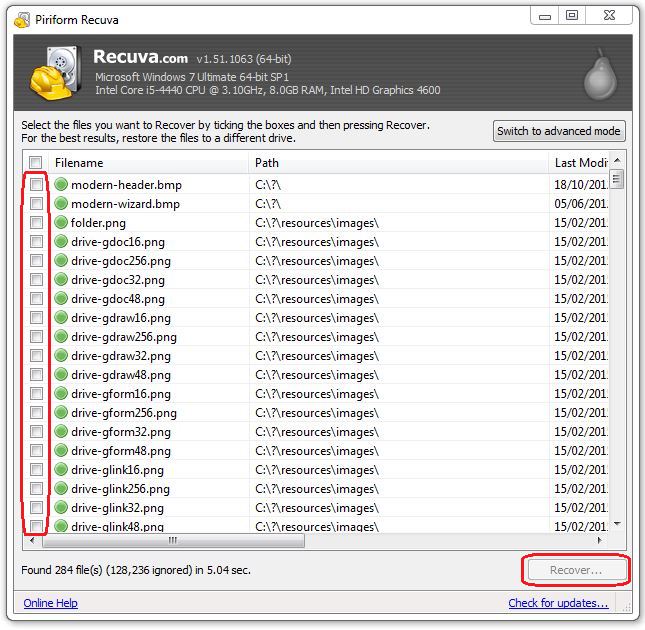
Locate the files you want to recover and check the box next to it. When you’re done, click on the “Recover” button at the bottom right of the window. |
![]() |
|
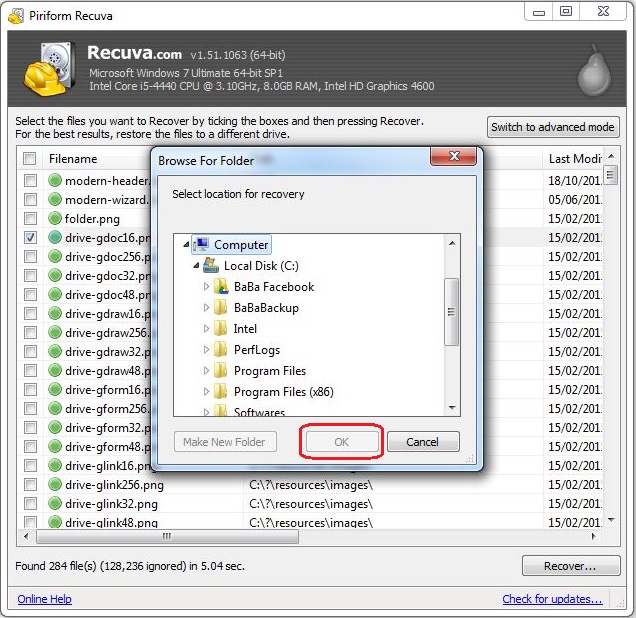
After clicking “Recover”, a new window will prompt you to select a folder you would like to recover the files into, and once selected, click “OK” to restore the file to that folder. |
![]() |
|
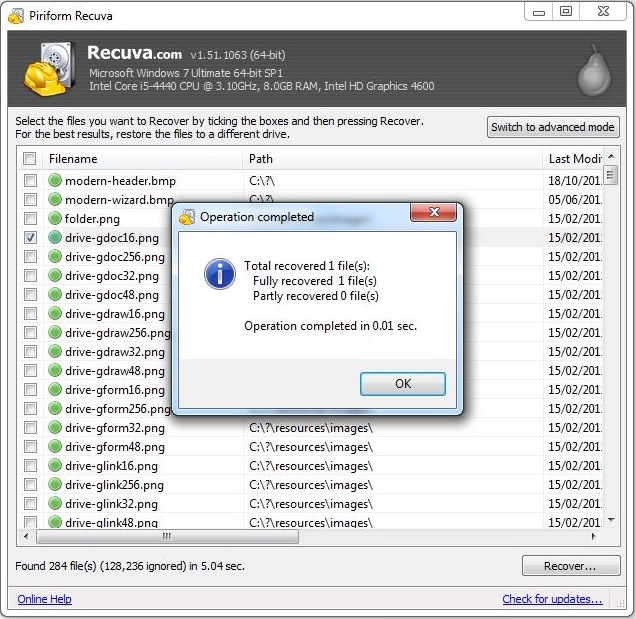
Once the process is complete, you will see this notification, containing information on all the files that were successfully (or unsuccessfully) recovered. |
![]() |
|
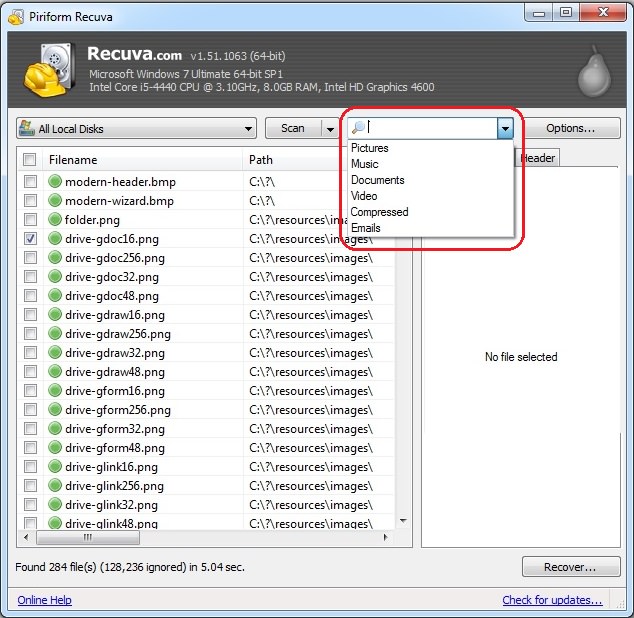
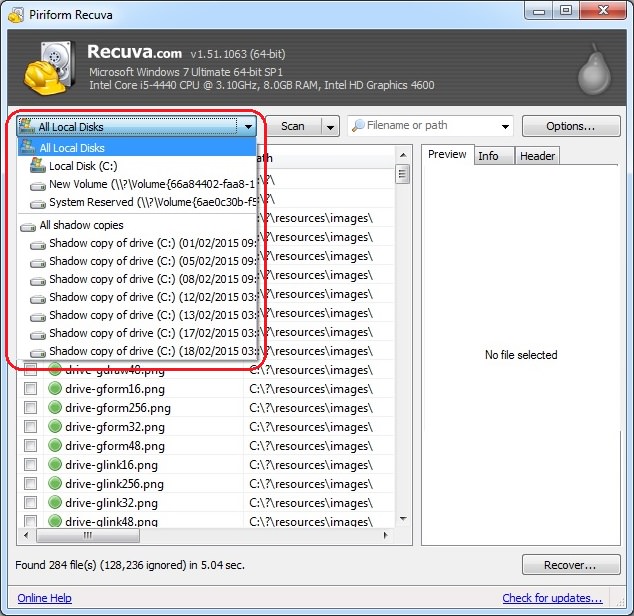
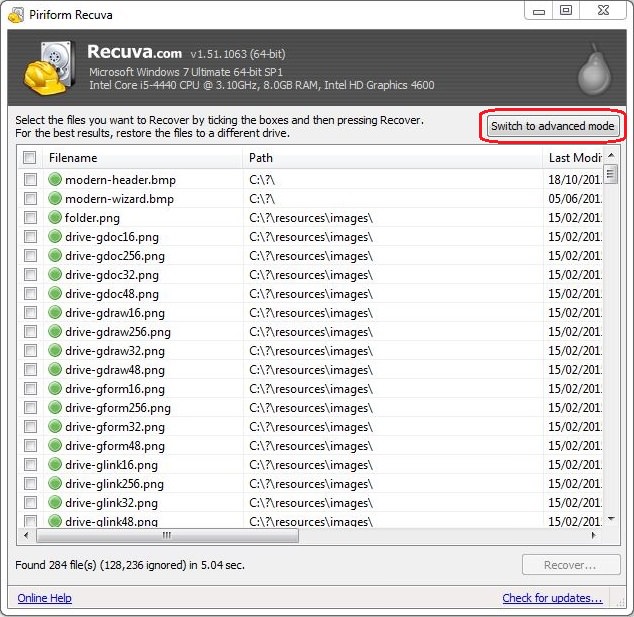
If you feel confident, you can use the advanced mode, which will allow you to search for specific file types, file name, or location. |
![]() |
![]() |
| Search by file name or type |
![]() |
| Search by location |
|
Please note – as time passes and with regular use, the quality of deleted files deteriorates, eventually making them unrecoverable. The sooner you perform the scan – the more likely it will be that the file will be salvageable. |

Your Computer Mouse Can Do Much More Than You Think...
Knowing how to use your mouse can make computing so much easier than you ever realized. Here are some great tips on how to maximize the use of your mouse, which will increase your overall productivity on the computer.
Read Our Beginner's Guide to Microsoft Word Here
Get the most out of the most widely-used word-processing application in the world, with our simple beginner's guide to Microsoft Word.
Become a Windows Computer Wiz by Using These 11 Tricks
These simple tips and tricks for using a Windows PC will help you use your computer and turn you into a Windows PC master!
Read Our Comprehensive Guide to Using Google Translate
Of the many Google tricks out there, Google translate is by far one of the most useful. Read this free guide to learn exactly how to make use of it.
WI-FI GUIDE: Stop People Hacking Your Wi-Fi Password
This is how you set up a password for your wireless Wi-Fi account, to stop people using your connection for free.
16 Things You Didn't Know Google Can Do For You
We bet you didn't know about this brilliant Google tricks which will make your searches quicker and more accurate!
The 7 Backup Mistakes That Leave Your Files Vulnerable
Hereโs what most people get wrong about backups.
Your Easy Guide to OpenAI's Amazing Video and Photo Tools
OpenAI has created tools that anyone can use to make videos and photos, even if you're not a computer expert. Let me walk you through them step by step.
Do You Eat Out Often? These 7 Apps Will Save You Money!
If youโre struggling to keep up with your monthly food budget, youโre not alone. Here are 7 dinning apps that will save you money every time you eat.
You Should Bookmark These Incredibly Useful Sites
Make sure that you bookmark these handy websites!
Who Traces Your Emails? Learn How to Detect Email-Tracking
40% of emails are being tracked by somebody without people's consent or notification, which means you'd better learn how to protect your privacy...
Is DeepSeek Worth the Hype? A Closer Look at Its Features
DeepSeek is the new AI chatbot in town. But is worth the hype?
11 Free AI Tools That Actually Help You Get Stuff Done
Have you tried any of these useful free AI apps?
9 Useful Blogs Created Specifically For Senior Citizens
Hereโs a wonderful collection of blogs that seniors will find particularly helpful.
Surround Yourself With the Forest Sounds of the World
Ready to be surrounded by the music of the worldโs forests and experience the restorative properties of being in nature?
Do You Know How to Act in a Medical Emergency?
Don't feel powerless in a medical emergency, learn what actions to take in these 10 serious medical emergencies and how to save lives
43:39
AI News: What's Going On With AI This Week?
This week's AI news covers major releases and impressive demos.
Guide: How to Unlock Your Phone Without a Passcode
Forgot your phone passcode? Don't panic.Just follow these steps.
What We Can Learn from ChatGPT About Being Human
What can we learn from ChatGPT about ourselves?
This Free Website Will Let You Play the Most Fun Mazes!
Do you love mazes and navigation challenges? Look no further than this fun site!
How to Spot Fake Online Reviews: A Shopperโs Guide
Here are practical tips to help you spot fake Amazon reviews.
7 Reasons Why Your Computer is Running Abnormally Slow
There are many things that could be slowing your computer down and you'll find 7 of them in this article. Take a look!
If You Arenโt Doing these Things, Your PC WILL Wear Out...
All the basics of computer maintenance.
These 5 Free Tools Can Help You Save Money Today!
These free apps and sites make saving money a breeze.
I Bet You Didn't Know You Could Do THIS on Google Maps
Here are all of the things you can do on Google Maps that you never knew you could.
Looking for an Instagram Alternative? Try These Platforms
If youโre ready to explore beyond Instagram, here are eight great alternatives.
8:31
20 Terrifically Helpful Chrome Keyboard Shortcuts
Welcome to the ultimate guide to mastering 20 essential keyboard shortcuts for the Google Chrome browser!
If You Do This, Then You Could Be Damaging Your Phone...
Many people end up damaging their phones without even realizing that they are doing so, and here are 9 of the most common ways this happens.
5:02
How to Transfer Data From Your Old iPhone to The New One
Got a new iPhone? Here's how you can move all your data from your old iPhone to the new one.
Gboard Secrets: 7 Handy Features You're Not Using Yet
Make the most out of Gboard with these awesome tips and tricls.
17:41
TikTok: Tips and Tricks for Beginners
Whether you are a total beginner or just looking to streamline your process to get more views, this tutorial covers everything you need to know to go from recording to posting.
1:56
No More Clutter! Free Up WhatsApp Storage in Minutes
Running out of storage on your phone because of WhatsApp? Try these hacks now.
8 Smart Safari Customizations Every Mac User Should Know
Here are some of the most effective ways to fine-tune Safari on your Mac.
Stop Paying For Software: 8 Free Productivity Options
Here are eight free open-source alternatives that can take the place of paid productivity apps without sacrificing quality or functionality.
12 USEFUL Chrome Extensions That Save Time
Improve your browsing experience with these free Google Chrome extensions.
Exploring the Web Beyond Google: 7 Handy Alternatives
Try some of these non-conventional search engines that you didn't know existed.
PowerToys: The Best Free Microsoft App for Windows Users
In this article, we'll introduce you to this toolbox and show you which 23 useful tools are waiting for you there.
How to Tell If a Virus Warning Is Real or Fake - 12 Tips
If you see a barrage of security alerts popping up on your computer, then it might be sign of a virus attack.
0:48
WhatsApp Hack: Read Messages Without Showing Blue Ticks
Learn how to read WhatsApp messages without showing blue ticks in this video.
Your Computer Mouse Can Do Much More Than You Think...
Knowing how to use your mouse can make computing so much easier than you ever realized. Here are some great tips on how to maximize the use of your mouse, which will increase your overall productivity on the computer.
3:35
Want to Increase Your iPad Keyboard Size? Watch This Guide
Want to increase the size of your iPad? Watch this tutorial nowโฆ
What Do Those 12 'F' Keys on Your Keyboard Do?
Find out what those 12 curious F keys on your keyboard mean.
Why Fake Info is Best for These 6 Types of Sites
Always avoid giving your real information on these kinds of websites.
Smishing 101: How to Recognize Scam Text Messages
This is how you recognize and handle fraudulent or scam text messages, also known as smashing.
Computer Guide: How to Keep Your Computer Up-to-Date!
Follow this simple guide to update drives and resolve common issues on your Windows computer.
12 Amazing Internet Radio Stations to Spice Up Your Day!
Check out these 12 fantastic internet radio stations.
You Didnโt Realize it, But AI Is Making Your Life Better!
Here are thirteen unique ways AI can simplify daily life.
To enable your Ad-Free Subscription, please fill the fields below
Your subscription was successful, now you can enjoy an ad-free experience!! Note: To make sure you get no ads, please make sure to log in to your account. If you are logged in already, then refresh the page. The subscription can be cancelled at any time.