
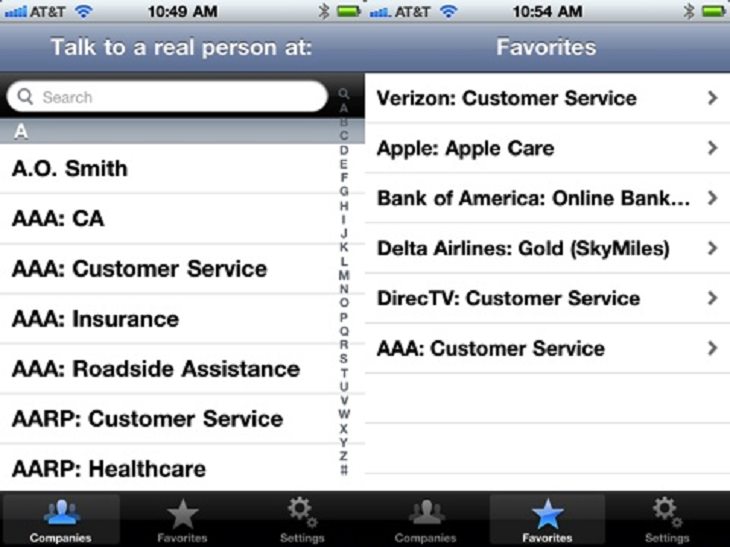

For large companies that have quite a few different contact numbers, Fast Customer even neatly categorizes them for you (as can be seen in the image above) so that you make sure you get in touch with the right department immediately.
Once you've found the company (or department) that you want to contact, simply tap on its name. You'll then be taken to another screen, where the app will let you know whether or not the company's customer service desk is open. If they are, then you just have to press the big green button labeled 'Have someone call me.'
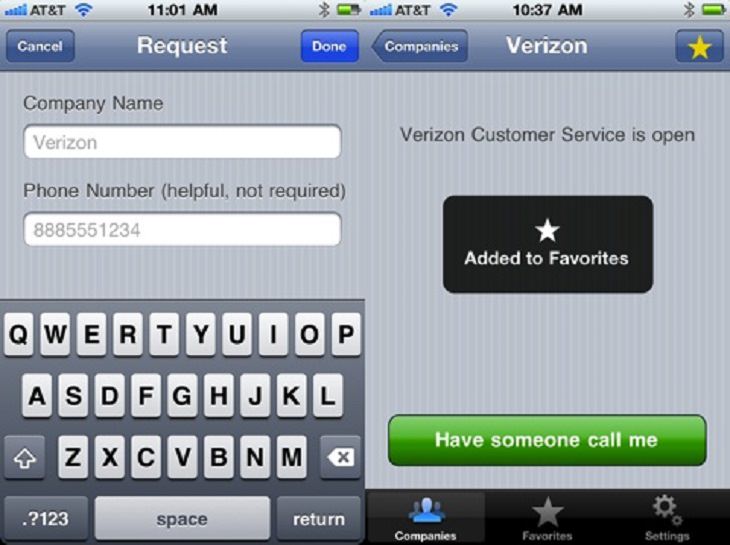
Then, as soon as the customer service department has an open slot, they'll call you right back to deal with your issue. In this way, you'll be able to save yourself hours of waiting and simply get on with your life while waiting for the call. Your only regret will be not finding out about this app sooner!
If you know anybody who hates calling customer care departments, then don't forget to share this article with them.
Sources: appsafari, apple, play, fastcustomer
Images: 1, 2, 3

16 Things You Didn't Know Google Can Do For You
We bet you didn't know about this brilliant Google tricks which will make your searches quicker and more accurate!
1:22
Are Smartphones Making Us Stupid? This Will Surprise You!
If you use a smartphone you need to see this!
Don't Like the Standard Apps on Your Phone? Get These!
Here are 6 brilliant apps, that'll blow the free ones that come with your phone out of the water!
Muscle Degeneration Starts with these 8 Early Symptoms!
Are you familiar with muscular dystrophy? Spot the early signs of this disease by being aware of these tips.
Find Siri Underwhelming? Here Are Some Great Alternatives
Take a look at some useful voice command apps for iPhone that might just be better than Siri for you.
If You Do This, Then You Could Be Damaging Your Phone...
Many people end up damaging their phones without even realizing that they are doing so, and here are 9 of the most common ways this happens.
8 Smart Safari Customizations Every Mac User Should Know
Here are some of the most effective ways to fine-tune Safari on your Mac.
Not Sure What to Watch Next? Try These 8 Helpful Sites
Not sure what to watch next? Try these helpful sites.
How to Spot Fake Online Reviews: A Shopper’s Guide
Here are practical tips to help you spot fake Amazon reviews.
The Most Amazing Websites for Learning Languages for Free
Learn any language for free with these amazing websites!
17:20
Discover a Feature of Windows That's Super Helpful
Learn how to use some advanced new features of Windows 10 that you probably weren't aware of.
10 Popular Tech Myths You Need To Stop Believing Now
Here we bust some popular and common myths about everyday tech that people still believe in.
7:38
Most People Don’t Know About These Google Maps Features
Google Maps has a ton of new features that most people don’t know about.
These 5 Free Tools Can Help You Save Money Today!
These free apps and sites make saving money a breeze.
Stop Paying For Software: 8 Free Productivity Options
Here are eight free open-source alternatives that can take the place of paid productivity apps without sacrificing quality or functionality.
Privacy Settings You Should Change in Chrome Right Now
These Chrome settings should always be disabled.
5:23

Phone Security– The Fastest Way to Secure a Hacked Phone
This guide helps you in checking for hackers on your phone, removing them, and locking down your phone.
Do You Eat Out Often? These 7 Apps Will Save You Money!
If you’re struggling to keep up with your monthly food budget, you’re not alone. Here are 7 dinning apps that will save you money every time you eat.
Overpaying for Streaming? Here’s How to Fix That!
Save big on your streaming bills with these simple tips.
3:32
The Easy Way to Clean Your Computer's Keyboard
Cleaning a dirty keyboard is quite a straightforward task, as you're about to find out.
Simplify Finances With These Budget Apps for Families
Try these money mangement tools to simplify your finances in 2025
9 Warning Signs You're Dealing with a Social Media Scam
Don’t fall for these common social media scam ads.
7:09
Struggling with Slow iPhone Internet? Try These Tips
iPhone running slow again? Here’s how you boost your speed…
We Found These Awesome Sites for Reading Short Stories!
These are the best places to read short stories online.
Secure Your Data: 5 Must-Have Privacy Apps
A look at five apps that help you take back control of your digital footprint, including their strengths, trade-offs, and where to download them safely.
5 Best Antiviruses in 2025 for Both PC and Mac
Below, we highlight five popular antivirus solutions for Windows PCs and five for Macs, featuring a mix of free and paid options.
8 Mistakes That Shorten the Life of Your Electronics
Your gadgets and household electronics won’t last long if you keep repeating these common mistakes.
10 Free Ancestry Sites for Tracing Your Family History
Here are 10 of the best free ancestry sites that can help you uncover your family’s story.
Exploring the Web Beyond Google: 7 Handy Alternatives
Try some of these non-conventional search engines that you didn't know existed.
2:09
Guide: Download Netflix Videos on Any Laptop & PC
Want to watch your favorite Netflix content offline? This easy guide has you covered.
What Do Those 12 'F' Keys on Your Keyboard Do?
Find out what those 12 curious F keys on your keyboard mean.
Selling Used Stuff? Try These Amazing Apps
You can now sell your used household clothes and other items through some amazing apps.
This Free Website Will Let You Play the Most Fun Mazes!
Do you love mazes and navigation challenges? Look no further than this fun site!
Learn Any New Language with These Awesome Apps!
Learn new languages faster with these AI-powered apps.
Your Computer Mouse Can Do Much More Than You Think...
Knowing how to use your mouse can make computing so much easier than you ever realized. Here are some great tips on how to maximize the use of your mouse, which will increase your overall productivity on the computer.
2:35
6 Simple Tips for Taking Screenshots on Windows
Taking screenshots on Windows is now super easy. Just note these tips.
5:02
How to Transfer Data From Your Old iPhone to The New One
Got a new iPhone? Here's how you can move all your data from your old iPhone to the new one.
All You Need to Know About Your Computer
It's that age of computers, and we should all educate ourselves so we all save ourselves time and anxiety when using a computer, a tablet or a phone. This collection of posts will give you insight into many computer-related issues.
7 Tips to Follow When a Computer Hangs or Freezes
Take note of these steps that will help you unfreeze a computer that freezes or hangs regularly.
This One Computer Key Is Used for a Myriad of Shortcuts!
The 'Win' key is usally thought to only bring up the start menu. It actually does a whole lot more. Get a load of these dozens of shortcuts!
Best ChatGPT Prompts for 2024
Let's explore some great prompts you can start with on your AI adventure, either for fun or for productivity or knowledge.
5 Best Online Platforms for Couples' Counselling
We've researched the options and returned with the 5 best platforms for online couples' therapy.
5 Things to Never Store on Your Smartphone
Stop using your smartphone as a master repository for saving all kinds of information. It may be dangerous...
How to Download Free Windows Software Securely – 7 Tools
Here’s how you can download free Windows software safely and securely.
21:27
It's Finally Here! iOS 18's Game-Changing New Features
Here's what's new and exciting in iOS 18!
1:56
No More Clutter! Free Up WhatsApp Storage in Minutes
Running out of storage on your phone because of WhatsApp? Try these hacks now.
9:43
Tired of Google Photos Storage Limits? Try These Solutions
Get more space in your Google Photos account with these useful hacks.
To enable your Ad-Free Subscription, please fill the fields below
Your subscription was successful, now you can enjoy an ad-free experience!! Note: To make sure you get no ads, please make sure to log in to your account. If you are logged in already, then refresh the page. The subscription can be cancelled at any time.