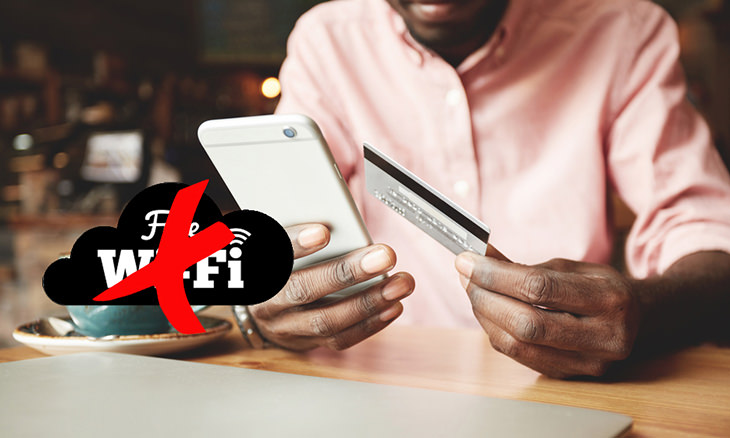
Data theft is always a risk when you’re using a public Wi-Fi network, so you should definitely switch to using your mobile data when out and about to protect yourself from it. The price of a few megabytes of data is much well worth it when you consider that it’s ensuring your safety.
2. Turn off Wi-Fi if you’re not using the internet
Turning off your Wi-Fi when you’re not using it solves three issues at once, namely, the rapid discharge of your smartphone’s battery, preventing automatic connections to fraudulent networks, and annoying ad emails.
3. Connect using a VPN
A Virtual Private Network allows you to retain your anonymity when using the internet. It makes the websites you enter see a virtual network IP address, as opposed to your own. Note that most VPN services are paid, however, they’re usually not that expensive, and many service providers offer free services too.
4. Don’t let your smartphone remember the network
Most smartphones and tablets will connect to a Wi-Fi network that they’ve connected to before when they’re in its range. Fraudsters have the ability to create their own access points using the same names as Wi-Fi networks, leaving your profile data vulnerable to being accessed, not to mention your finances.

Another trick that hackers and fraudsters use to gain access to people’s information is to use networks with similar names to the ones in the vicinity. An authentic Wi-Fi network normally requires payment and/or authorization to be used, but a fake one will always be free. Ask the owner of a Wi-Fi network about its correct name before connecting to it.
6. Install good antivirus software
Always make sure that you have the latest version of an antivirus software installed on the devices you use. New ways of hacking appear almost every day, and in addition, antivirus software warns you of possible fake Wi-Fi connections.
7. Choose two-stage authentication networks
Keep in mind that a network that doesn’t require you to take any additional action in order to connect to it might be fraudulent. Connecting to a Wi-Fi network that requires some form of authentication, such as requiring you to enter a code sent as a text message to your phone, is preferable.
8. Keep your passwords encrypted
You shouldn’t really keep your passwords stored in your smartphone at all, but if you really must, then make sure you use a password manager to encrypt your information.
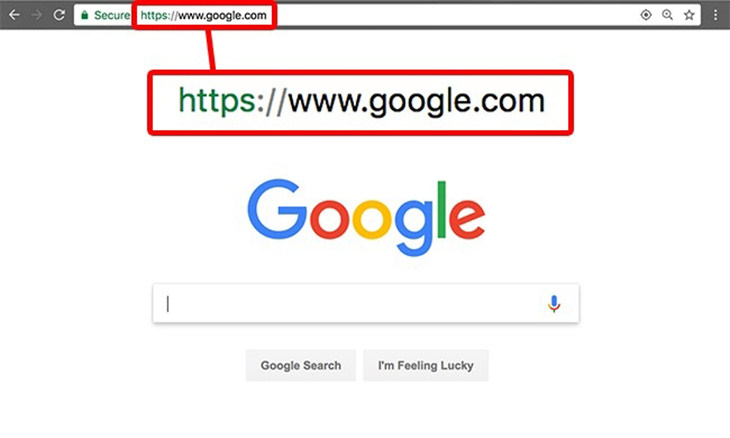
Fake Wi-Fi networks might redirect you to well-known websites, but they do so to collect your personal data. A tell-tale sign is seeing weird characters in a website’s URL (address). You can prevent this from happening by using a reliable and secure web browser. Such browsers will detect such differences and warn you about it.


10:52
These Tips Will Make Google Maps Even MORE Useful
This guide covers all of the essential features in the new version of Google Map so that you get the most out of this handy app.
Permanently Disconnecting from Facebook the Right Way
This guide will show you how to safely delete your Facebook Account while retaining all of the fond memories you've stored there.
These Awesome Extensions Add Functionality to Your Browser
These awesome extensions for your Google Chrome or Safari web browser will add a ton of functionality to them. Take a look at them now.
11:06
These Phone Stand Ideas Are Nothing Short of Awesome
It's way too easy simply to go out and buy your own phone stand - why not have a go at making your own at home? Here are 32 unique phone stand ideas.
They Say the Best Apps In Life Are Free: Best Apps of 2018!
There are many great apps, but the greatest of all are actually FREE! Here are 10 great free apps for smartphones.
WARNING! Facebook Is Selling Your Privacy Away...
Facebook has been supplying your own private data to companies for many years, and here are 5 of its worst abuses to date.
How to Spot Fake Online Reviews: A Shopper’s Guide
Here are practical tips to help you spot fake Amazon reviews.
10 Warning Signs You’re About to Fall for a Fake Ad
Thse are 10 red flags that should make you pause before clicking on a social media ad.
5 DIY Solutions to Better Organize Your Cords and Cables
Computer cables have an annoying tendency to tangle and create an unseemly mess. Here are some easy ways to prevent that.
Who Traces Your Emails? Learn How to Detect Email-Tracking
40% of emails are being tracked by somebody without people's consent or notification, which means you'd better learn how to protect your privacy...
3:28
Easy Tips for Connecting Your Laptop to an External Screen
Watch this helpful tutorial to learn how to connect your laptop to a monitor.
3:32
The Easy Way to Clean Your Computer's Keyboard
Cleaning a dirty keyboard is quite a straightforward task, as you're about to find out.
Fed Up With Spotify? Try These Alternatives for Free Music
Here are eight of the best platforms where you can listen to music online without spending a dime.
7:31
How to Edit Your Photos Using 3 Different AI Services
If you shoot weddings, portraits, or anything high-volume, and you’ve wondered if AI can really speed things up without cutting corners, this is the no-nonsense breakdown you need.
The Most Amazing Websites for Learning Languages for Free
Learn any language for free with these amazing websites!
Simplify Finances With These Budget Apps for Families
Try these money mangement tools to simplify your finances in 2025
Privacy Settings You Should Change in Chrome Right Now
These Chrome settings should always be disabled.
5:02
How to Transfer Data From Your Old iPhone to The New One
Got a new iPhone? Here's how you can move all your data from your old iPhone to the new one.
Turn Off These 9 Android Settings. They Pose a Risk
Here are some Android settings that you should consider turning off to enhance your device’s performance.
Secure Your Data: 5 Must-Have Privacy Apps
A look at five apps that help you take back control of your digital footprint, including their strengths, trade-offs, and where to download them safely.
Learn Any New Language with These Awesome Apps!
Learn new languages faster with these AI-powered apps.
8 Smart Safari Customizations Every Mac User Should Know
Here are some of the most effective ways to fine-tune Safari on your Mac.
2025's Online Threats Will Be More Sophisticated Than Ever
A look at the cyber scams that you need to be wary of this year.
10 Popular Tech Myths You Need To Stop Believing Now
Here we bust some popular and common myths about everyday tech that people still believe in.
Exploring the Web Beyond Google: 7 Handy Alternatives
Try some of these non-conventional search engines that you didn't know existed.
1:56
No More Clutter! Free Up WhatsApp Storage in Minutes
Running out of storage on your phone because of WhatsApp? Try these hacks now.
2:09
Guide: Download Netflix Videos on Any Laptop & PC
Want to watch your favorite Netflix content offline? This easy guide has you covered.
USB Drives Can Do More Than You Think – 10 Hacks You Need
Let’s explore some of the most practical yet overlooked ways to use USB drives.
Stop Paying For Software: 8 Free Productivity Options
Here are eight free open-source alternatives that can take the place of paid productivity apps without sacrificing quality or functionality.
2:35
6 Simple Tips for Taking Screenshots on Windows
Taking screenshots on Windows is now super easy. Just note these tips.
5 Best Online Platforms for Couples' Counselling
We've researched the options and returned with the 5 best platforms for online couples' therapy.
5 Best Antiviruses in 2025 for Both PC and Mac
Below, we highlight five popular antivirus solutions for Windows PCs and five for Macs, featuring a mix of free and paid options.
Gboard Secrets: 7 Handy Features You're Not Using Yet
Make the most out of Gboard with these awesome tips and tricls.
These Websites ONLY Share Positivity and Good Stories!
Say goodbye to negativity with these positive news platforms.
7:09
Struggling with Slow iPhone Internet? Try These Tips
iPhone running slow again? Here’s how you boost your speed…
Selling Used Stuff? Try These Amazing Apps
You can now sell your used household clothes and other items through some amazing apps.
9:42
Here's How to Make Your iPhone Run Like New Again - 9 Tips
Save space on your iPhone with these simple hacks.
All You Need to Know About Your Computer
It's that age of computers, and we should all educate ourselves so we all save ourselves time and anxiety when using a computer, a tablet or a phone. This collection of posts will give you insight into many computer-related issues.
Computer Tips: All You Can Do With the CTRL/Control Key!
The control key has more uses than just copying and pasting. These are the 20 more useful keyboard shortcuts you can do with the control key.
7 UNDISCOVERED Apps That are NOT on the Google Play Store!
I can’t believe I never knew about these handy Android apps.
I Bet You Didn't Know You Could Do THIS on Google Maps
Here are all of the things you can do on Google Maps that you never knew you could.
10 Free Ancestry Sites for Tracing Your Family History
Here are 10 of the best free ancestry sites that can help you uncover your family’s story.
Boost Your Brain With These 8 Brainy Mobile Games!
We’ve gathered 8 recommended games to keep your brain active, challenge your logical thinking, and help you pass the time enjoyably.
Losing Important Emails? Here’s How to Tidy Up Your Gmail
A helpful guide to setting up Gmail filters to prevent emails from getting lost or spam overflowing your inbox.
12 USEFUL Chrome Extensions That Save Time
Improve your browsing experience with these free Google Chrome extensions.
Laptop Won't Power Up? Try These 11 Effective Solutions
Laptop not starting? Try these essential steps to troubleshoot it.

It’s Almost a Crime Not to Use These Free Nifty Websites
Check out 15 really useful websites. They are completely free to use!
To enable your Ad-Free Subscription, please fill the fields below
Your subscription was successful, now you can enjoy an ad-free experience!! Note: To make sure you get no ads, please make sure to log in to your account. If you are logged in already, then refresh the page. The subscription can be cancelled at any time.