|
I see that many people sign up for Facebook, but miss out on all the useful things you can do with it, as well as how to stay safe from identity theft, etc. This is why I have created this simple and useful guide for users who might not be too computer savvy. |
|

![]() |
|
|
The first thing you must do is make sure that your information is private and not freely shared with the whole world. Some bad people might use it to steal your identity, or try to scam you in some way or the other. Facebook makes it easy to make sure your private information remains private, and that what you share can be public, or only shared with your friends. |
|
|
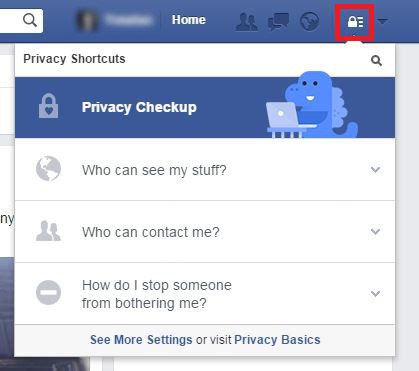
1. Click the privacy icon on the top-right corner. (highlighted in red) |
![]() |
|
2. Use the privacy checkup option to quickly set-up your privacy settings: |
![]() |
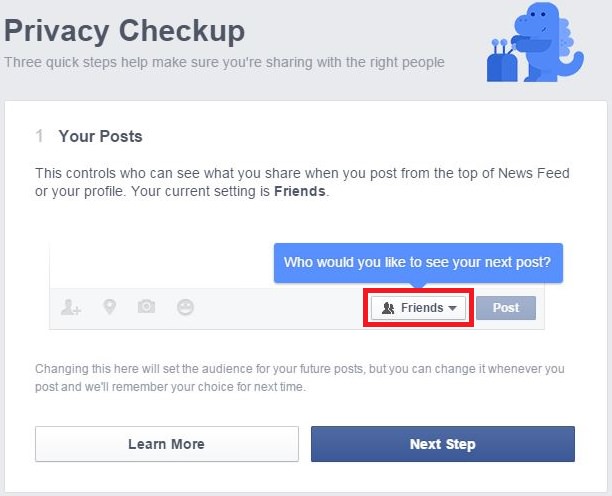
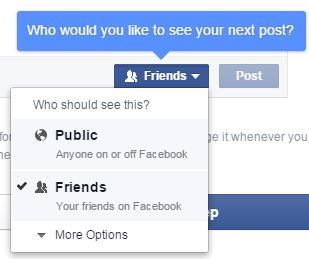
| 3. Clicking on the highlighted box will open this window, allowing you to decide who can see your posts. |
![]() |
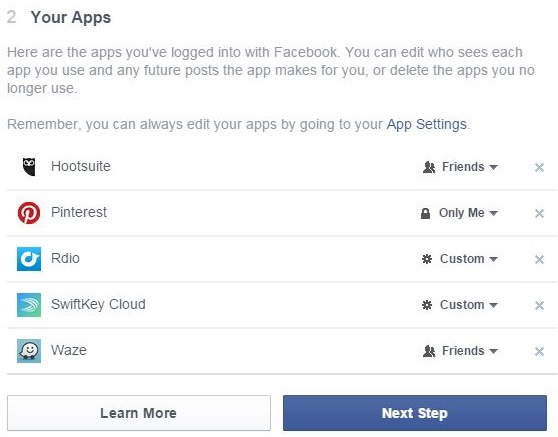
| 4. Choose who gets to see posts from applications you connected with Facebook: |
![]() |
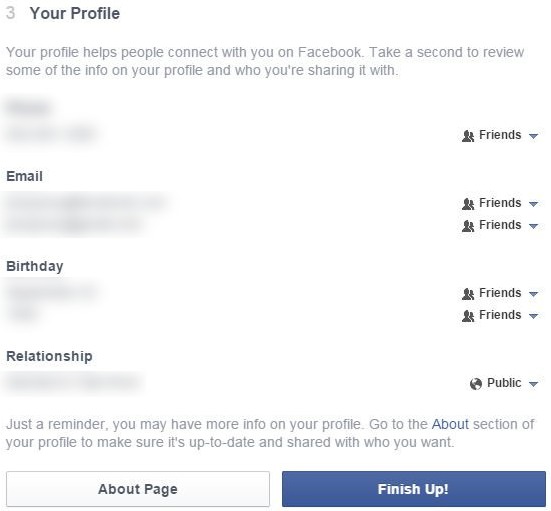
| 5. Choose what information is visible, and to whom: |
![]() |
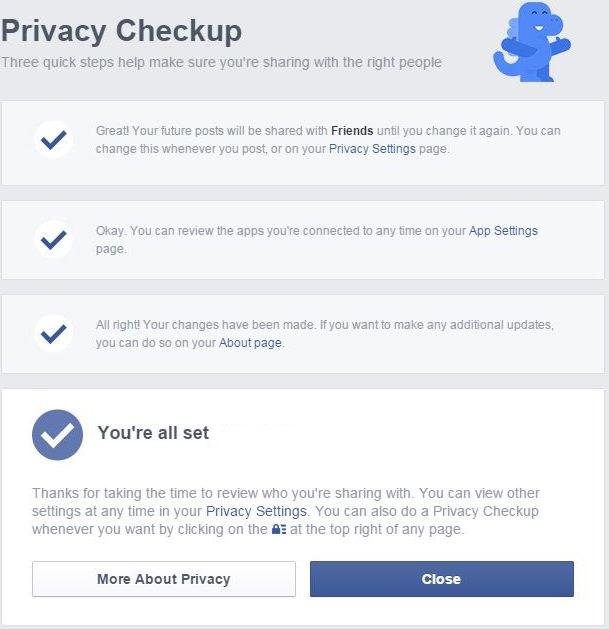
| 6. You’re all set! |
![]() |
|
You can edit extra privacy features like: |
|
|
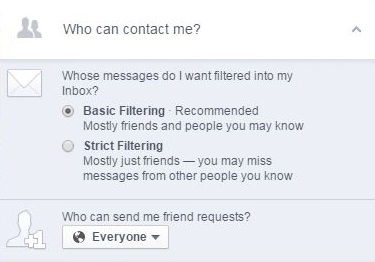
You can choose who's allowed to send you messages and friend requests. |
![]() |
|
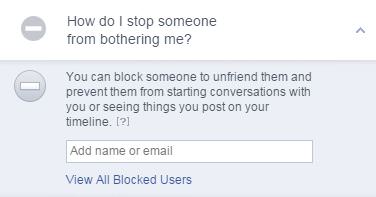
If you're being harassed online, you can block the person by putting their name in the field, then selecting their profile from the drop-down list. |
![]() |
|
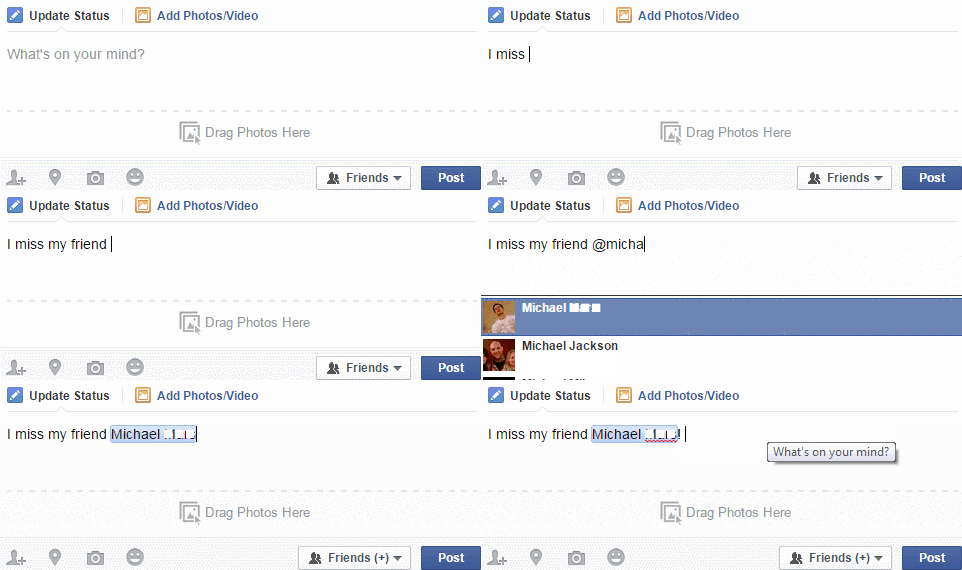
If you want to write a post and make sure a particular friend sees it, add the ‘@’ sign and write their name, and then select the friend from the drop-down list. (You can do this several times and add several friends to one post) |
|
![]() |
|
|
If you found a great site you want your friends to see, it’s simple to share it with your friends: |
|
|
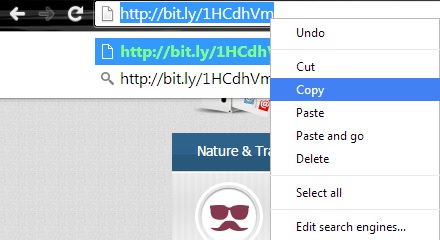
1. Copy the link you want to share |
![]() |
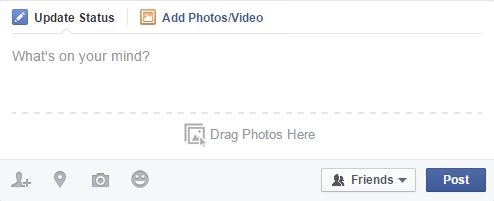
| 2. Begin as you would writing a regular post |
![]() |
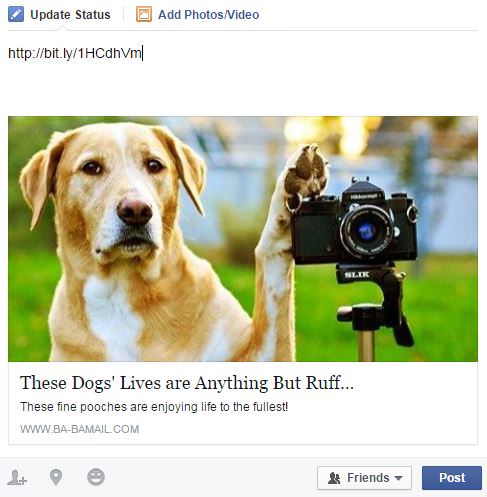
| 3. Paste the link in the text line of the post |
![]() |
|
5. Once a preview of the site appears, you can delete the link from the text box and write your own text instead *Try tagging a friend if you want to make sure they see this link |
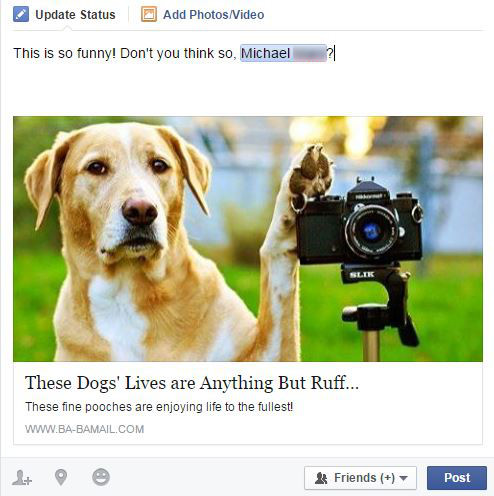
![]() |
|
If someone you don’t recognize is trying to become your “friend” on Facebook, don’t add them automatically. Engage them in a conversation to see if you know them, and if you don’t – that you would like them to see your information and posts. If a friend starts posting odd content, don’t click on it. Try sending them a message to see if they really did post it, or if their account was hacked. Don’t post private information like numbers or photos of your credit card, social security, ID, passport, etc. Those can be found and used by identity thieves. |
|
|
Be safe and enjoy your social media experience with peace of mind |
|

STOP! You're Damaging Your Computer...
Computers are practically indispensable to us these days. The thing is, you could be damaging yours without even knowing it. Looking out for these 16 things.
The Only Guide You Need to Clean Your Computer
Computers collect dust and dirt, causing them to slow down and heat up. Here's how to clean them:
This Free Program Means You'll Never Lose a File Again
We all hate losing files and photos on our computers. Luckily, a free program called Recuva exists to help you get your deleted files back.
Your Computer Mouse Can Do Much More Than You Think...
Knowing how to use your mouse can make computing so much easier than you ever realized. Here are some great tips on how to maximize the use of your mouse, which will increase your overall productivity on the computer.
Advocacy Groups Want the Messenger Kids App to Be Shelved
Despite Facebook's insistence that its Messenger Kids app is safe, child advocacy groups want it to be shelved. Find out more about their concerns.
3:29
Former NSA Hacker Reveals How to Keep Yourself Safe Online
If you want to keep yourself safe online, then make sure that you heed these tips from a former hacker.
12 USEFUL Chrome Extensions That Save Time
Improve your browsing experience with these free Google Chrome extensions.
5 Awesome Google Chrome Settings You Arenโt Using
Google Chromeโs advanced settings have many useful features that will make your browsing experience so much better.
How to Identify an Online Scam Email
Phishing emails are a common way of stealing information, but you can avoid them if you follow these tips that'll help you identify them
Do This to Your Router to Increase Internet Speed
Want a faster and safer internet connection? Then do this to your router...
All You Need to Know About Your Computer
It's that age of computers, and we should all educate ourselves so we all save ourselves time and anxiety when using a computer, a tablet or a phone. This collection of posts will give you insight into many computer-related issues.
Turn Off These 9 Android Settings. They Pose a Risk
Here are some Android settings that you should consider turning off to enhance your deviceโs performance.
10 Warning Signs Youโre About to Fall for a Fake Ad
Thse are 10 red flags that should make you pause before clicking on a social media ad.
Did You Know These Cell Phone Facts Are All Totally False?
People just love to give you advice about smart phones, but it turns out that a lot of this information is false. Never believe these 9 smart phone myths.
Busting 12 Password Myths to Safeguard Your Online Life
Donโt fall for these common password myths.
Replace Your Smartphone if Itโs Showing Any of These Signs
Here are 7 major telltale signs that your smartphone is in need of an upgrade.
Laptop Won't Power Up? Try These 11 Effective Solutions
Laptop not starting? Try these essential steps to troubleshoot it.
7 UNDISCOVERED Apps That are NOT on the Google Play Store!
I canโt believe I never knew about these handy Android apps.
4:28
Update Now or Wait? Comparing iOS 17.7 and iOS 18
If you are wary of updating to iOS 18, watch this video.
7:09
Struggling with Slow iPhone Internet? Try These Tips
iPhone running slow again? Hereโs how you boost your speedโฆ
5 DIY Solutions to Better Organize Your Cords and Cables
Computer cables have an annoying tendency to tangle and create an unseemly mess. Here are some easy ways to prevent that.
7:38
Most People Donโt Know About These Google Maps Features
Google Maps has a ton of new features that most people donโt know about.
9 Useful Blogs Created Specifically For Senior Citizens
Hereโs a wonderful collection of blogs that seniors will find particularly helpful.
Simplify Finances With These Budget Apps for Families
Try these money mangement tools to simplify your finances in 2025
3:35
Want to Increase Your iPad Keyboard Size? Watch This Guide
Want to increase the size of your iPad? Watch this tutorial nowโฆ
7 Safe Ways to Watch Movies & TV Shows Online Free in 2024
Free movie and TV show sites you need to know about in 2024.
Overpaying for Streaming? Hereโs How to Fix That!
Save big on your streaming bills with these simple tips.
ChatGPT's Got Competition: 7 Exciting AI Contenders
Looking for a ChatGPT alternative? Here are a few good ones.
We Found These Awesome Sites for Reading Short Stories!
These are the best places to read short stories online.
Fed Up With Spotify? Try These Alternatives for Free Music
Here are eight of the best platforms where you can listen to music online without spending a dime.
Your Computer Mouse Can Do Much More Than You Think...
Knowing how to use your mouse can make computing so much easier than you ever realized. Here are some great tips on how to maximize the use of your mouse, which will increase your overall productivity on the computer.
0:48
WhatsApp Hack: Read Messages Without Showing Blue Ticks
Learn how to read WhatsApp messages without showing blue ticks in this video.
7:31
How to Edit Your Photos Using 3 Different AI Services
If you shoot weddings, portraits, or anything high-volume, and youโve wondered if AI can really speed things up without cutting corners, this is the no-nonsense breakdown you need.
Firefox Just Got Better: 10 Handy Extensions Youโll Love
With the right add-ons, Firefox can become an indispensable browser that you'll rely on every day.
Exploring the Web Beyond Google: 7 Handy Alternatives
Try some of these non-conventional search engines that you didn't know existed.
5 Hidden Google Chrome Games (And a Bonus)
Tired of Backgammon online? Try Google Chrome's online in-browser collection of games for an easy-to-reach entertainment break. Tic-tac-toe, snake, and more!
12:38
Skype is Dead: 9 Features of Microsoft Teams
These nine lesser-known tools are a must for any Microsoft Teams user.
14 Tips for Using the Computer More Easily
Itโs very likely that in the following computer tips list youโll find information that will surprise you!
Itโs Almost a Crime Not to Use These Free Nifty Websites
Check out 15 really useful websites. They are completely free to use!
7 Tips to Follow When a Computer Hangs or Freezes
Take note of these steps that will help you unfreeze a computer that freezes or hangs regularly.
9 Warning Signs You're Dealing with a Social Media Scam
Donโt fall for these common social media scam ads.
Why Fake Info is Best for These 6 Types of Sites
Always avoid giving your real information on these kinds of websites.
These 10 Keyboard Shortcuts Will Make Life Easy!
These keyboard shortcuts will help you learn the easiest ways to use your computer when your mouse is being less than cooperative!
Not Sure What to Watch Next? Try These 8 Helpful Sites
Not sure what to watch next? Try these helpful sites.
The Most Amazing Websites for Learning Languages for Free
Learn any language for free with these amazing websites!
10 Practical Smartphone Tips and Features Few People Know
These practical tips and clever uses of smartphones will help you start using your phone at its full potential!
9:16
Unlock iOS 18 Early: Your Installation Guide
Follow this guide to install iOS 18 Beta on your device easily.
To enable your Ad-Free Subscription, please fill the fields below
Your subscription was successful, now you can enjoy an ad-free experience!! Note: To make sure you get no ads, please make sure to log in to your account. If you are logged in already, then refresh the page. The subscription can be cancelled at any time.