Suno AI is at the cutting edge of blending music creation with the power of artificial intelligence. Born from the minds of a dynamic group of musicians and AI wizards in Cambridge, MA, and bringing together talent from big names like Meta, TikTok, and Kensho, this platform is truly something special. What sets Suno AI apart is its remarkable ability to craft custom tunes just from your words.
Picture this: you type in what you're feeling, or the vibe you're after, and Suno AI brings it to life with not just melodies and rhythms but also with the nuanced sounds of life itself, from laughter to sighs to the patter of rain. And with their latest brainchild, model v3, we're talking about whipping up full-blown, radio-ready songs in mere moments. It's not just music; it's a platform that can make anyone a talented creator if they have the musical taste and love of all things musical.
How to use it
Accessing the Platform: First, you would need to visit the Suno AI website or access their platform through any app or interface they provide. Registration or sign-in might be required to use the platform's features. Don't worry, it's free unless you want to pay for a premium version. Each day you will get 50 free tokens to create up to 10 songs for free! So unless you really want to create dozens of songs every day, it'll probably be more than you need.
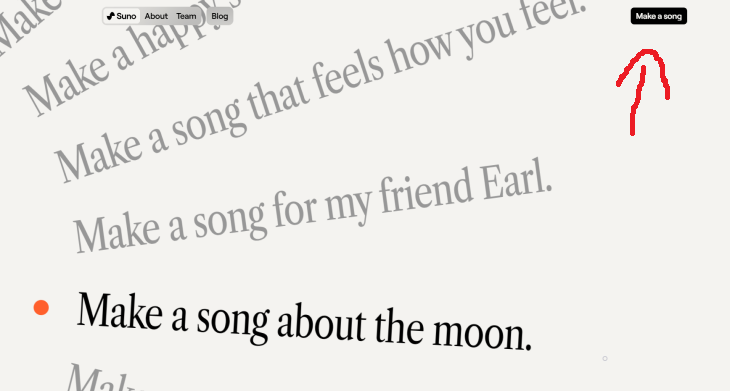
Entering a Prompt: You will see suggestions for songs. Click on Make a Song, located on the upper right corner.
Suno AI's core functionality revolves around creating music based on text prompts. You would enter a description of the type of song or sound you're interested in. This could include the mood, genre, specific instruments, and even lyrics if you have something specific in mind. The platform's AI then interprets this prompt to generate music that matches your description. For example, you could ask for a disco song about your favorite food, or a love ballad dedicated to your partner by name and personality.Customization Options: There are additional options to further customize your song. This includes adjusting the length of the track, tempo, or key. Most importantly, you can even give your OWN lyrics to the song. So you can create entirely original songs in any style or type of voice you want. In addition, you can create instrumental pieces that don't require lyrics at all.
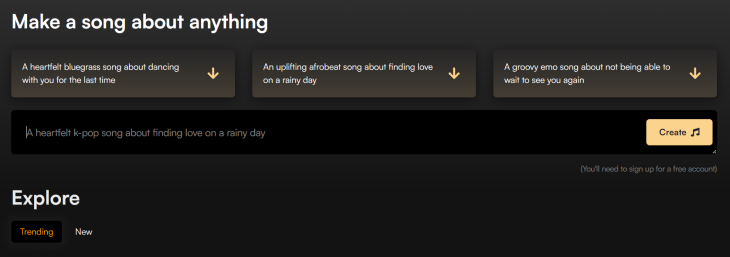
Generation Process: After submitting your prompt and any additional customizations, the AI begins the generation process. This is typically done in seconds or minutes, depending on the complexity of the request and how busy it is right now. Usually it will take around 30-60 seconds. The play button will appear but will not play the song until it is done forming it.
Download or Share: After finalizing the song, you can get a link to the audio or to a video (the song with a cover photo and the name of the song) or share it from the website itself if you want people to see it there and try it out for themselves!
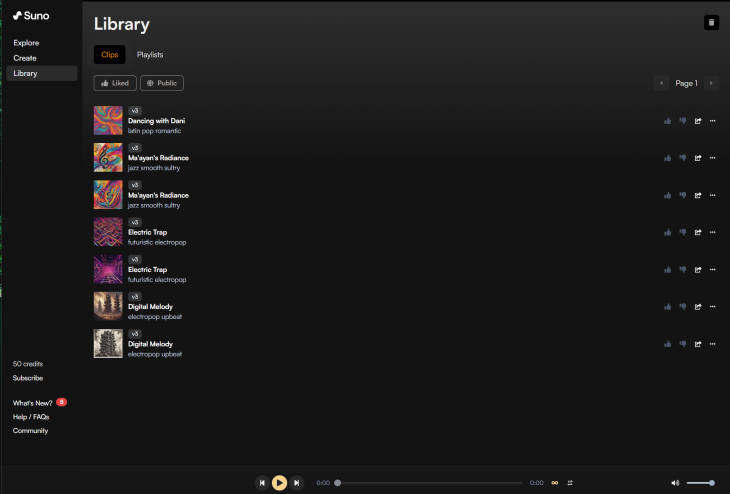
Library: On the left hand side of the screen there is a column with "Explore", "Create" and "Library". In the library you'll be able to see all the musical pieces you've made, edit them or share them with friends and family.
Explore: There are incredibly talented people who have already made some amazing instrumental music pieces, operas and other amazing songs of any variety. The world is filled with people passionate about music, and so the explore option can be very rewarding if you're a music lover.
Now you can create your very own songs! Feeling like a musician yet? Share it with friends and family who also love music!

Your Easy Guide to OpenAI's Amazing Video and Photo Tools
OpenAI has created tools that anyone can use to make videos and photos, even if you're not a computer expert. Let me walk you through them step by step.
You Can Now Speak With ChatGPT on Your Whatsapp!

et’s explore what 1-800-ChatGPT offers, how to use it effectively, and why this innovation makes interacting with AI more seamless.
How to Download Free Windows Software Securely – 7 Tools
Here’s how you can download free Windows software safely and securely.
Best ChatGPT Prompts for 2024
Let's explore some great prompts you can start with on your AI adventure, either for fun or for productivity or knowledge.
12 Amazing Internet Radio Stations to Spice Up Your Day!
Check out these 12 fantastic internet radio stations.
Fed Up With Spotify? Try These Alternatives for Free Music
Here are eight of the best platforms where you can listen to music online without spending a dime.
Overpaying for Streaming? Here’s How to Fix That!
Save big on your streaming bills with these simple tips.
Computer Guide: How to Keep Your Computer Up-to-Date!
Follow this simple guide to update drives and resolve common issues on your Windows computer.
Busting 12 Password Myths to Safeguard Your Online Life
Don’t fall for these common password myths.
Best ChatGPT Prompts for 2024
Let's explore some great prompts you can start with on your AI adventure, either for fun or for productivity or knowledge.
Did You Know These Cell Phone Facts Are All Totally False?
People just love to give you advice about smart phones, but it turns out that a lot of this information is false. Never believe these 9 smart phone myths.
Your Computer Mouse Can Do Much More Than You Think...
Knowing how to use your mouse can make computing so much easier than you ever realized. Here are some great tips on how to maximize the use of your mouse, which will increase your overall productivity on the computer.
6 Reliable Ways to Save YouTube Videos in 2024
Want to download your favorite YouTube videos for offline viewing? Read this now!
Is Your Browser Slowing Down? Fix It With These 10 Tips
Get Chrome running smoothly with these seven easy fixes.
5:23
Phone Security– The Fastest Way to Secure a Hacked Phone
This guide helps you in checking for hackers on your phone, removing them, and locking down your phone.
3:32
The Easy Way to Clean Your Computer's Keyboard
Cleaning a dirty keyboard is quite a straightforward task, as you're about to find out.
The Most Amazing Websites for Learning Languages for Free
Learn any language for free with these amazing websites!
You Didn’t Realize it, But AI Is Making Your Life Better!
Here are thirteen unique ways AI can simplify daily life.
Computer Tips: All You Can Do With the CTRL/Control Key!
The control key has more uses than just copying and pasting. These are the 20 more useful keyboard shortcuts you can do with the control key.
Learn Any New Language with These Awesome Apps!
Learn new languages faster with these AI-powered apps.
10 Warning Signs You’re About to Fall for a Fake Ad
Thse are 10 red flags that should make you pause before clicking on a social media ad.
Do This to Your Router to Increase Internet Speed
Want a faster and safer internet connection? Then do this to your router...
7:09
Struggling with Slow iPhone Internet? Try These Tips
iPhone running slow again? Here’s how you boost your speed…
2:09
Guide: Download Netflix Videos on Any Laptop & PC
Want to watch your favorite Netflix content offline? This easy guide has you covered.
5 Awesome Google Chrome Settings You Aren’t Using
Google Chrome’s advanced settings have many useful features that will make your browsing experience so much better.
9:16
Unlock iOS 18 Early: Your Installation Guide
Follow this guide to install iOS 18 Beta on your device easily.
10 Practical Smartphone Tips and Features Few People Know
These practical tips and clever uses of smartphones will help you start using your phone at its full potential!
5 DIY Solutions to Better Organize Your Cords and Cables
Computer cables have an annoying tendency to tangle and create an unseemly mess. Here are some easy ways to prevent that.
It’s Almost a Crime Not to Use These Free Nifty Websites
Check out 15 really useful websites. They are completely free to use!
10 Popular Tech Myths You Need To Stop Believing Now
Here we bust some popular and common myths about everyday tech that people still believe in.
Watch Classic Cinema for Free with These Sites!
Here's where you can watch hundreds of classic movies online for free.
2025's Online Threats Will Be More Sophisticated Than Ever
A look at the cyber scams that you need to be wary of this year.
5 Best Online Platforms for Couples' Counselling
We've researched the options and returned with the 5 best platforms for online couples' therapy.
Selling Used Stuff? Try These Amazing Apps
You can now sell your used household clothes and other items through some amazing apps.
Smishing 101: How to Recognize Scam Text Messages
This is how you recognize and handle fraudulent or scam text messages, also known as smashing.
The Most Reliable Cloud Storage Services for 2025
Here’s a closer look at some of the best cloud storage services to consider in 2025.
7 UNDISCOVERED Apps That are NOT on the Google Play Store!
I can’t believe I never knew about these handy Android apps.
Laptop Won't Power Up? Try These 11 Effective Solutions
Laptop not starting? Try these essential steps to troubleshoot it.
9 Lesser Known Free Websites for Learning in 2025
A list of 9 great free learning websites that cover a variety of subjects, from coding and science to business and language learning.
Thirsty For Knowledge? Check Out These YouTube Channels
If you love to learn new things with each passing day, then get ready to discover a gold mine full of educational tools!
These 5 Free Tools Can Help You Save Money Today!
These free apps and sites make saving money a breeze.
Master AliExpress Shopping with These Expert Tips
Here’s how to shop smart and save on AliExpress.
How to Download Free Windows Software Securely – 7 Tools
Here’s how you can download free Windows software safely and securely.
7 Clear Indicators Your Home Router Needs to Be Changed
Is your router in need of an upgrade? Watch out for these signs.
These Websites ONLY Share Positivity and Good Stories!
Say goodbye to negativity with these positive news platforms.
I Bet You Didn't Know You Could Do THIS on Google Maps
Here are all of the things you can do on Google Maps that you never knew you could.
Skype Is Shutting Down – Try These Alternatives Now
With Skype officially retiring, here are some handy alternatives you should try.
To enable your Ad-Free Subscription, please fill the fields below
Your subscription was successful, now you can enjoy an ad-free experience!! Note: To make sure you get no ads, please make sure to log in to your account. If you are logged in already, then refresh the page. The subscription can be cancelled at any time.