Unlike the youth of today, we seniors were not born with a smartphone in one hand and a mouse in the other. In fact, many of us remember a time when people had rotary phones, and a web was something spiders made. In this modern era, computers are everywhere and knowing how to position the different components can make a difference between a stiff and sore neck and shoulders, and an enjoyable experience. |
| Source |
|
First, let’s start with the lighting in the room – To minimize strain to your eyes, make sure you put the computer in a dimly-lit room to avoid glare from the screen. If you are going to work with papers and documents, make sure that you have a table lamp. Don’t be afraid to experiment with different light levels to find what is most comfortable for you. |

![]() |
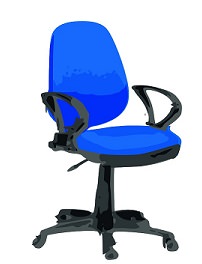
Second, your computer chair – Since you are going to be spending quite some time on that chair, you should invest in one that is both comfortable and offers good back support. The chair needs to leave you enough room to fit your legs under the desk. If the chair has arm support, make sure that they will not interrupt your usage by preventing you from sitting close enough to the keyboard. Invest in an adjustable chair with a curved back that offers lower-back support. Try a few chairs at the store, choose the one that feels more comfortable. |
|
Third, foot support – Now that you’ve taken care of your eyes and back, let’s tend to your feet. When you’re at the computer, your feet must be comfortably placed on the ground. If they are not, you may need a small stool for your feet. |
|
Fourth, positioning the monitor – The best way to test if your screen is properly positioned, sit by your desk and lean back, then hold your arms out in front of you. If you can touch the middle of the screen then your screen is positioned correctly for both your eyes and height. If you need to tilt your head to view the screen, then it is not properly placed. If you still haven’t gotten an LCD screen, you may want to consider it since they’re easier on the eyes than the old CRT screens. |

![]() |
|
Fifth, Keyboard positioning – The most important advice I can give a senior computer user is to make sure that their keyboard is positioned correctly. A properly positioned keyboard allows for natural posture while typing. Make sure that the keyboard is at elbow-height when you sit. If your wrists are angled when you type, you’re bound to suffer from forearm fatigue and it may even lead to carpal tunnel syndrome. Consider purchasing an ergonomic keyboard. |

Sixth, positioning your mouse – One of the most common work-related injuries in the last 20 years has been carpal tunnel syndrome. The rise in numbers of this infliction is due to incorrectly placed mice and lack of wrist support. You need to make sure that the mouse is placed on a stable surface in the same height as your keyboard, and that your hand feels like it’s in a neutral position. Consider purchasing a mouse pad with a silicone-gel pad for your wrist, or buying a “trackball” mouse, which requires less hand movement than a regular mouse. |
| Source |
|
Seventh, positioning documents – If you work with papers and other documents, you will want them to be as close to the screen as possible. Use a document holder to keep them at screen height, this will minimize the strain on your neck when you need to look at the papers. |
|
|
| Source |
| Title image source |

Got Aches & Pains? It Could Be an Issue with Your Organs
Depending on where the ache or pain is, unexplained pain may be associated with an organ.
This Guide Is All You Need to Relieve Your Joint Pain
If you're one of those unlucky individuals who suffers regularly from joint pain, make sure you refer to this guide to find out how to relieve it.
5:03
This Video Saved Me From Wrist Pain. Let it Help You Too
Stretching your tendons can relieve pain better than stretching muscles. Here are 3 stretched for your hands.
Guide: How to Protect Your Eyes When On the Computer
Eye strain can be a serious problem if you work at a computer for long hours each day. Luckily, there are various things you can do in order to prevent it.
Guide: How to Treat Foot Pain (Plantar Fasciitis)
Do you ever get foot pain? This guide will tell you all you need to know about plantar fasciitis.
Become a Windows Computer Wiz by Using These 11 Tricks
These simple tips and tricks for using a Windows PC will help you use your computer and turn you into a Windows PC master!
The Most Amazing Websites for Learning Languages for Free
Learn any language for free with these amazing websites!
The Most Reliable Cloud Storage Services for 2025
Hereโs a closer look at some of the best cloud storage services to consider in 2025.
2:09
Guide: Download Netflix Videos on Any Laptop & PC
Want to watch your favorite Netflix content offline? This easy guide has you covered.
5 Best Online Platforms for Couples' Counselling
We've researched the options and returned with the 5 best platforms for online couples' therapy.
10 Warning Signs Youโre About to Fall for a Fake Ad
Thse are 10 red flags that should make you pause before clicking on a social media ad.
Did You Know These Cell Phone Facts Are All Totally False?
People just love to give you advice about smart phones, but it turns out that a lot of this information is false. Never believe these 9 smart phone myths.
7 UNDISCOVERED Apps That are NOT on the Google Play Store!
I canโt believe I never knew about these handy Android apps.
8 Mistakes That Shorten the Life of Your Electronics
Your gadgets and household electronics wonโt last long if you keep repeating these common mistakes.
6 Reliable Ways to Save YouTube Videos in 2024
Want to download your favorite YouTube videos for offline viewing? Read this now!
7:09
Struggling with Slow iPhone Internet? Try These Tips
iPhone running slow again? Hereโs how you boost your speedโฆ
Secure Your Data: 5 Must-Have Privacy Apps
A look at five apps that help you take back control of your digital footprint, including their strengths, trade-offs, and where to download them safely.
Is DeepSeek Worth the Hype? A Closer Look at Its Features
DeepSeek is the new AI chatbot in town. But is worth the hype?
15:24
15 Tech Hacks That Will Make Your Life Way Easier
These practical tips are designed to improve your daily tech experience.
1:56
No More Clutter! Free Up WhatsApp Storage in Minutes
Running out of storage on your phone because of WhatsApp? Try these hacks now.
Your Easy Guide to OpenAI's Amazing Video and Photo Tools
OpenAI has created tools that anyone can use to make videos and photos, even if you're not a computer expert. Let me walk you through them step by step.
2:35
6 Simple Tips for Taking Screenshots on Windows
Taking screenshots on Windows is now super easy. Just note these tips.
5 DIY Solutions to Better Organize Your Cords and Cables
Computer cables have an annoying tendency to tangle and create an unseemly mess. Here are some easy ways to prevent that.
These Websites ONLY Share Positivity and Good Stories!
Say goodbye to negativity with these positive news platforms.
Simplify Finances With These Budget Apps for Families
Try these money mangement tools to simplify your finances in 2025
7:31
How to Edit Your Photos Using 3 Different AI Services
If you shoot weddings, portraits, or anything high-volume, and youโve wondered if AI can really speed things up without cutting corners, this is the no-nonsense breakdown you need.
Privacy Settings You Should Change in Chrome Right Now
These Chrome settings should always be disabled.
12 USEFUL Chrome Extensions That Save Time
Improve your browsing experience with these free Google Chrome extensions.
Turn Off These 9 Android Settings. They Pose a Risk
Here are some Android settings that you should consider turning off to enhance your deviceโs performance.
15:16
Get Smarter: How Do Hard Drives Work?
How do hard drives built and how do they work? All is explained in this video.
0:48
WhatsApp Hack: Read Messages Without Showing Blue Ticks
Learn how to read WhatsApp messages without showing blue ticks in this video.
The 7 Backup Mistakes That Leave Your Files Vulnerable
Hereโs what most people get wrong about backups.
3:35
Want to Increase Your iPad Keyboard Size? Watch This Guide
Want to increase the size of your iPad? Watch this tutorial nowโฆ
Make Google Maps Better with These Handy Tools
These add-ons make Google Maps so much better!
9:43
Tired of Google Photos Storage Limits? Try These Solutions
Get more space in your Google Photos account with these useful hacks.
7 Reasons Why Your Computer is Running Abnormally Slow
There are many things that could be slowing your computer down and you'll find 7 of them in this article. Take a look!
5:23
Phone Securityโ The Fastest Way to Secure a Hacked Phone
This guide helps you in checking for hackers on your phone, removing them, and locking down your phone.
17:20
Discover a Feature of Windows That's Super Helpful
Learn how to use some advanced new features of Windows 10 that you probably weren't aware of.
3:28
Easy Tips for Connecting Your Laptop to an External Screen
Watch this helpful tutorial to learn how to connect your laptop to a monitor.
You Should Bookmark These Incredibly Useful Sites
Make sure that you bookmark these handy websites!
9 Lesser Known Free Websites for Learning in 2025
A list of 9 great free learning websites that cover a variety of subjects, from coding and science to business and language learning.
Fed Up With Spotify? Try These Alternatives for Free Music
Here are eight of the best platforms where you can listen to music online without spending a dime.
5 Things to Never Store on Your Smartphone
Stop using your smartphone as a master repository for saving all kinds of information. It may be dangerous...
Making These Email Mistakes Comes Off As Rude or Annoying
When sending an email, the last thing you want is to come off as impolite or annoying. Here are 5 common email mistakes to avoid.
If You Arenโt Doing these Things, Your PC WILL Wear Out...
All the basics of computer maintenance.
4:08
Guide: Download All Google Photos in a Few Clicks!
Want to download all your Google your photos and videos in a few clicks? Watch thisโฆ
These 5 Free Tools Can Help You Save Money Today!
These free apps and sites make saving money a breeze.
To enable your Ad-Free Subscription, please fill the fields below
Your subscription was successful, now you can enjoy an ad-free experience!! Note: To make sure you get no ads, please make sure to log in to your account. If you are logged in already, then refresh the page. The subscription can be cancelled at any time.