|
Have you ever had something on your phone you wanted to save at that moment? A phone number or an image? Maybe just a conversation you had with someone. We all need important information shown or saved for a later use. We might even use pictures like that to capture a shot of a problem we have with our phone, and send it to someone that can help us. To help you do that, here's a handy, short and easy guide to show you how you can take screenshots of your smartphone screen. |
|
iPhone iPad and other iOS users:
|
|
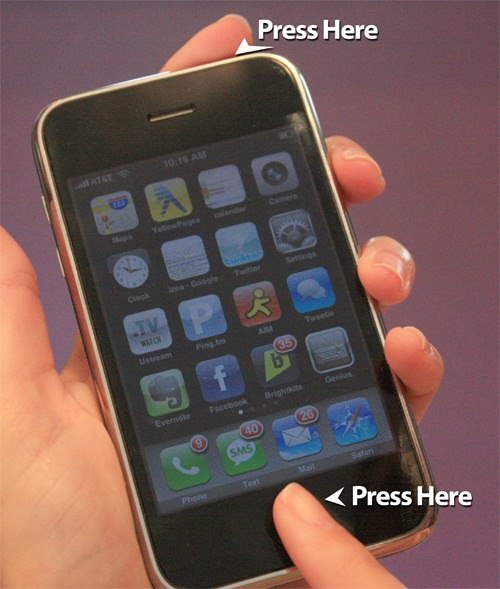
You'll know that you have taken a screenshot when the screen will briefly flash and, if you have sound enabled, hear the sound of a camera shutter just like any other picture you take. Any screenshot you took can be found in your main photo section or app. Form there, you can Email it to yourself or others and send it as part of a text message. |
|
Android 4.0 and above:
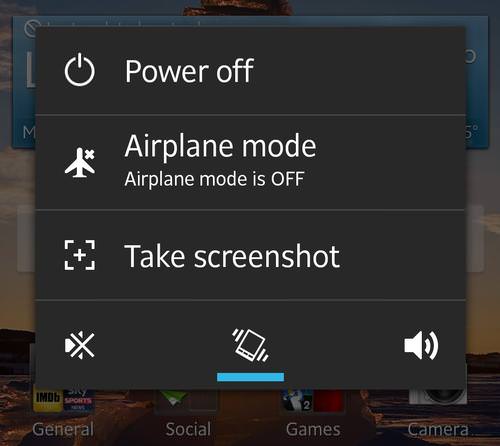
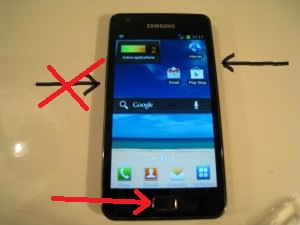
Much like the iOS phones people with a relatively new and up to date Android devices can use one of two methods to make a screen capture. The first is to hold the power/sleep button until the options menu will show up, there you will have an option to make a screenshot. Press it, and your done.
|
|
The pictures you take will be stored in your gallery in a new folder, often called “Screenshots”. From here you can pick any picture you like and share it in any way your phone is capable of. |
|
Android 2.3 and below: Since these phones are a bit out of date you'll need to download a software from the Android Web site to your computer. The thing you are looking for is called Android SDK, download and install it. Android SDK is a development tool that allows you to do certain actions on your phone form the computer. Once the software is installed plug in your phone to your computer via a USB cable. Once your phone is plugged in, enter the "tool" option of the Android SDK software and click the "ddms" icon. Find the type of phone you are using and click the "device" icon. You should now see "screen capture" and an image of your phone. Find whatever you want to capture by using the phone itself and press save on your computer to take a picture. Due to the fact that this option is a bit too complex and clumsy, we recommend you don't try it unless you really really need to make a screen capture of something. |

Lost Your Phone? Don't Panic - Here's How To Find It Again
Lost your phone? Maybe it was stolen? Use this quick and easy guide to locate your phone or at least prevent others from using it.
They Say the Best Apps In Life Are Free: Best Apps of 2018!
There are many great apps, but the greatest of all are actually FREE! Here are 10 great free apps for smartphones.
20 Handy Android & iPhone Hacks and Features To Know About
Here is a look at some truly useful tips and tricks for Android and iPhone users that are bound to make your experience better.
1:22
Are Smartphones Making Us Stupid? This Will Surprise You!
If you use a smartphone you need to see this!
If Your Windows PC Is Slowing Down, You Should Read This
NO - a slowing Windows PC isn't a fact of life. You simply need to know a few tips and tricks that you can apply to yours in order to speed it up! Read on...
Learn How to Protect Yourself Using a Public Wi-Fi Network
Public Wi-Fi networks are incredibly convenient, but they're not always safe. Here are 10 ways of protecting yourself when using public Wi-Fi.
7 Tips to Follow When a Computer Hangs or Freezes
Take note of these steps that will help you unfreeze a computer that freezes or hangs regularly.
Computer Guide: How to Clear Space on Your Google Account
How to easily free up storage space on your Google Drive without paying for more storage.
Why Fake Info is Best for These 6 Types of Sites
Always avoid giving your real information on these kinds of websites.
I Bet You Didn't Know You Could Do THIS on Google Maps
Here are all of the things you can do on Google Maps that you never knew you could.
How to Solve Windows 11's Most Annoying Errors
In this article, we’ll explain the frequent problems people run into on Windows 11 and walk through easy, no-fuss fixes.
5 DIY Solutions to Better Organize Your Cords and Cables
Computer cables have an annoying tendency to tangle and create an unseemly mess. Here are some easy ways to prevent that.
Skype Is Shutting Down – Try These Alternatives Now
With Skype officially retiring, here are some handy alternatives you should try.
15:16
Get Smarter: How Do Hard Drives Work?
How do hard drives built and how do they work? All is explained in this video.
9 Useful Blogs Created Specifically For Senior Citizens
Here’s a wonderful collection of blogs that seniors will find particularly helpful.
8:31
20 Terrifically Helpful Chrome Keyboard Shortcuts
Welcome to the ultimate guide to mastering 20 essential keyboard shortcuts for the Google Chrome browser!
1:56
No More Clutter! Free Up WhatsApp Storage in Minutes
Running out of storage on your phone because of WhatsApp? Try these hacks now.
4:08
Guide: Download All Google Photos in a Few Clicks!
Want to download all your Google your photos and videos in a few clicks? Watch this…
It’s Almost a Crime Not to Use These Free Nifty Websites
Check out 15 really useful websites. They are completely free to use!
Do You Eat Out Often? These 7 Apps Will Save You Money!
If you’re struggling to keep up with your monthly food budget, you’re not alone. Here are 7 dinning apps that will save you money every time you eat.
Did You Know These Cell Phone Facts Are All Totally False?
People just love to give you advice about smart phones, but it turns out that a lot of this information is false. Never believe these 9 smart phone myths.
9:43
Tired of Google Photos Storage Limits? Try These Solutions
Get more space in your Google Photos account with these useful hacks.
7 UNDISCOVERED Apps That are NOT on the Google Play Store!
I can’t believe I never knew about these handy Android apps.
Turn Off These 9 Android Settings. They Pose a Risk
Here are some Android settings that you should consider turning off to enhance your device’s performance.
3:32
The Easy Way to Clean Your Computer's Keyboard
Cleaning a dirty keyboard is quite a straightforward task, as you're about to find out.
12 USEFUL Chrome Extensions That Save Time
Improve your browsing experience with these free Google Chrome extensions.
Computer Guide: Comparing Skype and Microsoft Teams
This article will explain why Skype is going away, how Teams fills its shoes, and guide you through using Teams for your personal video calls, screen shares, and chats.
5:02
How to Transfer Data From Your Old iPhone to The New One
Got a new iPhone? Here's how you can move all your data from your old iPhone to the new one.
7 Websites With Free Useful Apps for Your Computer
we've gathered 7 recommended repositories where you can find almost any software you might need for Windows – and at no cost!
0:48
WhatsApp Hack: Read Messages Without Showing Blue Ticks
Learn how to read WhatsApp messages without showing blue ticks in this video.
Do This to Your Router to Increase Internet Speed
Want a faster and safer internet connection? Then do this to your router...
Who Traces Your Emails? Learn How to Detect Email-Tracking
40% of emails are being tracked by somebody without people's consent or notification, which means you'd better learn how to protect your privacy...
Computer Tips: All You Can Do With the CTRL/Control Key!
The control key has more uses than just copying and pasting. These are the 20 more useful keyboard shortcuts you can do with the control key.
Guide: How to Unlock Your Phone Without a Passcode
Forgot your phone passcode? Don't panic.Just follow these steps.
What Do Those 12 'F' Keys on Your Keyboard Do?
Find out what those 12 curious F keys on your keyboard mean.
2:27
Tutorial: How to Uninstall Apps on Your Windows 11 PC
How to uninstall apps on your windows PC.
23:04
ChatGPT: 30 Tips to Using and Working with the AI
In this video, we’re breaking down 30 practical tips to help you use ChatGPT more effectively
7 Reasons Why Your Computer is Running Abnormally Slow
There are many things that could be slowing your computer down and you'll find 7 of them in this article. Take a look!
Guide: How to Sign a PDF Without Printing it First
This guide will teach you how to sign PDF files digitally without having to print them.
11 Free AI Tools That Actually Help You Get Stuff Done
Have you tried any of these useful free AI apps?
Simplify Finances With These Budget Apps for Families
Try these money mangement tools to simplify your finances in 2025
Can’t Connect to the Internet? Here’s What To Do
Not being able to connect to the internet is one of the most pestering things. This is why it might be happening and easy solution to fix it.
Watch Classic Cinema for Free with These Sites!
Here's where you can watch hundreds of classic movies online for free.
PowerToys: The Best Free Microsoft App for Windows Users
In this article, we'll introduce you to this toolbox and show you which 23 useful tools are waiting for you there.
9 Warning Signs You're Dealing with a Social Media Scam
Don’t fall for these common social media scam ads.
What To Do When Windows Will NOT Boot
There's nothing more frustrating than your computer refusing to boot. Here is what you can do to fix it when the system won't even initialize.
These Websites ONLY Share Positivity and Good Stories!
Say goodbye to negativity with these positive news platforms.
To enable your Ad-Free Subscription, please fill the fields below
Your subscription was successful, now you can enjoy an ad-free experience!! Note: To make sure you get no ads, please make sure to log in to your account. If you are logged in already, then refresh the page. The subscription can be cancelled at any time.
In any iOS mobile device you can take a screenshot by clicking one button while clicking and holding another.