|
In this day and age, almost all of our information is saved either in our computer or on an external drive, allowing us to access and transfer many photos instantly. However, despite the improved availability and speed of access to our files, deleting them by mistake can also be easy.

Imagine sending your computer to get repaired, and when you get it back, it’s without your precious photos from your kid’s wedding. All of those precious memories gone in an instant. Luckily for you, not all is lost – you can restore most (if not all) of your lost data by using a simple, free program called Recuva. |
![]() |
| Source |
|
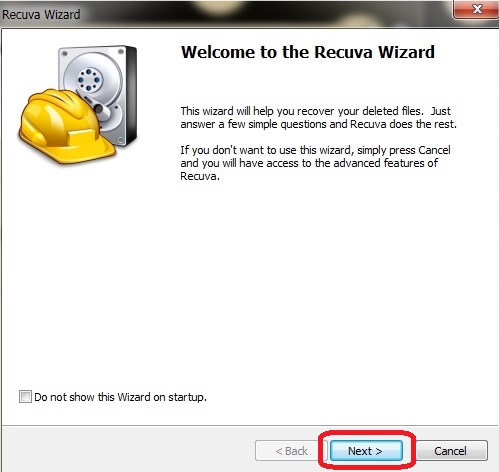
How does this work? When a file on your computer is deleted, only the link to it has been removed, making the file invisible. What that means is that the data is still on your hard drive or external drive, and programs like Recuva can search and recover the data (unless it has been overwritten – then you need to take it to a lab). If you recently deleted a file by accident, Recuva will be able to find it and restore it. How do I use it? First, download the program HERE and install it. After the installation, the Recuva window will open, displaying the “Recuva Wizard”, meant to simplify your use of the program. Click on “Next” when you’re ready. |
![]() |
|
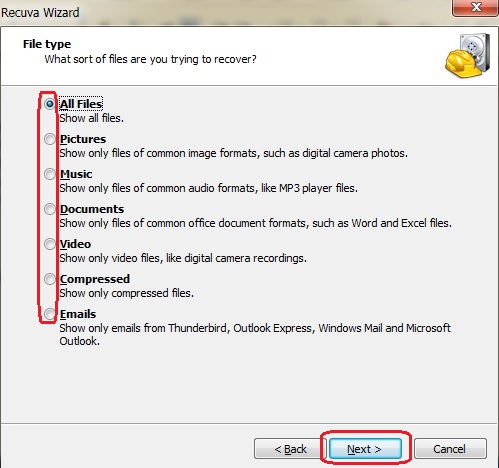
The next window will ask you what type of file(s) you’re looking for, so select the appropriate kind. If you’re unsure, select “All Files” instead and hit “Next”. |
![]() |
|
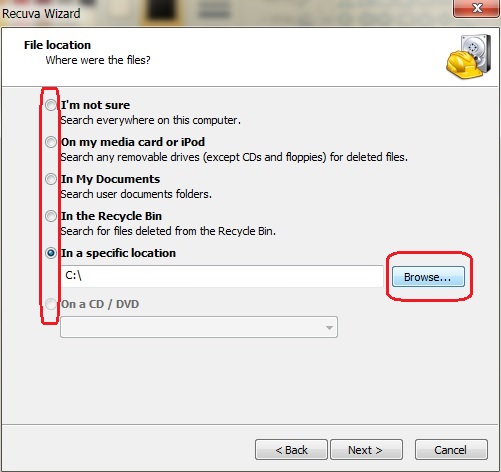
In the next window, you’ll be asked where the missing file was. If you don’t know, select “I’m not sure”, prompting the program to search the entire computer. If you know exactly where it is, click on “Browse” to find the directory it is in and then on “Next” to proceed. |
![]() |
|
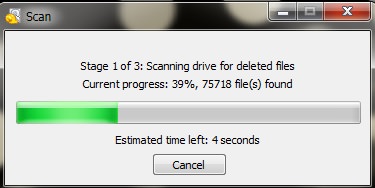
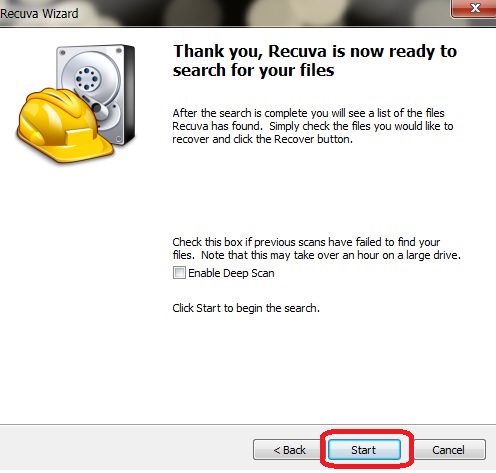
In the next window, click on “Start” – this will begin a scan of your computer for any recoverable files. |
![]() |
![]() |
| Scan window |
|
At the end of the scan, a new window will open up with a list of all the recoverable files that the program found. The files will have a circle on the left-hand side in either green, yellow or red. Green indicates that the file can be recovered, yellow indicates that the file may or may not be recoverable, and red indicates unrecoverable files. |
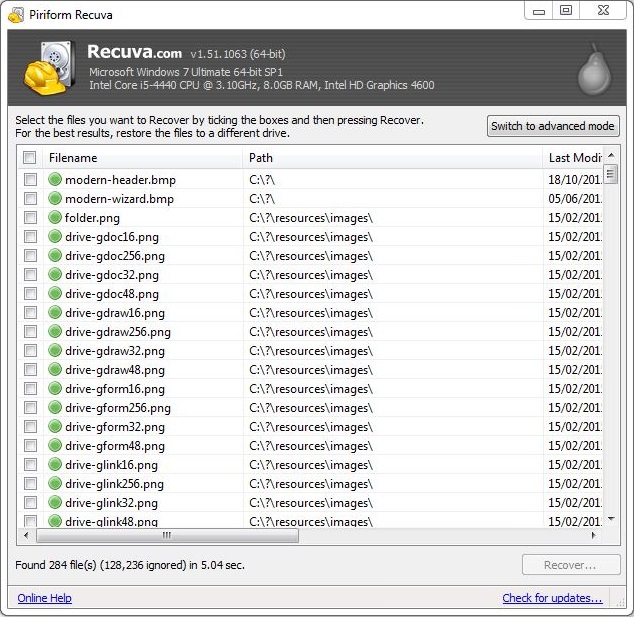
![]() |
|
Locate the files you want to recover and check the box next to it. When you’re done, click on the “Recover” button at the bottom right of the window. |
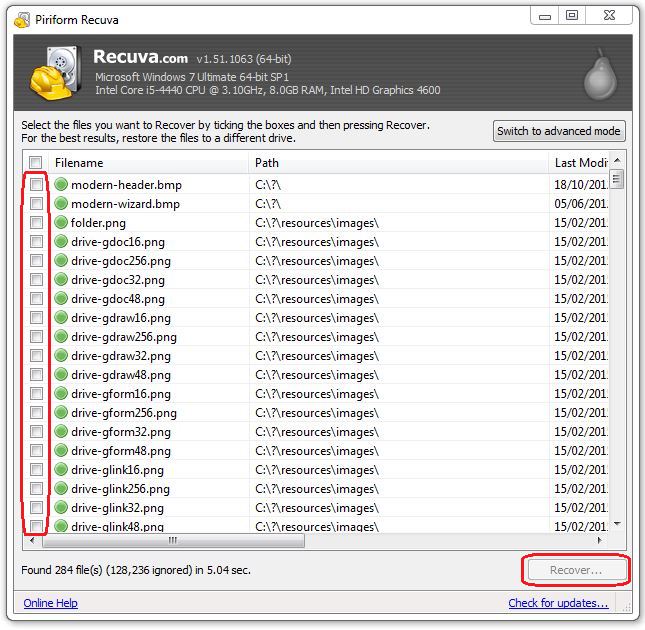
![]() |
|
After clicking “Recover”, a new window will prompt you to select a folder you would like to recover the files into, and once selected, click “OK” to restore the file to that folder. |
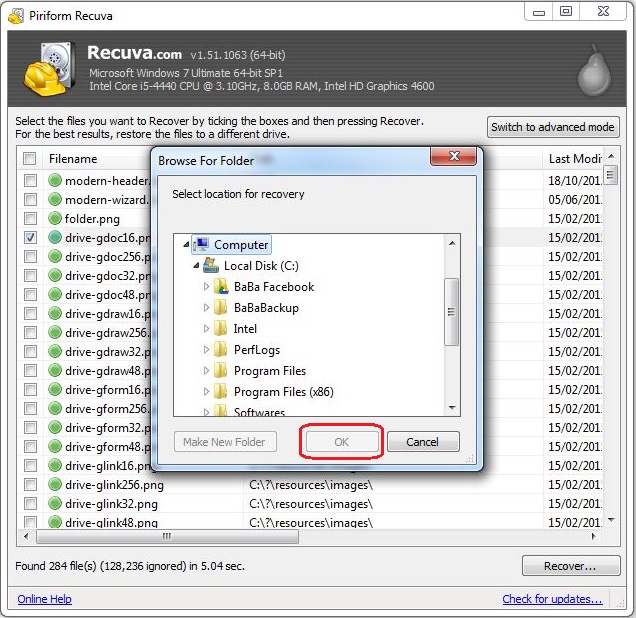
![]() |
|
Once the process is complete, you will see this notification, containing information on all the files that were successfully (or unsuccessfully) recovered. |
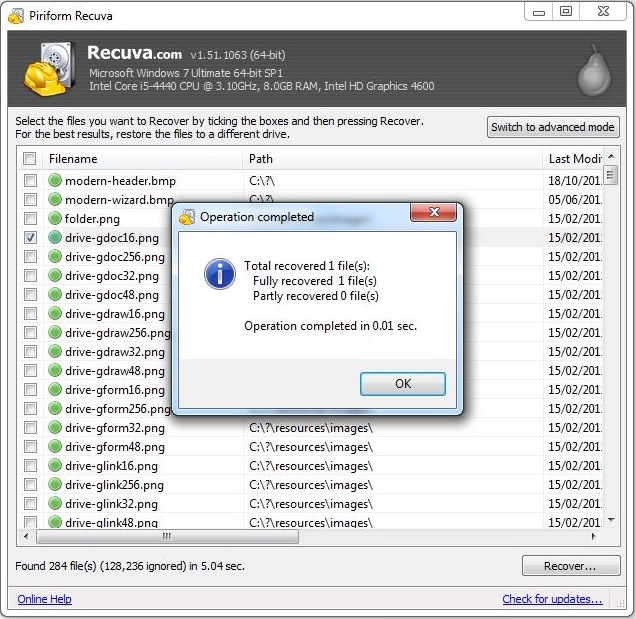
![]() |
|
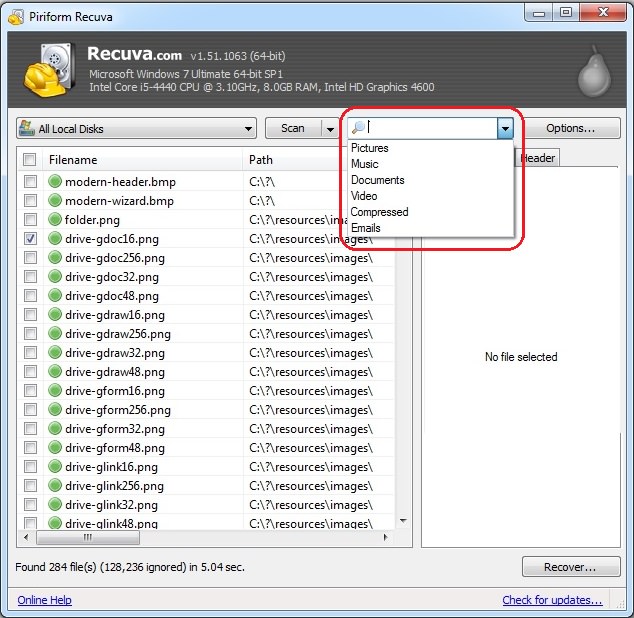
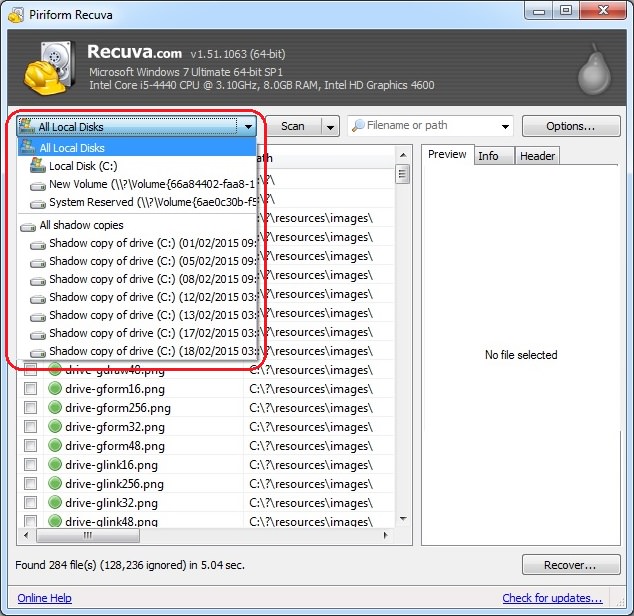
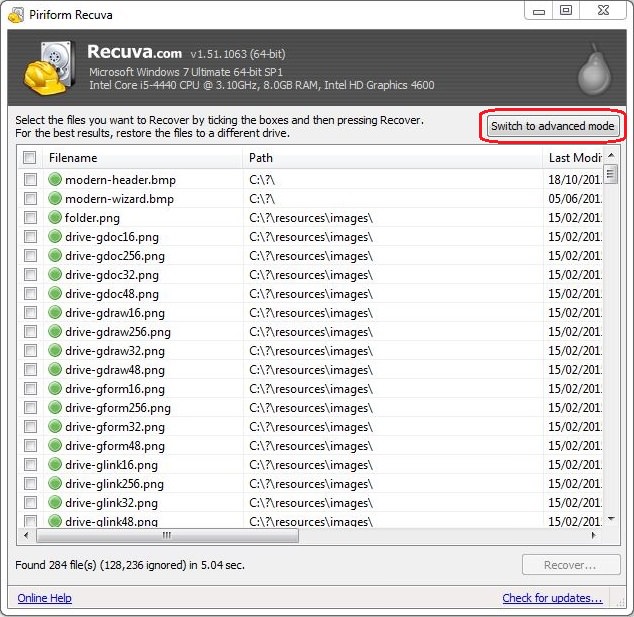
If you feel confident, you can use the advanced mode, which will allow you to search for specific file types, file name, or location. |
![]() |
![]() |
| Search by file name or type |
![]() |
| Search by location |
|
Please note – as time passes and with regular use, the quality of deleted files deteriorates, eventually making them unrecoverable. The sooner you perform the scan – the more likely it will be that the file will be salvageable. |

The Ultimate Computer Guide Collection
A comprehensive collection of computer tips for beginners and intermediates.
Become a Windows Computer Wiz by Using These 11 Tricks
These simple tips and tricks for using a Windows PC will help you use your computer and turn you into a Windows PC master!
Your Computer Mouse Can Do Much More Than You Think...
Knowing how to use your mouse can make computing so much easier than you ever realized. Here are some great tips on how to maximize the use of your mouse, which will increase your overall productivity on the computer.
WI-FI GUIDE: Stop People Hacking Your Wi-Fi Password
This is how you set up a password for your wireless Wi-Fi account, to stop people using your connection for free.
STOP! You're Damaging Your Computer...
Computers are practically indispensable to us these days. The thing is, you could be damaging yours without even knowing it. Looking out for these 16 things.
What To Do When Windows Will NOT Boot
There's nothing more frustrating than your computer refusing to boot. Here is what you can do to fix it when the system won't even initialize.
6 Reliable Ways to Save YouTube Videos in 2024
Want to download your favorite YouTube videos for offline viewing? Read this now!
Who Traces Your Emails? Learn How to Detect Email-Tracking
40% of emails are being tracked by somebody without people's consent or notification, which means you'd better learn how to protect your privacy...
How to Download Free Windows Software Securely โ 7 Tools
Hereโs how you can download free Windows software safely and securely.
5 Hidden Google Chrome Games (And a Bonus)
Tired of Backgammon online? Try Google Chrome's online in-browser collection of games for an easy-to-reach entertainment break. Tic-tac-toe, snake, and more!
9 Useful Blogs Created Specifically For Senior Citizens
Hereโs a wonderful collection of blogs that seniors will find particularly helpful.
9:42
Here's How to Make Your iPhone Run Like New Again - 9 Tips
Save space on your iPhone with these simple hacks.
Replace Your Smartphone if Itโs Showing Any of These Signs
Here are 7 major telltale signs that your smartphone is in need of an upgrade.
You Didnโt Realize it, But AI Is Making Your Life Better!
Here are thirteen unique ways AI can simplify daily life.
Gboard Secrets: 7 Handy Features You're Not Using Yet
Make the most out of Gboard with these awesome tips and tricls.
How to Spot Fake Online Reviews: A Shopperโs Guide
Here are practical tips to help you spot fake Amazon reviews.
10 Warning Signs Youโre About to Fall for a Fake Ad
Thse are 10 red flags that should make you pause before clicking on a social media ad.
These 10 Keyboard Shortcuts Will Make Life Easy!
These keyboard shortcuts will help you learn the easiest ways to use your computer when your mouse is being less than cooperative!
2:09
Guide: Download Netflix Videos on Any Laptop & PC
Want to watch your favorite Netflix content offline? This easy guide has you covered.
10 Popular Tech Myths You Need To Stop Believing Now
Here we bust some popular and common myths about everyday tech that people still believe in.
Exploring the Web Beyond Google: 7 Handy Alternatives
Try some of these non-conventional search engines that you didn't know existed.
Firefox Just Got Better: 10 Handy Extensions Youโll Love
With the right add-ons, Firefox can become an indispensable browser that you'll rely on every day.
4:28
Update Now or Wait? Comparing iOS 17.7 and iOS 18
If you are wary of updating to iOS 18, watch this video.
7 Websites With Free Useful Apps for Your Computer
we've gathered 7 recommended repositories where you can find almost any software you might need for Windows โ and at no cost!
This Free Website Will Let You Play the Most Fun Mazes!
Do you love mazes and navigation challenges? Look no further than this fun site!
Not Sure What to Watch Next? Try These 8 Helpful Sites
Not sure what to watch next? Try these helpful sites.
What Do Those 12 'F' Keys on Your Keyboard Do?
Find out what those 12 curious F keys on your keyboard mean.
Is Your Browser Slowing Down? Fix It With These 10 Tips
Get Chrome running smoothly with these seven easy fixes.
The 7 Backup Mistakes That Leave Your Files Vulnerable
Hereโs what most people get wrong about backups.
Top 5 Apps for Checking on Your Petโs Health
These apps were selected based on their functionality, user reviews, and relevance to health monitoring, as highlighted by pet care and technology sources.
Best ChatGPT Prompts for 2024
Let's explore some great prompts you can start with on your AI adventure, either for fun or for productivity or knowledge.
Did You Know These Cell Phone Facts Are All Totally False?
People just love to give you advice about smart phones, but it turns out that a lot of this information is false. Never believe these 9 smart phone myths.
These Apps Make Every Photo Look Amazing!
No satisfied with your smartphone photos? Try these super apps today!
0:48
WhatsApp Hack: Read Messages Without Showing Blue Ticks
Learn how to read WhatsApp messages without showing blue ticks in this video.
3:28
Easy Tips for Connecting Your Laptop to an External Screen
Watch this helpful tutorial to learn how to connect your laptop to a monitor.
Watch Classic Cinema for Free with These Sites!
Here's where you can watch hundreds of classic movies online for free.
7 UNDISCOVERED Apps That are NOT on the Google Play Store!
I canโt believe I never knew about these handy Android apps.
You Should Bookmark These Incredibly Useful Sites
Make sure that you bookmark these handy websites!
The Most Reliable Cloud Storage Services for 2025
Hereโs a closer look at some of the best cloud storage services to consider in 2025.
Your Computer Mouse Can Do Much More Than You Think...
Knowing how to use your mouse can make computing so much easier than you ever realized. Here are some great tips on how to maximize the use of your mouse, which will increase your overall productivity on the computer.
What Causes Laptop Batteries to Bulge Over Time?
These early warning signs can save your laptop's battery and prevent potentially dangerous situations.
14 Tips for Using the Computer More Easily
Itโs very likely that in the following computer tips list youโll find information that will surprise you!
7 Clear Indicators Your Home Router Needs to Be Changed
Is your router in need of an upgrade? Watch out for these signs.
12:38
Skype is Dead: 9 Features of Microsoft Teams
These nine lesser-known tools are a must for any Microsoft Teams user.
7:09
Struggling with Slow iPhone Internet? Try These Tips
iPhone running slow again? Hereโs how you boost your speedโฆ
Privacy Settings You Should Change in Chrome Right Now
These Chrome settings should always be disabled.
Do You Eat Out Often? These 7 Apps Will Save You Money!
If youโre struggling to keep up with your monthly food budget, youโre not alone. Here are 7 dinning apps that will save you money every time you eat.
To enable your Ad-Free Subscription, please fill the fields below
Your subscription was successful, now you can enjoy an ad-free experience!! Note: To make sure you get no ads, please make sure to log in to your account. If you are logged in already, then refresh the page. The subscription can be cancelled at any time.