|
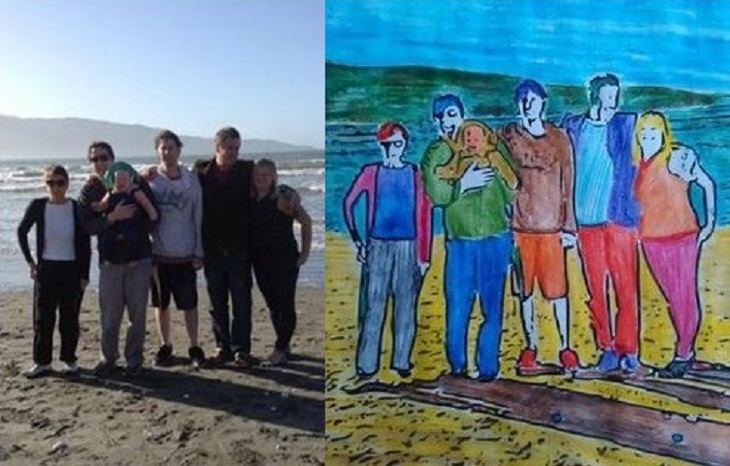
When I was a kid I loved to play with coloring books - even the memory of it excites me thinking of the bright colors, the waxy touch and distinctive smell of my crayon sets. But did you know know that these days homemade coloring books are being made and used by adults too? They find the experience of coloring in outlines of their own family snaps soothing and fun. This will make a lovely, relaxing activity for you too. You won’t believe how much joy it will give you to revisit this wonderful childhood activity, courtesy of photo editor, BeFunky.com. Alternatively, it’ll make a great simple gift for someone you love. Follow our easy-to-follow instructional guide and you too can start to make your very own coloring books using images from your treasured photo collection.
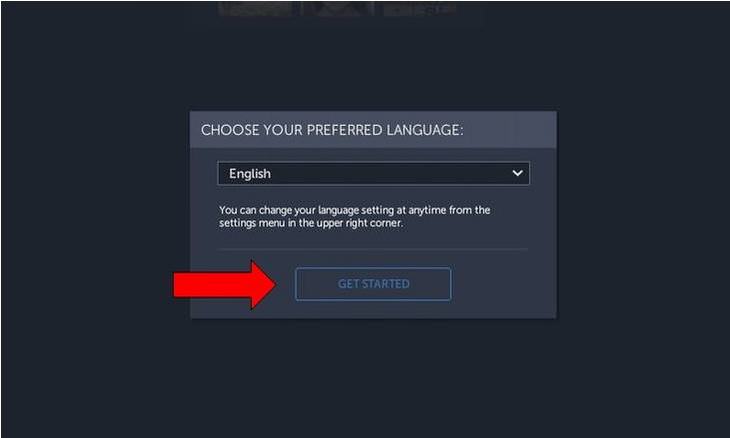
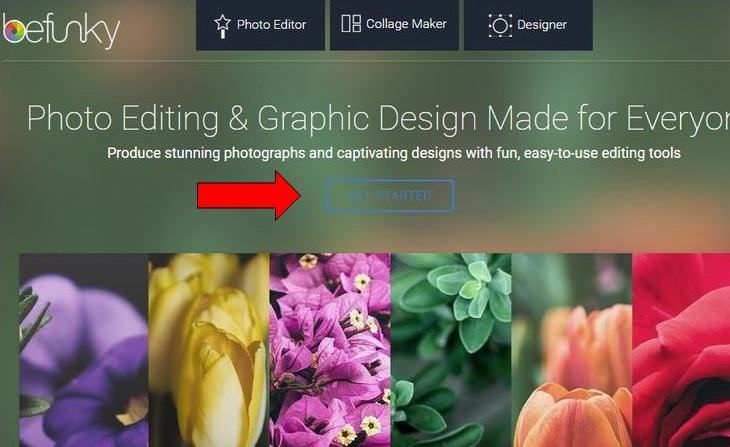
Log into befunky.com and select the option in the middle of the screen, 'GET STARTED.' Step 2
|
|
You will be presented with a screen asking you to select your preferred language. If you click on ‘GET STARTED’ again, English will automatically be selected. Step 3
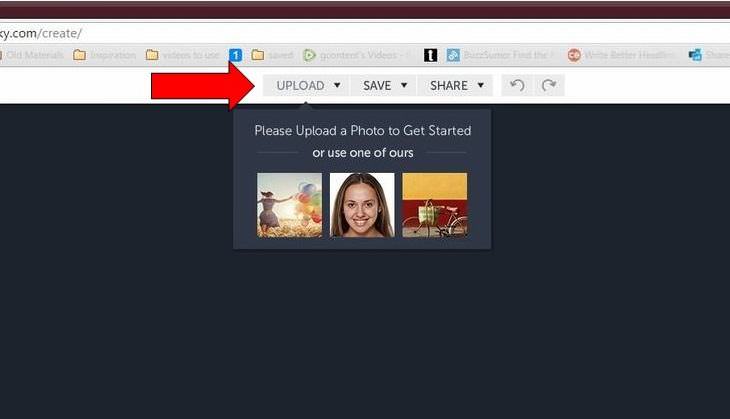
Next click on ‘UPLOAD’, which is located at the top of the screen. Or if you want to have a bit of a practice, instead select one of the three stock images that you can see. Step 4
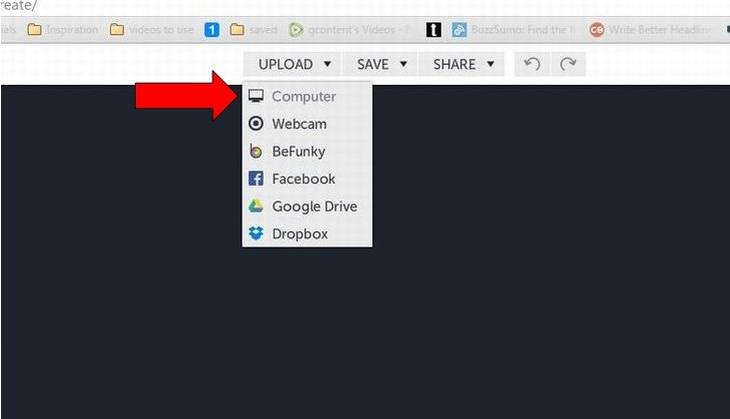
Select the location where your photo is. Perhaps you are taking one directly from Facebook, or you have your images saved in a folder on Google Drive or Dropbox. In my case my photo was saved on the computer. Step 5
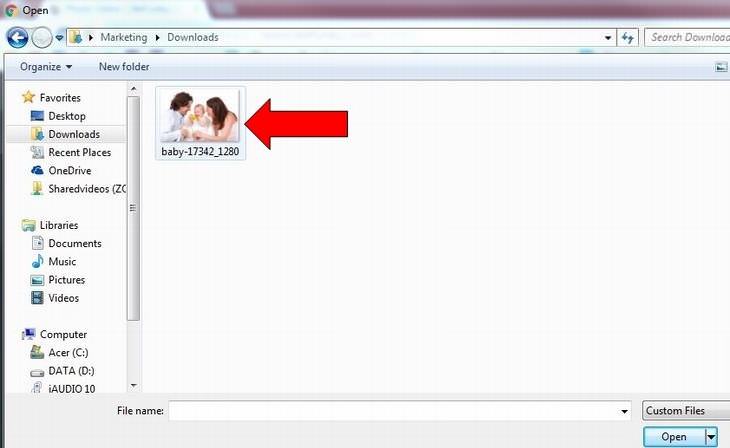
Find the folder in which your photo is residing. In my case the image is in Downloads. Then click on the photo with your mouse. Step 6
Now your family snap will be uploaded into the photo editor where you can see it and begin to alter it. Step 7
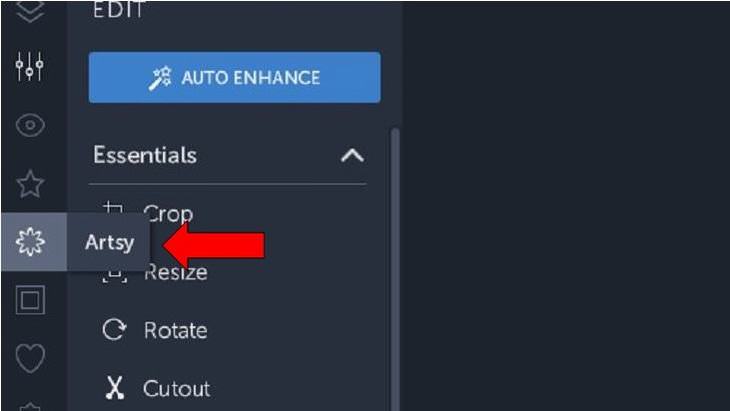
On the far left there is a row of gray icons; select the one located immediately below the star, which is called ‘Artsy.’ Step 8
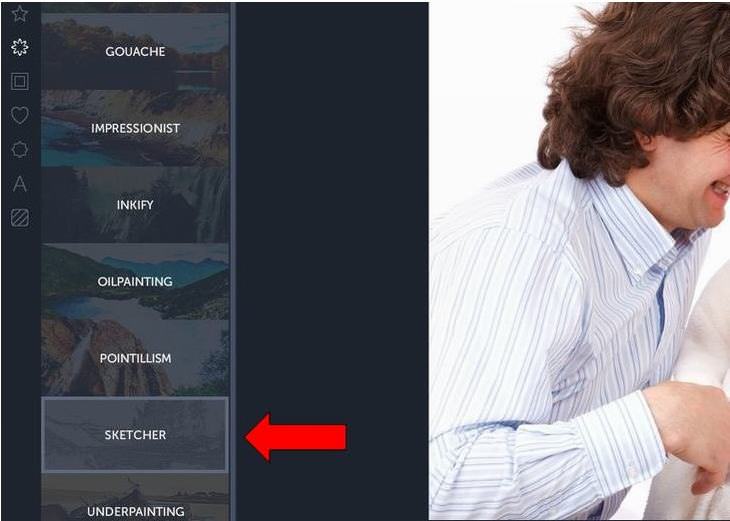
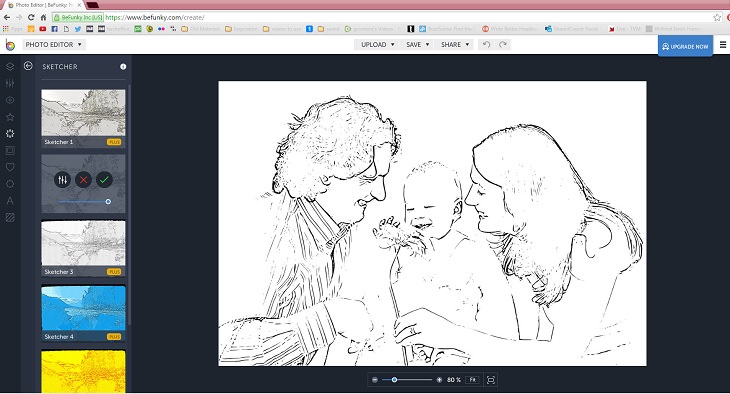
This menu will present you with several options. In order to make a coloring book page, select ‘SKETCHER.’ Step 9
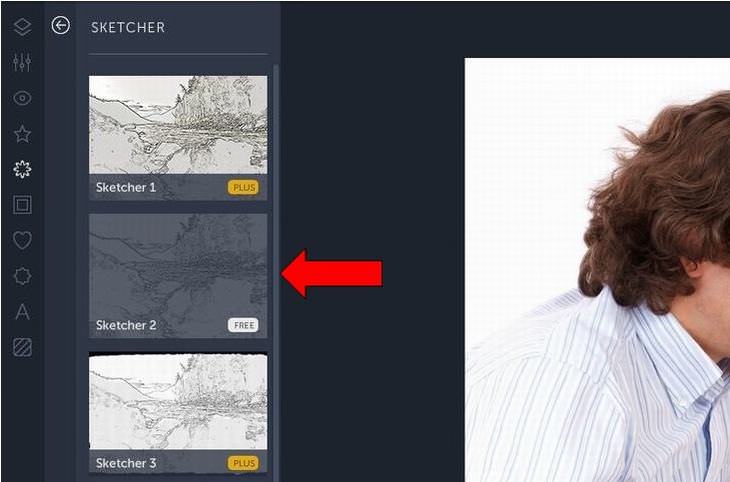
Sketcher 1 and Sketcher 3 both require a subscription. So instead try out the FREE option, sketcher 2. This is located on the left hand side of your photo. Click here. Step 10
Wait a few moments while the editor processes your photograph. Step 11
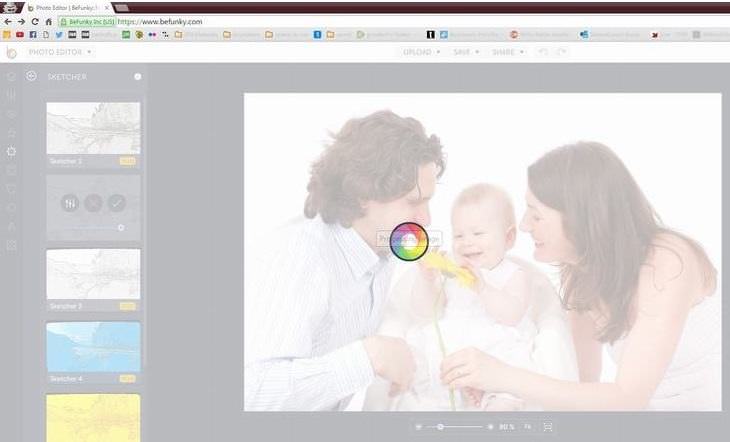
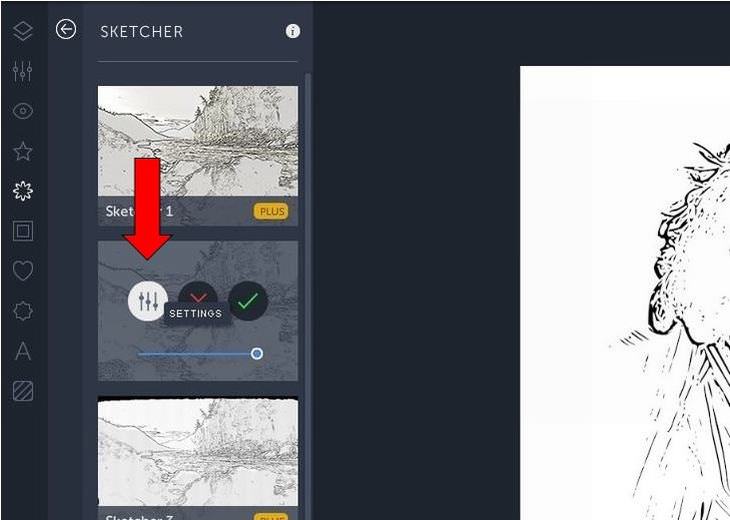
The photo has now been changed. On the left you have 3 options. The first is settings. Click here if you want to make any adjustments. Step 12
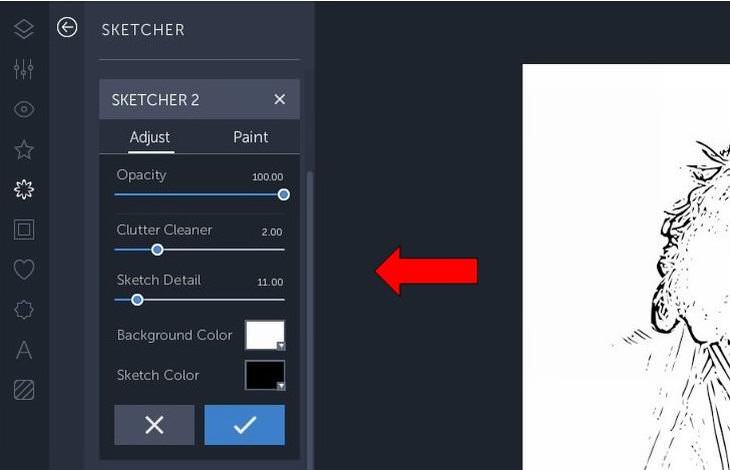
Here you can change how the sketch book might look, altering the opacity and detail etc. When you are finished click on the check. Step 13
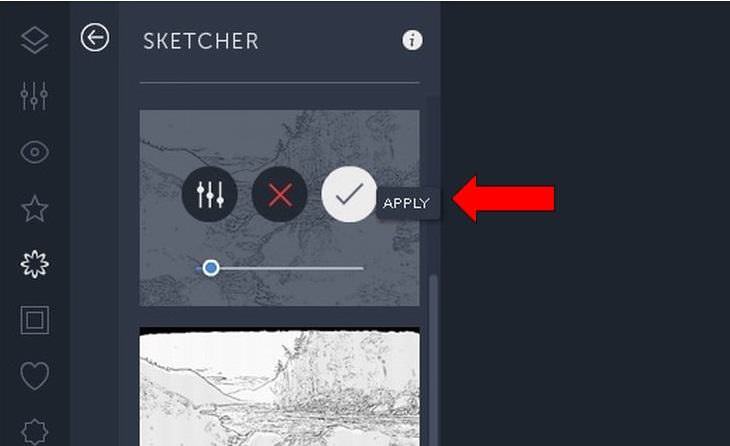
The red 'X' means cancel, allowing you to start again if you wish. The green check means apply. If you are happy with how it looks, click apply. Step 14
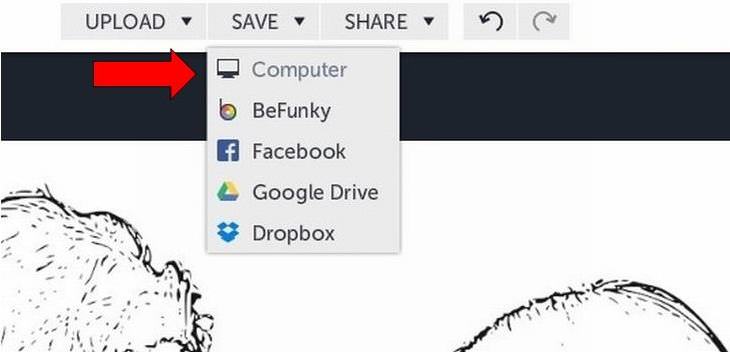
Save your new coloring page where you wish by going to the save option above the photo. From here choose the location. Step 15
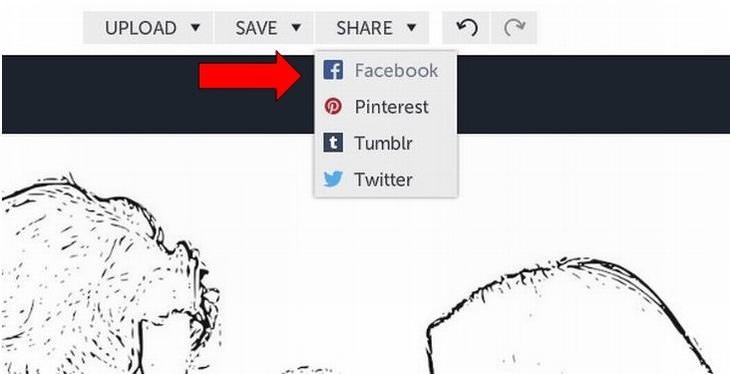
Then you might wish to share your image with other people, perhaps those included in your photo. You can choose to share on Facebook, Pinterest, Tumblr or Twitter. Step 16
Print off your new easy-to-fill canvas. Then you are free to go about your coloring fun. |
A Beginner's GUIDE to Sculpting with Clay
This guide will be your comprehensive introduction to the world of sculpting, with a focus on traditional clay modeling.
15 Photographs Showcasing Architecture Like Never Before
Here is a look at some of the best photographs of building art from all over the world that will make you appreciate their beauty.
Skillfully Restored Vintage Photos Reveal Destroyed Worlds
Look at 10 masterfully restored vintage photos that go from stained, cracked, and faded to mint new!
Surprise Your Kids With This Fake Snow Recipe!
Learn how to make your very own snow from the comfort of your own home thanks to this brilliant guide.
Surprise Your Kids This Halloween With These Simple Crafts
Making some of these creepy Halloween crochet creations couldn't be simpler! Simply follow these video guides to make your own ones!
3:20
The Reason Why No One Ever Smiles In Old Photographs
Discover the real cultural and technological reasons behind the serious faces in old portrait photographs.
The 7 Backup Mistakes That Leave Your Files Vulnerable
Here’s what most people get wrong about backups.
Is DeepSeek Worth the Hype? A Closer Look at Its Features
DeepSeek is the new AI chatbot in town. But is worth the hype?
USB Drives Can Do More Than You Think – 10 Hacks You Need
Let’s explore some of the most practical yet overlooked ways to use USB drives.
Top 5 Apps for Checking on Your Pet’s Health
These apps were selected based on their functionality, user reviews, and relevance to health monitoring, as highlighted by pet care and technology sources.
What Causes Laptop Batteries to Bulge Over Time?
These early warning signs can save your laptop's battery and prevent potentially dangerous situations.
2:27
Tutorial: How to Uninstall Apps on Your Windows 11 PC
How to uninstall apps on your windows PC.
5 Things to Never Store on Your Smartphone
Stop using your smartphone as a master repository for saving all kinds of information. It may be dangerous...
21:27
It's Finally Here! iOS 18's Game-Changing New Features
Here's what's new and exciting in iOS 18!
Firefox Just Got Better: 10 Handy Extensions You’ll Love
With the right add-ons, Firefox can become an indispensable browser that you'll rely on every day.
Skype Is Shutting Down – Try These Alternatives Now
With Skype officially retiring, here are some handy alternatives you should try.
Who Traces Your Emails? Learn How to Detect Email-Tracking
40% of emails are being tracked by somebody without people's consent or notification, which means you'd better learn how to protect your privacy...
23:04
ChatGPT: 30 Tips to Using and Working with the AI
In this video, we’re breaking down 30 practical tips to help you use ChatGPT more effectively
You Can Now Speak With ChatGPT on Your Whatsapp!
et’s explore what 1-800-ChatGPT offers, how to use it effectively, and why this innovation makes interacting with AI more seamless.
I Bet You Didn't Know You Could Do THIS on Google Maps
Here are all of the things you can do on Google Maps that you never knew you could.
Can’t Connect to the Internet? Here’s What To Do
Not being able to connect to the internet is one of the most pestering things. This is why it might be happening and easy solution to fix it.
You Should Bookmark These Incredibly Useful Sites
Make sure that you bookmark these handy websites!
Selling Used Stuff? Try These Amazing Apps
You can now sell your used household clothes and other items through some amazing apps.
Boost Your Brain With These 8 Brainy Mobile Games!
We’ve gathered 8 recommended games to keep your brain active, challenge your logical thinking, and help you pass the time enjoyably.
10 Free Ancestry Sites for Tracing Your Family History
Here are 10 of the best free ancestry sites that can help you uncover your family’s story.
9 Warning Signs You're Dealing with a Social Media Scam
Don’t fall for these common social media scam ads.
7 UNDISCOVERED Apps That are NOT on the Google Play Store!
I can’t believe I never knew about these handy Android apps.
5 Awesome Google Chrome Settings You Aren’t Using
Google Chrome’s advanced settings have many useful features that will make your browsing experience so much better.
Here’s Where You Can Watch Classic Movies for Free!
Want to watch free classic movies? Check out these sites and apps.
8 Smart Safari Customizations Every Mac User Should Know
Here are some of the most effective ways to fine-tune Safari on your Mac.
The Most Amazing Websites for Learning Languages for Free
Learn any language for free with these amazing websites!
12 USEFUL Chrome Extensions That Save Time
Improve your browsing experience with these free Google Chrome extensions.
Fed Up With Spotify? Try These Alternatives for Free Music
Here are eight of the best platforms where you can listen to music online without spending a dime.
Secure Your Data: 5 Must-Have Privacy Apps
A look at five apps that help you take back control of your digital footprint, including their strengths, trade-offs, and where to download them safely.
7 Tips to Follow When a Computer Hangs or Freezes
Take note of these steps that will help you unfreeze a computer that freezes or hangs regularly.
Losing Important Emails? Here’s How to Tidy Up Your Gmail
A helpful guide to setting up Gmail filters to prevent emails from getting lost or spam overflowing your inbox.
We Found These Awesome Sites for Reading Short Stories!
These are the best places to read short stories online.
Smishing 101: How to Recognize Scam Text Messages
This is how you recognize and handle fraudulent or scam text messages, also known as smashing.
Guide: How to Sign a PDF Without Printing it First
This guide will teach you how to sign PDF files digitally without having to print them.
All You Need to Know About Your Computer
It's that age of computers, and we should all educate ourselves so we all save ourselves time and anxiety when using a computer, a tablet or a phone. This collection of posts will give you insight into many computer-related issues.
Computer Guide: Comparing Skype and Microsoft Teams
This article will explain why Skype is going away, how Teams fills its shoes, and guide you through using Teams for your personal video calls, screen shares, and chats.
What Do Those 12 'F' Keys on Your Keyboard Do?
Find out what those 12 curious F keys on your keyboard mean.
Learn Any New Language with These Awesome Apps!
Learn new languages faster with these AI-powered apps.
Computer Guide: How to Clear Space on Your Google Account
How to easily free up storage space on your Google Drive without paying for more storage.
Your Easy Guide to OpenAI's Amazing Video and Photo Tools
OpenAI has created tools that anyone can use to make videos and photos, even if you're not a computer expert. Let me walk you through them step by step.
Do This to Your Router to Increase Internet Speed
Want a faster and safer internet connection? Then do this to your router...
How to Tell If a Virus Warning Is Real or Fake - 12 Tips
If you see a barrage of security alerts popping up on your computer, then it might be sign of a virus attack.
To enable your Ad-Free Subscription, please fill the fields below
Your subscription was successful, now you can enjoy an ad-free experience!! Note: To make sure you get no ads, please make sure to log in to your account. If you are logged in already, then refresh the page. The subscription can be cancelled at any time.