Data theft is always a risk when you’re using a public Wi-Fi network, so you should definitely switch to using your mobile data when out and about to protect yourself from it. The price of a few megabytes of data is much well worth it when you consider that it’s ensuring your safety.
2. Turn off Wi-Fi if you’re not using the internet
Turning off your Wi-Fi when you’re not using it solves three issues at once, namely, the rapid discharge of your smartphone’s battery, preventing automatic connections to fraudulent networks, and annoying ad emails.
3. Connect using a VPN
A Virtual Private Network allows you to retain your anonymity when using the internet. It makes the websites you enter see a virtual network IP address, as opposed to your own. Note that most VPN services are paid, however, they’re usually not that expensive, and many service providers offer free services too.
4. Don’t let your smartphone remember the network
Most smartphones and tablets will connect to a Wi-Fi network that they’ve connected to before when they’re in its range. Fraudsters have the ability to create their own access points using the same names as Wi-Fi networks, leaving your profile data vulnerable to being accessed, not to mention your finances.

Another trick that hackers and fraudsters use to gain access to people’s information is to use networks with similar names to the ones in the vicinity. An authentic Wi-Fi network normally requires payment and/or authorization to be used, but a fake one will always be free. Ask the owner of a Wi-Fi network about its correct name before connecting to it.
6. Install good antivirus software
Always make sure that you have the latest version of an antivirus software installed on the devices you use. New ways of hacking appear almost every day, and in addition, antivirus software warns you of possible fake Wi-Fi connections.
7. Choose two-stage authentication networks
Keep in mind that a network that doesn’t require you to take any additional action in order to connect to it might be fraudulent. Connecting to a Wi-Fi network that requires some form of authentication, such as requiring you to enter a code sent as a text message to your phone, is preferable.
8. Keep your passwords encrypted
You shouldn’t really keep your passwords stored in your smartphone at all, but if you really must, then make sure you use a password manager to encrypt your information.
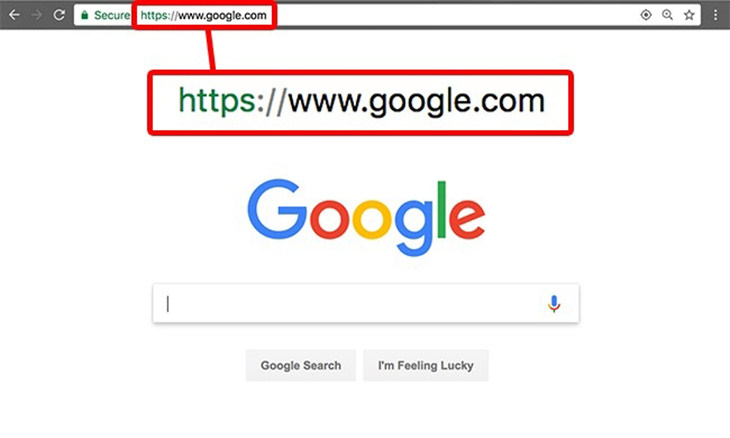
Fake Wi-Fi networks might redirect you to well-known websites, but they do so to collect your personal data. A tell-tale sign is seeing weird characters in a website’s URL (address). You can prevent this from happening by using a reliable and secure web browser. Such browsers will detect such differences and warn you about it.


5 Programs You Should Remove from Your Computer
This article specifies 5 programs that most people don't need on their computers and how to get rid of them.
WARNING! Facebook Is Selling Your Privacy Away...
Facebook has been supplying your own private data to companies for many years, and here are 5 of its worst abuses to date.
11:06
These Phone Stand Ideas Are Nothing Short of Awesome
It's way too easy simply to go out and buy your own phone stand - why not have a go at making your own at home? Here are 32 unique phone stand ideas.
14:29
How to Make Your Windows the Most Safe & Secure
Take advantage of the following video tutorial to gain comprehensive knowledge about all the crucial security and privacy settings available within Windows software.
Losing Important Emails? Here’s How to Tidy Up Your Gmail
A helpful guide to setting up Gmail filters to prevent emails from getting lost or spam overflowing your inbox.
11:51
Lesson: How to Protect Your Devices from Hacking
A handy tutorial that we will hope will teach you the right practices to avoid your account ever being hacked.
12:58
25 iPhone Tips and Tricks Everyone Should Know
If you've never tried these before, prepare to be amazed by what your phone can actually do. Let's get started!
8 Mistakes That Shorten the Life of Your Electronics
Your gadgets and household electronics won’t last long if you keep repeating these common mistakes.
9 Lesser Known Free Websites for Learning in 2025
A list of 9 great free learning websites that cover a variety of subjects, from coding and science to business and language learning.
Boost Your Brain With These 8 Brainy Mobile Games!
We’ve gathered 8 recommended games to keep your brain active, challenge your logical thinking, and help you pass the time enjoyably.
What Do Those 12 'F' Keys on Your Keyboard Do?
Find out what those 12 curious F keys on your keyboard mean.
5 Best Antiviruses in 2025 for Both PC and Mac
Below, we highlight five popular antivirus solutions for Windows PCs and five for Macs, featuring a mix of free and paid options.
Simplify Finances With These Budget Apps for Families
Try these money mangement tools to simplify your finances in 2025
Losing Important Emails? Here’s How to Tidy Up Your Gmail
A helpful guide to setting up Gmail filters to prevent emails from getting lost or spam overflowing your inbox.
The 11 Best Meal Planning Apps to Help You Lose Weight
Fortunately, numerous apps can make meal planning—and potentially weight loss—much more achievable.
10 Free Ancestry Sites for Tracing Your Family History
Here are 10 of the best free ancestry sites that can help you uncover your family’s story.
Your Easy Guide to OpenAI's Amazing Video and Photo Tools
OpenAI has created tools that anyone can use to make videos and photos, even if you're not a computer expert. Let me walk you through them step by step.
7 Websites With Free Useful Apps for Your Computer
we've gathered 7 recommended repositories where you can find almost any software you might need for Windows – and at no cost!
7 Reasons Why Your Computer is Running Abnormally Slow
There are many things that could be slowing your computer down and you'll find 7 of them in this article. Take a look!
4:28
Update Now or Wait? Comparing iOS 17.7 and iOS 18
If you are wary of updating to iOS 18, watch this video.
43:39
AI News: What's Going On With AI This Week?
This week's AI news covers major releases and impressive demos.
You Can Now Speak With ChatGPT on Your Whatsapp!
et’s explore what 1-800-ChatGPT offers, how to use it effectively, and why this innovation makes interacting with AI more seamless.
17:41
TikTok: Tips and Tricks for Beginners
Whether you are a total beginner or just looking to streamline your process to get more views, this tutorial covers everything you need to know to go from recording to posting.
How to Tell If a Virus Warning Is Real or Fake - 12 Tips
If you see a barrage of security alerts popping up on your computer, then it might be sign of a virus attack.
3:28
Easy Tips for Connecting Your Laptop to an External Screen
Watch this helpful tutorial to learn how to connect your laptop to a monitor.
If You Do This, Then You Could Be Damaging Your Phone...
Many people end up damaging their phones without even realizing that they are doing so, and here are 9 of the most common ways this happens.
Gemini 3: An AI Upgrade or a Warning of Things to Come?
A new AI version hitting the market is always the most successful, most surprising, and always overshadows its predecessors in every comparison metric - until the next version arrives and surpasses it.
It’s Almost a Crime Not to Use These Free Nifty Websites
Check out 15 really useful websites. They are completely free to use!
12:38
Skype is Dead: 9 Features of Microsoft Teams
These nine lesser-known tools are a must for any Microsoft Teams user.
Firefox Just Got Better: 10 Handy Extensions You’ll Love
With the right add-ons, Firefox can become an indispensable browser that you'll rely on every day.
5 Awesome Google Chrome Settings You Aren’t Using
Google Chrome’s advanced settings have many useful features that will make your browsing experience so much better.
Is Your Browser Slowing Down? Fix It With These 10 Tips
Get Chrome running smoothly with these seven easy fixes.
Laptop Won't Power Up? Try These 11 Effective Solutions
Laptop not starting? Try these essential steps to troubleshoot it.

5 DIY Solutions to Better Organize Your Cords and Cables
Computer cables have an annoying tendency to tangle and create an unseemly mess. Here are some easy ways to prevent that.

What To Do When Windows Will NOT Boot
There's nothing more frustrating than your computer refusing to boot. Here is what you can do to fix it when the system won't even initialize.

Secure Your Data: 5 Must-Have Privacy Apps
A look at five apps that help you take back control of your digital footprint, including their strengths, trade-offs, and where to download them safely.
17:20
Discover a Feature of Windows That's Super Helpful
Learn how to use some advanced new features of Windows 10 that you probably weren't aware of.
Looking for an Instagram Alternative? Try These Platforms
If you’re ready to explore beyond Instagram, here are eight great alternatives.
Exploring the Web Beyond Google: 7 Handy Alternatives
Try some of these non-conventional search engines that you didn't know existed.
4:08
Guide: Download All Google Photos in a Few Clicks!
Want to download all your Google your photos and videos in a few clicks? Watch this…
Replace Your Smartphone if It’s Showing Any of These Signs
Here are 7 major telltale signs that your smartphone is in need of an upgrade.
Skype Is Shutting Down – Try These Alternatives Now
With Skype officially retiring, here are some handy alternatives you should try.
Who Traces Your Emails? Learn How to Detect Email-Tracking
40% of emails are being tracked by somebody without people's consent or notification, which means you'd better learn how to protect your privacy...
15:16
Get Smarter: How Do Hard Drives Work?
How do hard drives built and how do they work? All is explained in this video.
Turn Off These 9 Android Settings. They Pose a Risk
Here are some Android settings that you should consider turning off to enhance your device’s performance.
8:31
20 Terrifically Helpful Chrome Keyboard Shortcuts
Welcome to the ultimate guide to mastering 20 essential keyboard shortcuts for the Google Chrome browser!
These 10 Keyboard Shortcuts Will Make Life Easy!
These keyboard shortcuts will help you learn the easiest ways to use your computer when your mouse is being less than cooperative!
To enable your Ad-Free Subscription, please fill the fields below
Your subscription was successful, now you can enjoy an ad-free experience!! Note: To make sure you get no ads, please make sure to log in to your account. If you are logged in already, then refresh the page. The subscription can be cancelled at any time.