|
You’re trying to get something done on your computer, maybe it’s some work, or chatting with your family, maybe you started writing that novel you’ve thought about for so long, but this damn piece of junk is so slow. If you don't want to spend money on a new computer, what can you do to solve this problem? I’ve been there, and thanks to my tech-savvy friends, I've compiled this guide to help you clean up your old computer and give it a new lease on life.

![]() First thing’s first: You need an antivirus installed on your computer! If you don’t have one, your computer might be infected with viruses, these nasty little pieces of software, used for a variety of things (gathering info, stealing passwords or just by people looking to be purposely malicious) – tend to hog the computing power of your Central Processing Unit (CPU) and slow down your computer’s response time.
According to tests performed in June 2014, the Antivirus software with the highest level of protection (99% success rate) were:
(credit: avira.com, 360safe.com, bitdefender.com, eset.com, kaspersky.com, cloudantivirus.com)
But before you install the Antivirus of your choice, make sure that you don’t have an old Antivirus installed – 2 antivirus programs don’t cooperate, they clash and slow down your computer. To check if you have an Antivirus installed, watch this video:
Pro-tip #1: Be sure to run a full scan on your computer once in a while, as there might be infected files lying dormant in your hard-drive.

![]() Now that we made sure you have an antivirus installed and that it’s up-to-date, it’s time to check for the other problems that might be slowing down your computer. These include “cookies” or even internet toolbars that can negatively effect your computer's speed because they might be doing “naughty” things in the background (like sending your browsing data to a company, or giving you search results that aren’t the best, but instead were paid for by advertisers).
Currently, the 2 best programs for clearing such offenders are BitDefender & Malwarebytes Antimalware Free (99% success rate or higher).
Pro-tip #2: Run a scan once or twice a week, you’ll be amazed at what you might find.

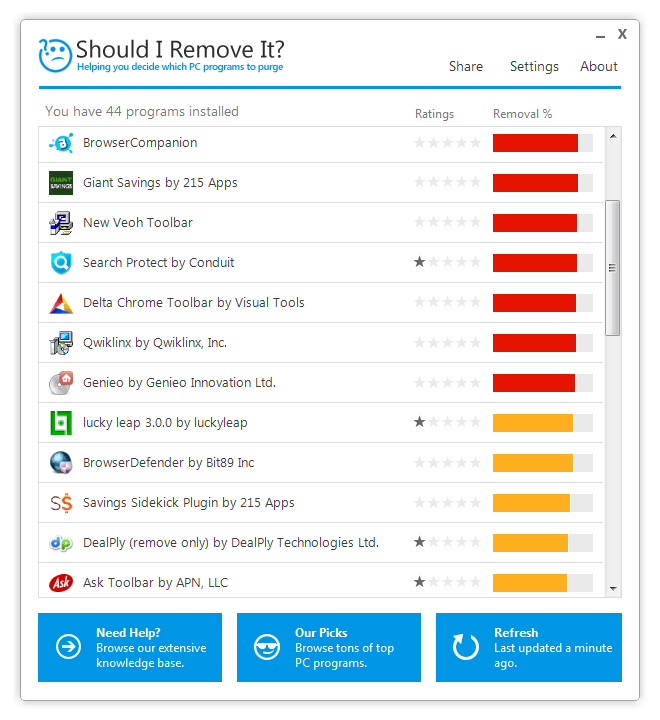
![]() Now that we've gotten the 2 biggest things out of the way, let’s clean up those nooks and crannies. You should download a program called “Should I Remove It” – it’ll scan your computer and let you know if you have useless programs installed, with an explanation on what each program does.
Some manufacturers install their own software on laptops and desktops and much of it is not really needed (called “bloatware”) and with ShouldIRemoveIt – you can easily get rid of all of these useless programs, clear space in your hard drive and speed up your computer.
Pro-tip #3: Most search-toolbars aren’t needed, and actually won’t display the best search results, consider uninstalling them.
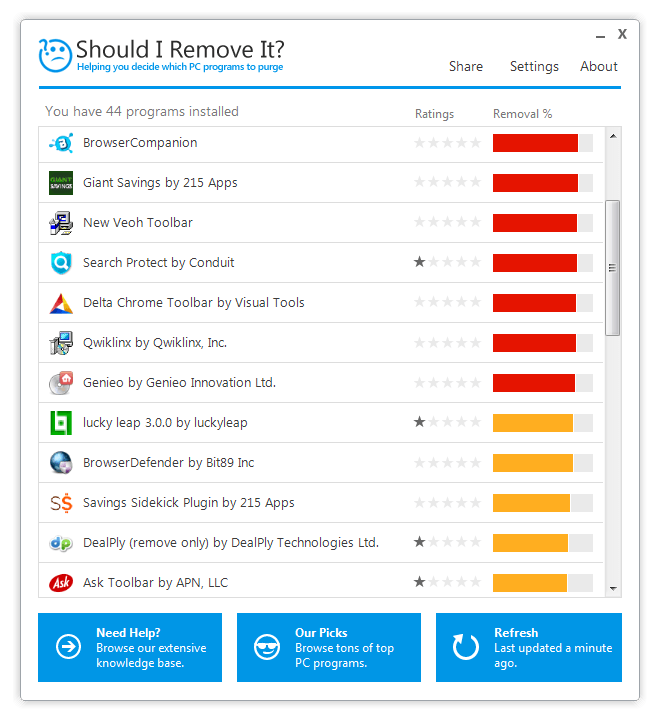
![]() (Credit: shouldiremoveit.com)
This process may take a while if your computer needs a serious clean-up, but if you follow these simple pieces of advice, you’ll enjoy a faster-working computer without the need to buy a new one or pay a technician to clean it for you!

![]() |

How to Easily Send Large Files to Your Friends and Family
Have videos, large images and music that you want to share with your loved ones? This is how you easily do so.
Your Computer Mouse Can Do Much More Than You Think...
Knowing how to use your mouse can make computing so much easier than you ever realized. Here are some great tips on how to maximize the use of your mouse, which will increase your overall productivity on the computer.
If You Aren’t Doing these Things, Your PC WILL Wear Out...
All the basics of computer maintenance.
If Your Computer Is Not Working, Here's What to Do
This troubleshooting guide is all you need if you're computer isn't turning on.
The Only Guide You Need to Clean Your Computer
Computers collect dust and dirt, causing them to slow down and heat up. Here's how to clean them:
STOP! You're Damaging Your Computer...
Computers are practically indispensable to us these days. The thing is, you could be damaging yours without even knowing it. Looking out for these 16 things.
5 Best Antiviruses in 2025 for Both PC and Mac
Below, we highlight five popular antivirus solutions for Windows PCs and five for Macs, featuring a mix of free and paid options.
10 Practical Smartphone Tips and Features Few People Know
These practical tips and clever uses of smartphones will help you start using your phone at its full potential!
20:27
Learn About Your Computer: Every Component Explained!
In just 3 minutes, you'll be much wiser about what your computer is made of.
Computer Guide: Comparing Skype and Microsoft Teams
This article will explain why Skype is going away, how Teams fills its shoes, and guide you through using Teams for your personal video calls, screen shares, and chats.
9 Useful Blogs Created Specifically For Senior Citizens
Here’s a wonderful collection of blogs that seniors will find particularly helpful.
Making These Email Mistakes Comes Off As Rude or Annoying
When sending an email, the last thing you want is to come off as impolite or annoying. Here are 5 common email mistakes to avoid.
These 10 Keyboard Shortcuts Will Make Life Easy!
These keyboard shortcuts will help you learn the easiest ways to use your computer when your mouse is being less than cooperative!
How to Solve Windows 11's Most Annoying Errors
In this article, we’ll explain the frequent problems people run into on Windows 11 and walk through easy, no-fuss fixes.
If Your Computer Is Not Working, Here's What to Do
This troubleshooting guide is all you need if you're computer isn't turning on.
If You Aren’t Doing these Things, Your PC WILL Wear Out...
All the basics of computer maintenance.
There's a keyboard Shortcut for Nearly Everything Here!
These shortcuts will cut down the time you waste fiddling about on the computer, and make you into something of an expert.
12 USEFUL Chrome Extensions That Save Time
Improve your browsing experience with these free Google Chrome extensions.
11 Free AI Tools That Actually Help You Get Stuff Done
Have you tried any of these useful free AI apps?
The Most Amazing Websites for Learning Languages for Free
Learn any language for free with these amazing websites!
How to Tell If a Virus Warning Is Real or Fake - 12 Tips
If you see a barrage of security alerts popping up on your computer, then it might be sign of a virus attack.
Customize Your Computer to Your Own Needs
Let the computer adjust itself to you! Here are 7 tricks that focus on ease of access and readability you can use to alter your computer experience for the better.
Who Traces Your Emails? Learn How to Detect Email-Tracking
40% of emails are being tracked by somebody without people's consent or notification, which means you'd better learn how to protect your privacy...
Turn Off These 9 Android Settings. They Pose a Risk
Here are some Android settings that you should consider turning off to enhance your device’s performance.
12:38
Skype is Dead: 9 Features of Microsoft Teams
These nine lesser-known tools are a must for any Microsoft Teams user.
7:40
ChatGPT vs. Google Gemini: Which One is Better in 2026?
Which AI truly owns your devices in 2026? Let’s find out.
Don't Charge Your Phone Over 80%, Here's Why
There is truth to the no-overnight-charging rule, and there is also some science to back it up.
2:19
Google Presents Genie: A New Way to Create Interactions
This is Project Genie. Where imagination meets interaction, and every prompt opens a new frontier in AI research.
3:28
Easy Tips for Connecting Your Laptop to an External Screen
Watch this helpful tutorial to learn how to connect your laptop to a monitor.
17:41
TikTok: Tips and Tricks for Beginners
Whether you are a total beginner or just looking to streamline your process to get more views, this tutorial covers everything you need to know to go from recording to posting.
25:19
S26 Ultra vs 17 Pro Max: A 2026 Flagship Phone Matchup!
In 2026, the smartphone crown is a toss-up between two absolute titans: the Samsung Galaxy S26 Ultra and the iPhone 17 Pro Max.
Surround Yourself With the Forest Sounds of the World
Ready to be surrounded by the music of the world’s forests and experience the restorative properties of being in nature?
2:27
Tutorial: How to Uninstall Apps on Your Windows 11 PC
How to uninstall apps on your windows PC.
17:20
Discover a Feature of Windows That's Super Helpful
Learn how to use some advanced new features of Windows 10 that you probably weren't aware of.
The 7 Backup Mistakes That Leave Your Files Vulnerable
Here’s what most people get wrong about backups.
Stop Paying For Software: 8 Free Productivity Options
Here are eight free open-source alternatives that can take the place of paid productivity apps without sacrificing quality or functionality.
19:08
How to Solve the Top 30 Desktop Computer Issues
in this great and helpful video, we're touching on 30 common PC problems and how to prevent and fix them.
Privacy Settings You Should Change in Chrome Right Now
These Chrome settings should always be disabled.
Computer Tips: All You Can Do With the CTRL/Control Key!
The control key has more uses than just copying and pasting. These are the 20 more useful keyboard shortcuts you can do with the control key.
The Only Guide You Need to Clean Your Computer
Computers collect dust and dirt, causing them to slow down and heat up. Here's how to clean them:
If You Do This, Then You Could Be Damaging Your Phone...
Many people end up damaging their phones without even realizing that they are doing so, and here are 9 of the most common ways this happens.
Your Easy Guide to OpenAI's Amazing Video and Photo Tools
OpenAI has created tools that anyone can use to make videos and photos, even if you're not a computer expert. Let me walk you through them step by step.
Exploring the Web Beyond Google: 7 Handy Alternatives
Try some of these non-conventional search engines that you didn't know existed.
All You Need to Know About Your Computer
It's that age of computers, and we should all educate ourselves so we all save ourselves time and anxiety when using a computer, a tablet or a phone. This collection of posts will give you insight into many computer-related issues.
7:10
Computer Guide: How to Use Password Managers
Password managers help us by requiring us to remember just one password instead of many. Have a look at this video explaining all about it.
5 Things to Never Store on Your Smartphone
Stop using your smartphone as a master repository for saving all kinds of information. It may be dangerous...
Boost Your Brain With These 8 Brainy Mobile Games!
We’ve gathered 8 recommended games to keep your brain active, challenge your logical thinking, and help you pass the time enjoyably.
To enable your Ad-Free Subscription, please fill the fields below
Your subscription was successful, now you can enjoy an ad-free experience!! Note: To make sure you get no ads, please make sure to log in to your account. If you are logged in already, then refresh the page. The subscription can be cancelled at any time.