The world’s largest search engine continues to expand in a whole multitude of areas, and flights are no exception. Google Flights is the quickest price comparison tool available right now, and works just as well on mobile.
How to use it:
All you need to do is head to the Google Flights website, enter your ideal travel dates and destination, and let Google do the rest. There are various filters for narrowing down your search, such as the number of stops you deem acceptable, what your budget is and even your preferred airline.
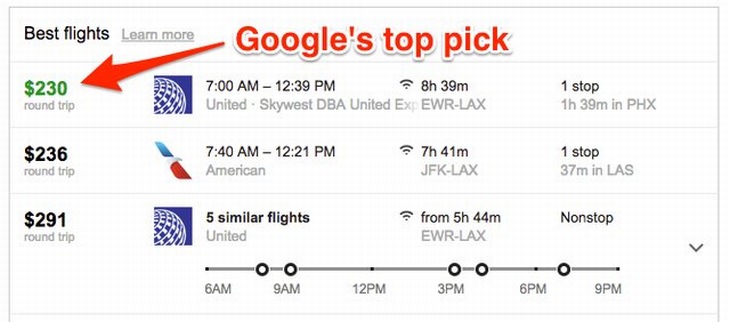
If you happen to be in a rush, take note of the price highlighted in green that will be visible under the “Best flights” heading. This is Google’s top pick for your desired route and dates.
Insider’s Tip:
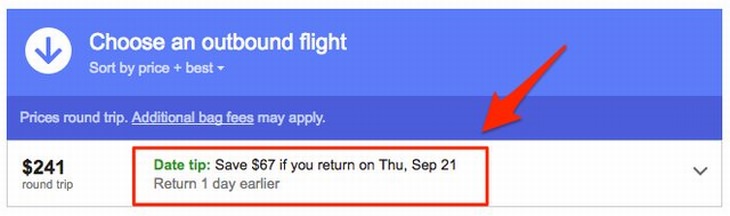
Should you not have fixed dates which you absolutely must travel on, you can save even more money by setting your destination and selecting the “Flexible dates” option. Google will give you a “Date tip”, which will show up in green at the top of your search results and suggest money-saving itinerary changes.
Kayak’s best feature is that it searches through a ton of travel sites at once, guaranteeing that you’ll find the best flight prices on the web for your route. Another highlight is its ability to find “hacker” fares, which are round-trip options consisting of one-way flights with two different airlines.
How to use it:
Simply enter your travel dates, destination and the class you wish to travel in. When compared to Google Flights, this search engine is a little slower, but it might just give you a couple of options that Google Flights didn’t display to you.
Insider’s Tip:
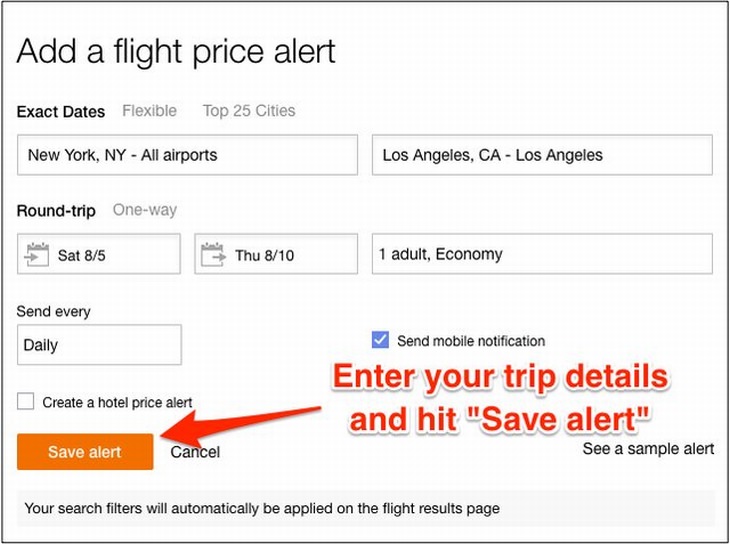
Setting up price alerts on Kayak is the best way to find the cheapest flights possible. It’s just a question of setting it up first. Enter your place of origin and destination, and the website will track flight prices for you. As soon as there’s a movement in prices, you’ll instantly be sent an email informing you of the change.
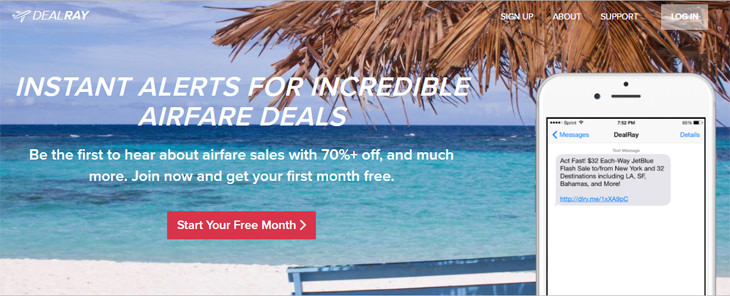
If you’re the type to book a trip somewhere spontaneously, then this is definitely the site for you. It’s free for the first month, and costs $9.99 per month thereafter, but this subscription fee might be worth paying in the long run.
How to use it:
Log on to DealRay and sign up via the Sign Up button at the top of the page, or else click the Start Your Free Month button. You’ll be prompted to enter various details, but it’s very easy to do. The website will send you SMS alerts about the hottest deals every day or two, but you have to be willing to travel anywhere in the world because it does not track destination-specific flights. DealRay members report saving a massive $428 per deal on average.
Insider’s Tip:
If you have an iPhone, be sure to download the DealRay app. That way you’ll get push notifications about the best deals straight to the home screen of your phone.

This Amazing Island Is the Mediterranean's Largest of All
Sicily is the largest island in the Mediterranean, and a rich heritage that's just waiting to be discovered. Read on to discover the top 10 places in Sicily.
Who Knew the US Has So Many Hidden Romantic Spots
These 10 lesser known holiday destinations are both original and romantic. If you live in the US they may even be closer than you thought!
This Joke Starts With an Elderly Couple At a Travel Agency
Two elderly people are spotted by a travel agent at his agency's window. He promptly invites them in and discusses sending them on a dream vacation...
11 of the Most Useful Websites on the Internet
The internet is full of useful resources to give us a little helping hand. Here are eleven great websites for you to add to your favorites.
8:25
Here's a Workout You Can Do EVERYWHERE
You don't even need sports shoes for this workout! This is the perfect routine for people who travel a lot.
11 of the Most Insanely Useful Websites on the Web
Believe it or not, there are tons of sites that offer useful free stuff. Here’s a look at a few of them.
Study: Even Two Cigarettes a Day Double the Risk of Death
A comprehensive study by the American Heart Association reveals alarming findings: smoking just 2 cigarettes per day doubles the risk of heart disease and increases mortality risk by approximately 60%.
Ever Hear of the 54321 Shopping Method to Buying Groceries?
Grocery shopping has become increasingly stressful as prices continue to climb. Many shoppers find themselves struggling to balance their budgets while still putting nutritious food on the table. But a straightforward shopping strategy is helping peo
15:24
15 Tech Hacks That Will Make Your Life Way Easier
These practical tips are designed to improve your daily tech experience.
Simplify Finances With These Budget Apps for Families
Try these money mangement tools to simplify your finances in 2025
Turn Off These 9 Android Settings. They Pose a Risk
Here are some Android settings that you should consider turning off to enhance your device’s performance.
Fed Up With Spotify? Try These Alternatives for Free Music
Here are eight of the best platforms where you can listen to music online without spending a dime.
9:16
Unlock iOS 18 Early: Your Installation Guide
Follow this guide to install iOS 18 Beta on your device easily.
There's a keyboard Shortcut for Nearly Everything Here!
These shortcuts will cut down the time you waste fiddling about on the computer, and make you into something of an expert.
How to Download Free Windows Software Securely – 7 Tools
Here’s how you can download free Windows software safely and securely.
Do This to Your Router to Increase Internet Speed
Want a faster and safer internet connection? Then do this to your router...
23:04
ChatGPT: 30 Tips to Using and Working with the AI
In this video, we’re breaking down 30 practical tips to help you use ChatGPT more effectively
Busting 12 Password Myths to Safeguard Your Online Life
Don’t fall for these common password myths.
Gboard Secrets: 7 Handy Features You're Not Using Yet
Make the most out of Gboard with these awesome tips and tricls.
This Free Website Will Let You Play the Most Fun Mazes!
Do you love mazes and navigation challenges? Look no further than this fun site!
Privacy Settings You Should Change in Chrome Right Now
These Chrome settings should always be disabled.
We Found These Awesome Sites for Reading Short Stories!
These are the best places to read short stories online.

5 Best Online Platforms for Couples' Counselling
We've researched the options and returned with the 5 best platforms for online couples' therapy.
Forget Chrome—Zen Browser Is the Upgrade You Need
If you’re tired of slow load times, constant battery drain, or a cluttered interface, Zen might be the browser you’ve been waiting for.
43:39
AI News: What's Going On With AI This Week?
This week's AI news covers major releases and impressive demos.
Guide: How to Unlock Your Phone Without a Passcode
Forgot your phone passcode? Don't panic.Just follow these steps.
Secure Your Data: 5 Must-Have Privacy Apps
A look at five apps that help you take back control of your digital footprint, including their strengths, trade-offs, and where to download them safely.
1:55
Never Lose Your WhatsApp Chats Again with These Hacks!
Protect your WhatsApp chats with these tips.
Why Fake Info is Best for These 6 Types of Sites
Always avoid giving your real information on these kinds of websites.
2:27
Tutorial: How to Uninstall Apps on Your Windows 11 PC
How to uninstall apps on your windows PC.
Is Your Browser Slowing Down? Fix It With These 10 Tips
Get Chrome running smoothly with these seven easy fixes.
7:38
Most People Don’t Know About These Google Maps Features
Google Maps has a ton of new features that most people don’t know about.
Skype Is Shutting Down – Try These Alternatives Now
With Skype officially retiring, here are some handy alternatives you should try.
Replace Your Smartphone if It’s Showing Any of These Signs
Here are 7 major telltale signs that your smartphone is in need of an upgrade.

10 Free Ancestry Sites for Tracing Your Family History
Here are 10 of the best free ancestry sites that can help you uncover your family’s story.

What Do Those 12 'F' Keys on Your Keyboard Do?
Find out what those 12 curious F keys on your keyboard mean.
7 Clear Indicators Your Home Router Needs to Be Changed
Is your router in need of an upgrade? Watch out for these signs.
ChatGPT's Got Competition: 7 Exciting AI Contenders
Looking for a ChatGPT alternative? Here are a few good ones.
Losing Important Emails? Here’s How to Tidy Up Your Gmail
A helpful guide to setting up Gmail filters to prevent emails from getting lost or spam overflowing your inbox.
The Most Reliable Cloud Storage Services for 2025
Here’s a closer look at some of the best cloud storage services to consider in 2025.
These 10 Keyboard Shortcuts Will Make Life Easy!
These keyboard shortcuts will help you learn the easiest ways to use your computer when your mouse is being less than cooperative!
If You Aren’t Doing these Things, Your PC WILL Wear Out...
All the basics of computer maintenance.
2:09
Guide: Download Netflix Videos on Any Laptop & PC
Want to watch your favorite Netflix content offline? This easy guide has you covered.
Did You Know These Cell Phone Facts Are All Totally False?
People just love to give you advice about smart phones, but it turns out that a lot of this information is false. Never believe these 9 smart phone myths.
7 Tips to Follow When a Computer Hangs or Freezes
Take note of these steps that will help you unfreeze a computer that freezes or hangs regularly.
What Causes Laptop Batteries to Bulge Over Time?
These early warning signs can save your laptop's battery and prevent potentially dangerous situations.
8 Smart Safari Customizations Every Mac User Should Know
Here are some of the most effective ways to fine-tune Safari on your Mac.
5 Things to Never Store on Your Smartphone
Stop using your smartphone as a master repository for saving all kinds of information. It may be dangerous...
2:35
6 Simple Tips for Taking Screenshots on Windows
Taking screenshots on Windows is now super easy. Just note these tips.
To enable your Ad-Free Subscription, please fill the fields below
Your subscription was successful, now you can enjoy an ad-free experience!! Note: To make sure you get no ads, please make sure to log in to your account. If you are logged in already, then refresh the page. The subscription can be cancelled at any time.