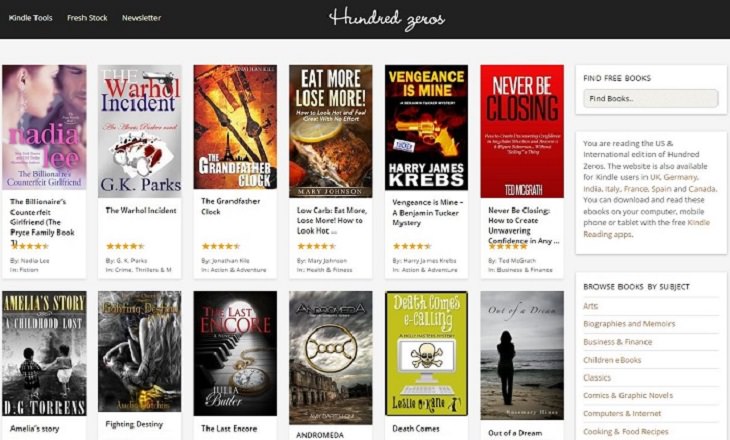

Our first on the list, and a great source for free eBooks is the aptly-named site, is Free-Ebooks.net. Offering their own collection of thousands of books and magazines, including many titles in Spanish and Portuguese, in addition to English. Joining is free of charge and you will never be asked to give any payment details since these are all free materials. Click on Join Now to begin.

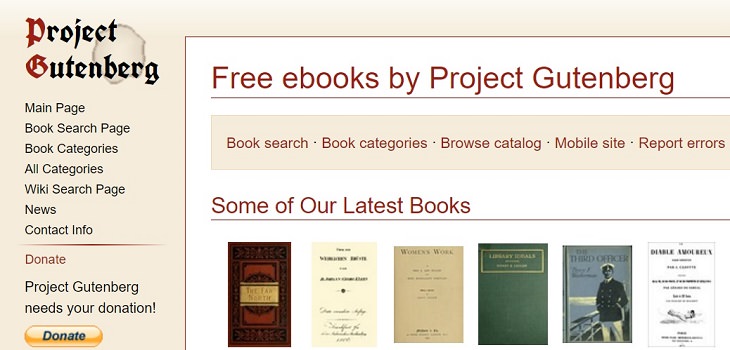
Project Gutenberg is a free organization that wants to spread knowledge throughout the world. They offer several thousand titles, mainly in English but also in Czech, Latin, Russian, Spanish, Portuguese, German, French and dozens more.

Add Extra Sunshine to Your Life With These Feel-Good Books
Need a little pick-me-up? These feel-good books are guaranteed to leave you smiling.
The Internet's Best Resources of Free e-Books
What's better than books? Free books. Here is our list of the internet's best resources for free e-books.
These Library Jokes Are Bound to Crack You Up!
When librarians decide to make us all laugh, they tend to do it in style!
13 Books That Will Make Your Time Fly
These times of social distancing are perfect for catching up on your reading. Check out this list of 13 must reads to get started.
7 Tips For How to Remember Everything You Read
This article will provide you with 7 tips on how to remember everything you learn from any source.
These Wonderful Apps Are Designed For Bookworms
Amazon Kindle isn’t the only reading app out there. These wonderful free apps will appeal to all book lovers too.

What To Do When Windows Will NOT Boot
There's nothing more frustrating than your computer refusing to boot. Here is what you can do to fix it when the system won't even initialize.

Thirsty For Knowledge? Check Out These YouTube Channels
If you love to learn new things with each passing day, then get ready to discover a gold mine full of educational tools!
7 Tips to Follow When a Computer Hangs or Freezes
Take note of these steps that will help you unfreeze a computer that freezes or hangs regularly.

These 10 Keyboard Shortcuts Will Make Life Easy!
These keyboard shortcuts will help you learn the easiest ways to use your computer when your mouse is being less than cooperative!
25:19
S26 Ultra vs 17 Pro Max: A 2026 Flagship Phone Matchup!
In 2026, the smartphone crown is a toss-up between two absolute titans: the Samsung Galaxy S26 Ultra and the iPhone 17 Pro Max.
7 Handy Chrome Extensions That You Must Install Today
This article features some of the best and most useful Google Chrome extensions that will be handy to every user.
If You Do This, Then You Could Be Damaging Your Phone...
Many people end up damaging their phones without even realizing that they are doing so, and here are 9 of the most common ways this happens.
The 11 Best Meal Planning Apps to Help You Lose Weight
Fortunately, numerous apps can make meal planning—and potentially weight loss—much more achievable.
2:35
6 Simple Tips for Taking Screenshots on Windows
Taking screenshots on Windows is now super easy. Just note these tips.
Want Your PC to Run Longer? Then Avoid These Mistakes
Avoiding these silly mistakes will help you prevent damage to your computer and also extend its life.
Learn How to Protect Yourself Using a Public Wi-Fi Network
Public Wi-Fi networks are incredibly convenient, but they're not always safe. Here are 10 ways of protecting yourself when using public Wi-Fi.
7:31
How to Edit Your Photos Using 3 Different AI Services
If you shoot weddings, portraits, or anything high-volume, and you’ve wondered if AI can really speed things up without cutting corners, this is the no-nonsense breakdown you need.
Customize Your Computer to Your Own Needs
Let the computer adjust itself to you! Here are 7 tricks that focus on ease of access and readability you can use to alter your computer experience for the better.
These Settings Will Keep Your Eyes Safe While on the PC
Here's how you can protect your eyes from computer screens using blue light filters.
STOP! You're Damaging Your Computer...
Computers are practically indispensable to us these days. The thing is, you could be damaging yours without even knowing it. Looking out for these 16 things.
Losing Important Emails? Here’s How to Tidy Up Your Gmail
A helpful guide to setting up Gmail filters to prevent emails from getting lost or spam overflowing your inbox.
Do You Know How to Act in a Medical Emergency?
Don't feel powerless in a medical emergency, learn what actions to take in these 10 serious medical emergencies and how to save lives
How to Make Easy Videos with AI (No Film School Required)
This guide explains how AI video creation works, what it costs, which tools are easiest to start with, and how to use a regular chatbot to write the instructions for you when you don't know the filmmaking vocabulary.
You've Probably Been Using Your Keyboard Wrong...
There's a very specific reason why the F and J keys are raised on your keyboard. Read this guide to find out why computer keyboards are the way they are.
7:40
ChatGPT vs. Google Gemini: Which One is Better in 2026?
Which AI truly owns your devices in 2026? Let’s find out.
2:19
Google Presents Genie: A New Way to Create Interactions
This is Project Genie. Where imagination meets interaction, and every prompt opens a new frontier in AI research.
A Plain-Language Guide to Password Managers
Here is a plain-language explanation of what they are, why they are worth having, and exactly how to get one on your phone or computer.
8:31
20 Terrifically Helpful Chrome Keyboard Shortcuts
Welcome to the ultimate guide to mastering 20 essential keyboard shortcuts for the Google Chrome browser!
4:50
Guide: How to Remove Malware from Android Phones
In this video, we’ll cut through the tech jargon to show you exactly how to spot the red flags of a compromised device.
There's a keyboard Shortcut for Nearly Everything Here!
These shortcuts will cut down the time you waste fiddling about on the computer, and make you into something of an expert.
What We Can Learn from ChatGPT About Being Human
What can we learn from ChatGPT about ourselves?
This Incredible Map Will Let You to Fly Above Any Location
This amazing site allows you to watch drone videos by location - and boy are they beautiful.
WARNING: 25 Most Common Scams on the Internet in 2026
As we navigate the internet, there's a minefield of scams that we have to avoid that could potentially explode in our faces. Here are the 25 most common.
4:44
What Is Net Neutrality and How Does It Affect You?
What on Earth is net neutrality, and how does it effect you? Watch this informative video and find out!
Don't Charge Your Phone Over 80%, Here's Why
There is truth to the no-overnight-charging rule, and there is also some science to back it up.
19:08
How to Solve the Top 30 Desktop Computer Issues
in this great and helpful video, we're touching on 30 common PC problems and how to prevent and fix them.
What is "AI Psychosis", and Should You Be Worried?
A new informal term has been making the rounds - "AI psychosis" - and while it may sound alarming, understanding what it means can help you stay grounded and use these tools wisely.
43:39
AI News: What's Going On With AI This Week?
This week's AI news covers major releases and impressive demos.
9:55
Windows 11: Super Helpful Tips and Tricks
Windows 11 has come a long way since its rocky launch, and if you haven't explored it lately, you're in for a surprise. ..
2:27
Tutorial: How to Uninstall Apps on Your Windows 11 PC
How to uninstall apps on your windows PC.
These Red Flags Indicate That a Shopping Website is Fake!
With online shopping being more prevalent than ever, scams are also on the rise. These are 8 warning signs that a shopping website is fake.
I Never Knew Repairing a Smartphone Was So Simple!
Having phone trouble? Here are 6 of the most common smartphone issues and exactly how you can fix them.
The Keyboard Shortcuts You Never Know Existed
These aren't shortcuts to save five seconds here and there. They're tricks that change how you interact with your computer once you start using them.
5 Things to Never Store on Your Smartphone
Stop using your smartphone as a master repository for saving all kinds of information. It may be dangerous...
Your Easy Guide to OpenAI's Amazing Video and Photo Tools
OpenAI has created tools that anyone can use to make videos and photos, even if you're not a computer expert. Let me walk you through them step by step.
25 Keyboard Shortcuts for Windows PCs and Apple Computers
Here are the most useful, in plain language, for both Windows 11 computers and Apple Mac computers.
To enable your Ad-Free Subscription, please fill the fields below
Your subscription was successful, now you can enjoy an ad-free experience!! Note: To make sure you get no ads, please make sure to log in to your account. If you are logged in already, then refresh the page. The subscription can be cancelled at any time.