|
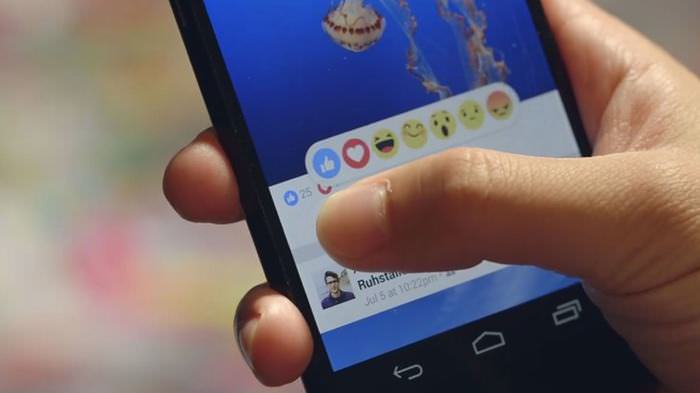
If you're a regular user of the popular social media website, Facebook, you may have seen the hype about its newest addition. We all know that the website's most prominent feature is the 'Like' button, and ever since it was introduced, there has been growing interest in the possibility of having a 'Dislike' button, which would serve for the opposite use. Although this hasn't been created yet, Facebook just satisfied us with a couple of other new buttons called 'reactions'. Reactions are not substitutions for the 'Like' button, rather an extension. They have been created to give us more freedom in the way we react to a post. This means that you're not just able to give a thumbs-up to a post, but more interestingly, give a heart if you love the post, a crying face if it makes you feel sad, and so on.
How does it work? Any Facebook user is able to enjoy this new feature while scrolling through the News Feed (Facebook's homepage). Although all may look normal to you, you can only access the reaction buttons if you hover over the usual 'Like' button. Once you hold your mouse here, a set of different reactions will show up on your screen. You can also do this by clicking and holding (this goes for mobile too). Note that if you click once, you would have 'liked' the post the normal way. One of the good things about this additional feature is that there were no modifications or complications to both the appearance as well as the use of the 'Like' feature - so you can consider the use of the reaction buttons as simply an additional choice. Now, there are officially six reactions you can use for any Facebook post - 'Like', 'Love', 'Haha', 'Wow', 'Sad' and 'Angry', each of which come with a respective Emoji (a digital image that expresses an emotion, such as an angry face). With this addition, it is now easier for us to specify our reaction to a certain post. Say if you want to express a reaction to a photo of an injured dog, it would be more appropriate to use a crying face to express sympathy, rather than an ambiguous 'Like'.
For more information about the feature, watch the following video: |
H/T: mashable.com

8 Benefits of Quitting Social Media (Even for a Week)
Learn about 8 benefits you can enjoy when quitting social media, even for a short period.
The Complete Selfie Tutorial and Guide for the Technophobe
A full tutorial to the secrets of taking a good selfie
Should You Follow Bloggers’ Weight Loss Advice?
With the rise of social media, many people rely on food bloggers to get quality weight loss advice, but are they getting it?
WARNING! Facebook Is Selling Your Privacy Away...
Facebook has been supplying your own private data to companies for many years, and here are 5 of its worst abuses to date.
8:23
This Cool Technology is the Future of Filmmaking
The world of CGI is moving at an insanely fast pace, and the famous green screen itself may soon be replaced by a novel technology called the volume.
Advocacy Groups Want the Messenger Kids App to Be Shelved
Despite Facebook's insistence that its Messenger Kids app is safe, child advocacy groups want it to be shelved. Find out more about their concerns.
5 Things to Never Store on Your Smartphone
Stop using your smartphone as a master repository for saving all kinds of information. It may be dangerous...
Selling Used Stuff? Try These Amazing Apps
You can now sell your used household clothes and other items through some amazing apps.
Is DeepSeek Worth the Hype? A Closer Look at Its Features
DeepSeek is the new AI chatbot in town. But is worth the hype?
Guide: How to Unlock Your Phone Without a Passcode
Forgot your phone passcode? Don't panic.Just follow these steps.
Turn Off These 9 Android Settings. They Pose a Risk
Here are some Android settings that you should consider turning off to enhance your device’s performance.
Overpaying for Streaming? Here’s How to Fix That!
Save big on your streaming bills with these simple tips.
How to Identify an Online Scam Email

Phishing emails are a common way of stealing information, but you can avoid them if you follow these tips that'll help you identify them
Fed Up With Spotify? Try These Alternatives for Free Music
Here are eight of the best platforms where you can listen to music online without spending a dime.
Did You Know These Cell Phone Facts Are All Totally False?
People just love to give you advice about smart phones, but it turns out that a lot of this information is false. Never believe these 9 smart phone myths.
11:12
The Windows Recycle Bin Isn’t Just for Trash—Here’s Why
Did you know about these cool features of the Windows Recycle Bin?
Best ChatGPT Prompts for 2024
Let's explore some great prompts you can start with on your AI adventure, either for fun or for productivity or knowledge.
2:09
Guide: Download Netflix Videos on Any Laptop & PC
Want to watch your favorite Netflix content offline? This easy guide has you covered.
Don't Charge Your Phone Over 80%, Here's Why
There is truth to the no-overnight-charging rule, and there is also some science to back it up.
7:38
Most People Don’t Know About These Google Maps Features
Google Maps has a ton of new features that most people don’t know about.
Computer Guide: Comparing Skype and Microsoft Teams
This article will explain why Skype is going away, how Teams fills its shoes, and guide you through using Teams for your personal video calls, screen shares, and chats.
Here’s Where You Can Watch Classic Movies for Free!
Want to watch free classic movies? Check out these sites and apps.
4:08
Guide: Download All Google Photos in a Few Clicks!
Want to download all your Google your photos and videos in a few clicks? Watch this…
How to Tell If a Virus Warning Is Real or Fake - 12 Tips
If you see a barrage of security alerts popping up on your computer, then it might be sign of a virus attack.
10 Free Ancestry Sites for Tracing Your Family History
Here are 10 of the best free ancestry sites that can help you uncover your family’s story.
23:04
ChatGPT: 30 Tips to Using and Working with the AI
In this video, we’re breaking down 30 practical tips to help you use ChatGPT more effectively
9 Useful Blogs Created Specifically For Senior Citizens
Here’s a wonderful collection of blogs that seniors will find particularly helpful.
12 USEFUL Chrome Extensions That Save Time
Improve your browsing experience with these free Google Chrome extensions.
10 Practical Smartphone Tips and Features Few People Know
These practical tips and clever uses of smartphones will help you start using your phone at its full potential!
8 Smart Safari Customizations Every Mac User Should Know
Here are some of the most effective ways to fine-tune Safari on your Mac.
0:48
WhatsApp Hack: Read Messages Without Showing Blue Ticks
Learn how to read WhatsApp messages without showing blue ticks in this video.
What Do Those 12 'F' Keys on Your Keyboard Do?
Find out what those 12 curious F keys on your keyboard mean.
9:42
Here's How to Make Your iPhone Run Like New Again - 9 Tips
Save space on your iPhone with these simple hacks.
Gboard Secrets: 7 Handy Features You're Not Using Yet
Make the most out of Gboard with these awesome tips and tricls.
Who Traces Your Emails? Learn How to Detect Email-Tracking
40% of emails are being tracked by somebody without people's consent or notification, which means you'd better learn how to protect your privacy...
Top 5 Apps for Checking on Your Pet’s Health
These apps were selected based on their functionality, user reviews, and relevance to health monitoring, as highlighted by pet care and technology sources.
This One Computer Key Is Used for a Myriad of Shortcuts!
The 'Win' key is usally thought to only bring up the start menu. It actually does a whole lot more. Get a load of these dozens of shortcuts!
Firefox Just Got Better: 10 Handy Extensions You’ll Love
With the right add-ons, Firefox can become an indispensable browser that you'll rely on every day.
If You Do This, Then You Could Be Damaging Your Phone...
Many people end up damaging their phones without even realizing that they are doing so, and here are 9 of the most common ways this happens.
9 Warning Signs You're Dealing with a Social Media Scam
Don’t fall for these common social media scam ads.
7 UNDISCOVERED Apps That are NOT on the Google Play Store!
I can’t believe I never knew about these handy Android apps.
The Most Reliable Cloud Storage Services for 2025
Here’s a closer look at some of the best cloud storage services to consider in 2025.
2025's Online Threats Will Be More Sophisticated Than Ever
A look at the cyber scams that you need to be wary of this year.
Computer Guide: How to Clear Space on Your Google Account
How to easily free up storage space on your Google Drive without paying for more storage.
Your Easy Guide to OpenAI's Amazing Video and Photo Tools
OpenAI has created tools that anyone can use to make videos and photos, even if you're not a computer expert. Let me walk you through them step by step.
The 7 Backup Mistakes That Leave Your Files Vulnerable
Here’s what most people get wrong about backups.
5 Awesome Google Chrome Settings You Aren’t Using
Google Chrome’s advanced settings have many useful features that will make your browsing experience so much better.
To enable your Ad-Free Subscription, please fill the fields below
Your subscription was successful, now you can enjoy an ad-free experience!! Note: To make sure you get no ads, please make sure to log in to your account. If you are logged in already, then refresh the page. The subscription can be cancelled at any time.